
Filling the box with five-square shapes in Pentomino Fit
Twelve shapes can be made by joining five squares edge to edge. Each one is named after the letter it resembles. You are given a handful of them and a rectangular box that they fill exactly. Turn each piece, flip it if needed, and place it so the box is covered with nothing left over. Every puzzle is guaranteed to have at least one solution.
The twelve pentominoes and how they work
A pentomino is any shape made from exactly five unit squares glued together along full edges. There are twelve distinct pentominoes when you count a shape and its mirror image as the same piece. They are named F, I, L, N, P, T, U, V, W, X, Y and Z, and each letter roughly suggests the outline of the piece.
Some of these shapes are symmetric. The I piece, a straight bar of five squares, looks the same whether you rotate or flip it. The X piece, a plus sign, has only one single distinct orientation no matter how you turn it. Others, like the F or the Z, produce up to eight different placements when you combine rotations and reflections. The game only steps through the distinct orientations, so you never cycle through duplicates.
Rules of the puzzle
You receive a box and a set of pieces drawn from the twelve pentominoes. The number of pieces depends on the box size. Every piece covers five squares, so a box of twenty squares gets four pieces, a box of twenty-five gets five, and a box of thirty gets six.
The goal is simple: place every single piece into the box so that every square is covered, no pieces overlap, and nothing sticks out past the edges. Each piece must be used exactly once. There is no time limit, but the game counts your moves so you can try to improve.
If a piece does not fit where you try to place it, the game refuses the placement and tells you. No piece is ever forced into a position where it overlaps another or hangs off the edge.
Controls for placing and turning pieces
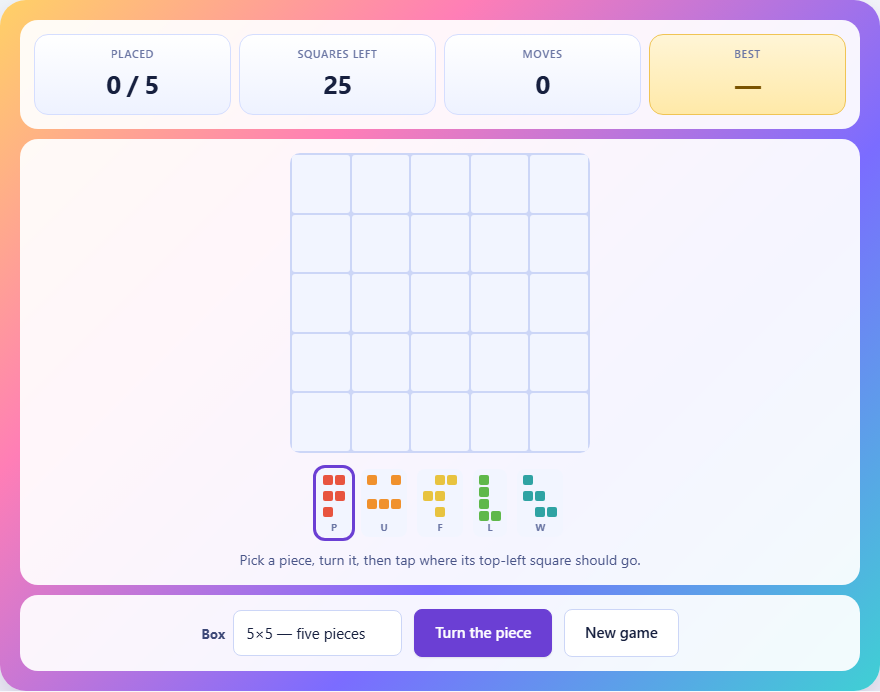
Tap a piece in the tray to select it. The selected piece is shown in its current orientation. Tap the same piece again, or press the Turn the piece button, to cycle through its distinct rotations and reflections. Place it by tapping a square in the box where you want the top-left corner of the piece to land.
To remove a piece you have already placed, tap it inside the box. It returns to the tray and the squares it covered become available again. This also counts as a move. There is no penalty for lifting and replacing pieces, but the move counter keeps going.
The stats bar tracks how many pieces you have placed out of the total, how many empty squares remain in the box, and how many moves you have made.
Strategy for corners and edges
A corner square of the box can only be covered by a limited number of piece orientations. Most pieces can cover a corner in only one or two of their forms. Starting from the corners forces your hand early, which is exactly what you want. Making a constrained choice early removes guesswork from the choices that follow. Think of each corner as a question with only a few answers, and answer the hardest questions first.
Edge squares are nearly as constrained. A piece placed along an edge cannot extend beyond it, which limits the orientations that work there. A piece in the middle of the box, by contrast, can face any direction. Save the middle for last, where flexibility helps rather than hinders. The open centre can absorb whatever shape you need it to, but a cramped corner cannot.
If you find yourself with a large open area in the middle and two pieces left, the remaining space is likely to be shapeable. If you have a single square tucked into a corner with two pieces left, you probably need to rethink the piece before it.
Avoiding dead space
The most common reason a placement fails is that it leaves a gap too small to fill. Every piece covers five squares, so a gap of one, two, three, or four squares cannot be covered by any pentomino. If you place a piece and see a tiny isolated region appear, that placement is wrong even though the piece itself fits.
Check for dead space after every placement. Look at the empty regions that remain. Each one must contain a number of squares that is a multiple of five, or at least must be large enough that the remaining pieces can cover it. A region of six squares is fine if two pieces remain. A region of four squares means something has already gone wrong.
On the smaller boards with four pieces, dead space is obvious because there are only twenty squares total. On the larger boards with six pieces, it can hide in narrow corridors between placed pieces.
Placing awkward pieces first
Not all pentominoes are equally flexible. The X piece, shaped like a plus sign, has only one distinct orientation. It fits in very few positions on the board. The U piece, shaped like a horseshoe, is nearly as restricted. If you leave these pieces for last, you may find that no remaining position can hold them.
By contrast, the L and P pieces are flexible. They have many orientations and can fit into a wide variety of spaces. Use these as your cleanup pieces. Place the rigid pieces first while there is plenty of open space, and let the flexible ones fill whatever remains.
If you find a puzzle difficult, try placing the pieces in a different order. Often the difference between an easy solution and a frustrating dead end is simply which piece was placed second.
The three box sizes
The easy setting uses a five by four box holding four pieces. With only twenty squares and four shapes, the number of possible arrangements is small and finding a solution rarely takes more than a few minutes. This is a good place to learn how the turning and placing controls work.
The normal setting uses a five by five box with five pieces. Twenty-five squares and five shapes make the puzzle noticeably harder, and dead space becomes a real concern. You will need to plan a step or two ahead rather than just fitting pieces wherever they happen to land.
The hard setting uses a six by five box with six pieces. Thirty squares and six shapes is a genuine challenge. The extra piece adds a level of interaction that makes brute force less practical and strategic thinking more important. Expect to lift and rearrange pieces several times before the final piece clicks into place.
Common mistakes beginners make
Forgetting to flip is the most frequent error. The turn button cycles through all distinct orientations including mirror images, but beginners often stop pressing it after four rotations, assuming they have seen everything. Some pieces have up to eight distinct orientations, and the right one may be the fifth or sixth in the cycle.
Placing pieces in the middle of the board first is another common trap. It feels natural to start where there is the most room, but it leaves the constrained corners for later, when fewer options remain. Corners first, middle last is almost always the better approach.
Giving up too early is the last common mistake. If a piece does not seem to fit anywhere, the problem is usually not the current piece but the one before it. Lifting the previous piece and trying a different orientation often opens up space that was not available before. Remember that every puzzle the game generates has been verified by its built-in solver, so a solution always exists even when the board looks impossible.
Privacy and where the puzzle runs
The entire puzzle runs inside your browser. Nothing is uploaded to any server, there is no account to create, and your best score is stored only on this device. The puzzle generator builds each layout fresh from a solver that fills the box first and then hands you the pieces it used. Once the page has loaded the game works offline.