
Clearing a tile board by finding paths with at most two turns
What the two-turn path rule actually means, why the border around the board is your best friend, how to spot pairs that open up the most new routes, and the habits that keep you from running into a dead end.
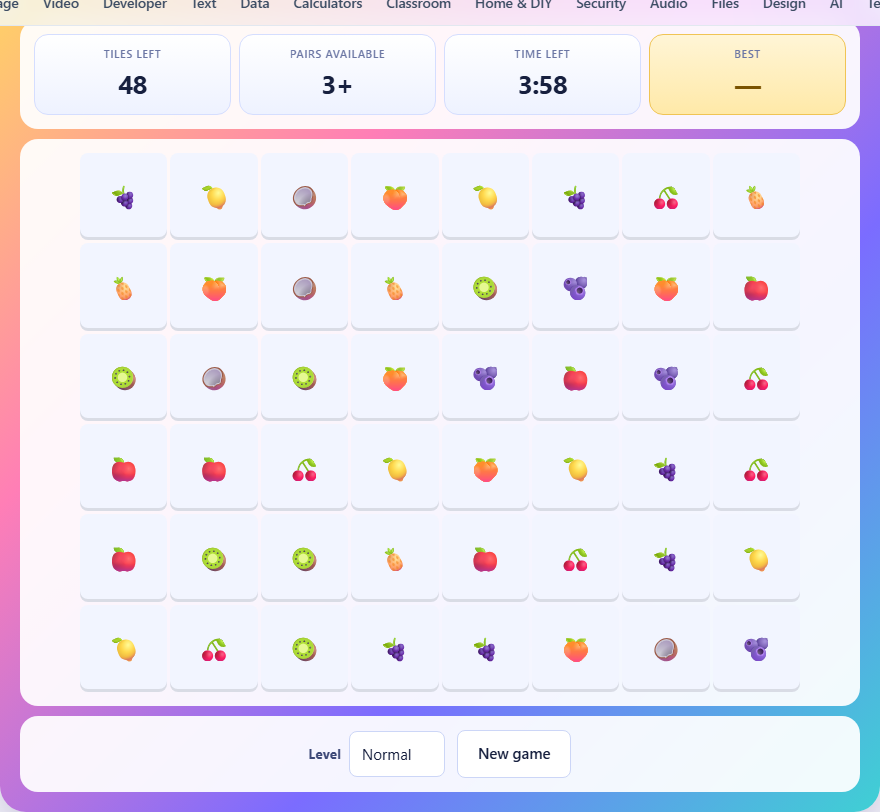
The setup and the goal
A rectangular grid is filled with tiles showing fruit faces. Every picture appears exactly twice somewhere on the board. Your job is to clear every tile before the clock runs out by matching pairs.
Two tiles can be removed if they show the same picture and if you can draw a path between them that meets two conditions. First, the path must travel only through empty space. It cannot cross another tile. Second, the path can turn at most twice. A straight line has zero turns. An L-shape has one turn. A Z-shape or a U-shape has two. Anything that needs three or more turns is not allowed.
What counts as a turn
A turn is a point where the path changes direction by 90 degrees. A path going left that bends to go up has made one turn. If it then bends again to go right, that is two turns. Two turns is the maximum.
The path does not have to be short. It can travel a very long way, as long as it changes direction no more than twice. A path that goes all the way up, across the top of the board, and back down to reach a tile on the other side of the grid is perfectly legal. It made two turns and it only travelled through empty cells.
This is the key insight most players miss at first. Two turns is much more reach than it sounds.
The border counts as empty space
The board has an invisible border of empty space around every edge. Paths are allowed to leave the board, travel through this border, and come back in. This is how two tiles on opposite sides of a full row can connect. The path exits one side, runs across the top or bottom border, and enters the other side.
Edge tiles benefit the most from this rule. A tile on the left edge can always send a path out to the left, through the border, and reach any tile on the right edge if the right column is clear at that spot. A tile in a corner can send a path along either border.
Interior tiles cannot use the border until some edge tiles have been cleared. This is why starting at the edges is almost always correct.
The three board sizes
Easy gives you a 6 by 4 grid with 24 tiles, drawn from 6 different pictures, and 180 seconds on the clock. There are only 12 pairs to find, and the small board means most pairs are close together.
Normal gives you an 8 by 6 grid with 48 tiles, 9 pictures, and 240 seconds. The larger grid means longer paths and more tiles blocking the routes you need.
Hard gives you a 10 by 6 grid with 60 tiles, all 12 pictures, and 300 seconds. The board is wide enough that crossing from left to right almost always requires the border. Finding pairs is harder because there are more tiles of each kind to tell apart, and clearing the middle of a full board takes patience.
Start with the edges and corners
Tiles on the outside row or column can almost always be matched, because the border gives them a free path outward. On a fresh board, check the four edges first. Any pair where both tiles sit on the same edge, or on adjacent edges, is likely to connect through the border.
Corners are the easiest of all. A corner tile can reach two borders with zero turns. If its match sits anywhere along either of those two edges, the path needs at most one turn.
Clearing edge tiles first does two things. It removes tiles from the board, creating empty space for interior paths. And it opens holes in the edges that interior tiles can later use to reach the border.
Clearing the middle before it locks up
Central tiles are the hardest to reach because every path to them must pass through other tiles. On a large board, the middle rows can stay full while the edges empty out. If you leave the centre until last, you might find yourself with four tiles packed together and no path between any pair.
Mix edge matches with the occasional interior match. When you clear a pair in the middle, it opens a corridor that other tiles can use. Think of each removal as creating a road, not just scoring a point.
If you see a pair in the interior that connects right now, take it. Interior pairs come and go as the board changes. An edge pair will probably still be available in a few seconds. An interior pair might not.
What happens when no pair can connect
Sometimes the remaining tiles are arranged so that no pair can be joined with two or fewer turns. When this happens, the board reshuffles automatically. The tiles that are left keep their pictures, but they move to new positions on the grid. This prevents the game from ending on an unfair dead board.
The scoreboard shows how many pairs are currently available. If that number drops to zero, the shuffle happens immediately. You do not need to do anything.
Reshuffles are not free. They burn a few seconds while the board rearranges, and the new layout might not be any easier. Preventing a shuffle by keeping the interior open is always better than relying on one.
How to read the available pairs count
The scoreboard shows a count labelled Pairs available. When it says 3+, there are at least three pairs on the board that can be matched right now. When it shows a specific number like 1 or 2, the situation is tighter.
If the count drops to 1, you have exactly one pair available. Find it and take it before it vanishes. If you match a different pair first, the last available one might lose its path because the board layout changed.
Use this number as a warning signal. Three or more pairs means the board is healthy. One pair means you are one bad move from a reshuffle.
A worked example
You see two apple tiles. One sits on the top edge, column four. The other is in the interior, row three, column six. Can they connect? The path would go from the top tile straight down through column four. But row two in column four is blocked by another tile. So a straight line will not work.
Try a path with one turn. Go right from the top tile along the border above the board to column six, then straight down to row three. Column six, rows one and two are both empty. The path works. One turn, through the border and empty cells. Tap both tiles and they vanish.
Now the spaces at row three column six and the top edge column four are both open. Other tiles next to those spots have new routes they did not have before.
Mistakes that cause dead boards
- Matching edge pairs only. The edges clear out but the packed middle stays full, and no path can reach into it.
- Ignoring the border path. Two tiles that look far apart are often one border trip away from connecting.
- Matching the first pair you see. It might be better to match a different pair that opens up a corridor for three more matches.
- Forgetting that order matters. Removing a tile changes every path on the board. A pair that is available now might not survive the next match.
- Rushing when the available count is low. One wrong choice when only one pair is available can trigger a reshuffle that costs more time than pausing to think.
Scoring and the clock
Your score is the time remaining when you clear the last tile. More time left means a better result. The game saves your best score for each level in your browser.
If the clock runs out, the game ends and reports how many tiles were still on the board. On Hard mode, 300 seconds for 30 pairs sounds generous, but the wide board and complex paths eat time. A clean finish on Hard takes practice.
Nothing leaves your browser
The entire game runs on your own device. The board is shuffled in your browser, the path search runs in your browser, and your best score is stored locally. No data is sent to any server. Disconnect after loading the page and it works exactly the same way.