
Navigating a randomly generated maze before the clock runs out
Each press of the new-game button carves a fresh maze with exactly one route from start to finish. This article explains how the mazes are built, how to read the trail you leave behind, and three strategies that reliably get you to the exit faster.
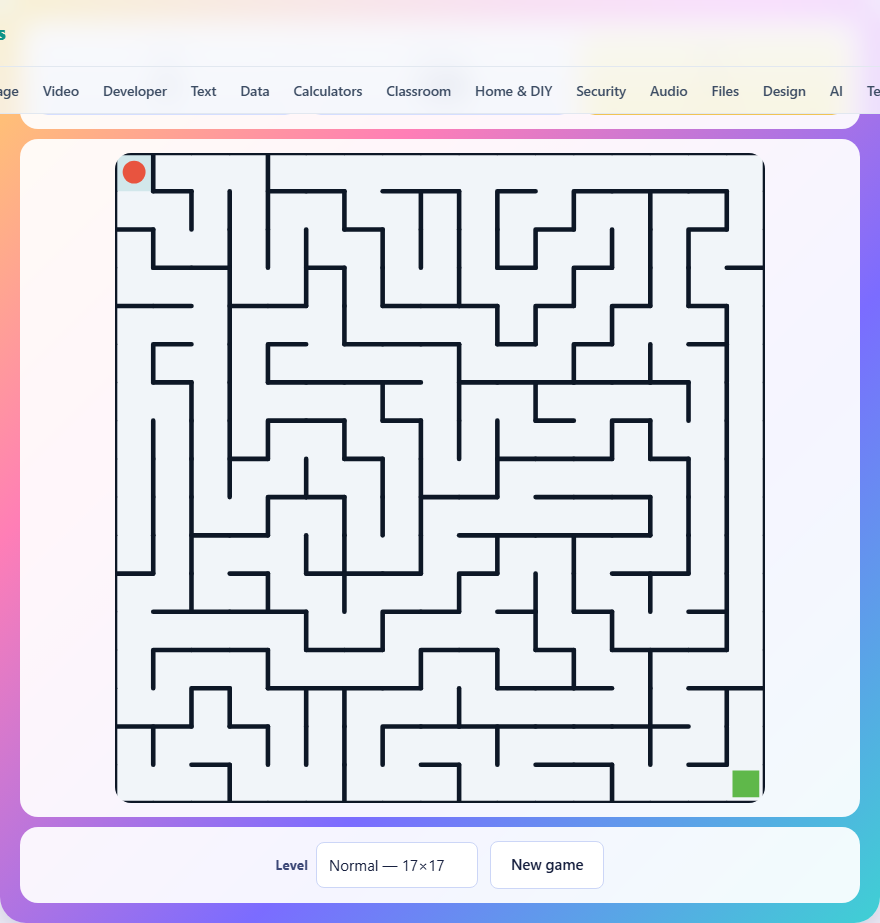
What you see when the game starts
The maze fills a square canvas. Thick lines mark the walls. A red dot in the top-left corner is you. A green square in the bottom-right corner is the exit. Between them is a network of corridors with dead ends, right angles, and long stretches that look promising until they stop.
Above the board, two stats show your progress. Steps counts every move you make. Time left counts down from the moment you start. When you reach the green square, the game tells you how many steps it took and how much time you had left.
How to move
On a computer keyboard, use the arrow keys. Up, down, left, and right do exactly what you would expect. The WASD keys also work: W is up, A is left, S is down, D is right.
On a phone or tablet, swipe in the direction you want to go. There is also a set of arrow buttons below the maze for tapping if you prefer that to swiping.
If you try to move into a wall, nothing happens. The red dot stays put, no step is counted, and a short sound tells you the path is blocked. You cannot break through walls or skip over them.
The trail and why it matters
Every square you step on gets a faint tint behind it. This trail stays visible for the rest of the game. It is your memory made visible.
On a small maze the trail is a nice touch. On a big maze it is essential. Without it, you would walk the same wrong corridor three times without realising. The trail shows you where you have already been, which means every shaded dead end is a dead end you can skip on the way back.
Think of the trail as a map you draw while walking. If you reach a junction and one path is already shaded, take the other one. The shaded path has already been explored and it led nowhere.
Maze sizes and time limits
Easy is an eleven-by-eleven grid with sixty seconds. That is 121 cells and a generous time limit. Most players finish with thirty or more seconds to spare on their first try.
Normal is seventeen by seventeen with ninety seconds. The maze has 289 cells, more than double the easy one. The extra time helps, but not as much as you might hope, because the distance from start to exit is also much longer.
Hard is twenty-five by twenty-five with 150 seconds. That is 625 cells. The corridors are thinner on screen, the dead ends are longer, and making a wrong turn at the start can cost you thirty seconds of walking before you realise. This is where strategy matters.
Why there is always a way out and only one
The maze is carved by a method that visits every cell exactly once, knocking down walls as it goes. The result is what mathematicians call a spanning tree. Every cell can be reached from every other cell, and there is exactly one path between any two points.
For the player, this means two things. First, there is always a route from the red dot to the green square. You will never get a broken maze. Second, there are no loops. If you walk forward and end up where you started, you made a U-turn at some point. You cannot walk in a circle, because no circle exists.
That second property is what makes wall-following work. Since there are no loops, every wall is connected to the outer boundary. Sticking to one wall will trace the entire boundary and eventually bring you to the exit.
The wall-following method
Pick a wall. The left one is traditional. Put your hand on it and never lift it. Walk forward, always keeping that wall on your left. When the corridor turns right, you turn right. When you hit a dead end, you turn around. When a junction offers two paths, you take whichever one keeps the left wall at your side.
This method is guaranteed to reach the exit in any maze with no loops, which is every maze this game generates. The downside is that it does not find the shortest path. It explores every branch that sticks to its chosen wall, including long dead ends far from the exit.
Wall-following is the safety net. Use it when you are disoriented on a hard maze and the clock is ticking. It is slower than intelligent navigation, but it never fails.
A faster approach: aim toward the exit
The exit is always in the bottom-right corner. You start in the top-left. The shortest possible path goes roughly from upper-left to lower-right. Any time you have a choice between going toward the exit and going away from it, lean toward the exit.
This does not mean you should always go right and down. Dead ends force detours, and the correct path often zigs left or up before turning back. But at every junction where multiple unexplored corridors branch off, pick the one that heads closest to the bottom-right corner.
Combine this with the trail. At a three-way junction, one path might be shaded from a previous visit, one might head upward, and one might head down-right. Take the down-right one. It is not always correct, but it is correct more often than chance.
Backtracking without wasting steps
When you hit a dead end, turn around and walk back. The trail will show you the exact path you took, so you do not need to remember it. Walk on the shaded squares until you reach the last junction, then take the unshaded branch.
Each step counts toward your total, even backtracking steps. This means a wrong turn of ten steps costs you twenty: ten to go in and ten to come back. On hard mode, where the solution path might be a hundred steps long, a single twenty-step detour is significant.
The way to reduce backtracking is to look ahead. Before committing to a long corridor, follow it with your eyes. If it curves away from the exit and you can see two or three turns into it, consider the other branch first. Two seconds of looking beats twenty steps of walking.
Common mistakes on the bigger grids
- Holding down an arrow key. The red dot moves one cell per keypress. If you hold the key, you shoot down a corridor at full speed and sail past a junction you should have taken. Tap deliberately.
- Ignoring the trail. On a hard maze, you will cross your own path many times. If you are walking on shaded squares without choosing to backtrack, you have gone in a circle and need to reverse.
- Going up or left for too long. A few steps away from the exit is fine. But if you find yourself near the top-left again, the path you are on is probably a long dead end. Turn back before the clock runs out.
- Starting without looking. Spend the first three or four seconds scanning the top-left area of the maze. You can often see the first two or three turns and plan a route before you move.
- Forgetting the direction buttons on mobile. Swiping works, but the on-screen arrows below the maze are more precise. On a crowded screen, a mis-swipe sends you the wrong way.
What makes a good step count
The best possible score is the length of the single correct path from start to exit. On an easy maze that might be 30 to 50 steps. On a hard maze it is typically 100 to 200. Any steps above the shortest path are detours.
A strong run on the hard maze finishes in under 200 steps. That means fewer than 50 wasted steps on wrong turns. If your count is over 300, you are exploring too many dead ends. Try the aim-toward-the-exit strategy to cut that number down.
Every maze is carved on your device
The generation algorithm runs in the page itself. No server sends you a maze, and no server checks your route. A new maze is built from scratch every time you press New game. Your step count, your best score, and your completion time are stored in your browser on that device only. Nothing is uploaded.
Because the maze is generated locally, it works with no internet connection at all. Load the page once, go offline, and every New game still produces a fresh layout.