
Beating the clock on twenty mental arithmetic questions
This article covers how Maths Blitz works, what each difficulty level throws at you, and how to answer twenty questions in a minute without losing half of it to wrong guesses.
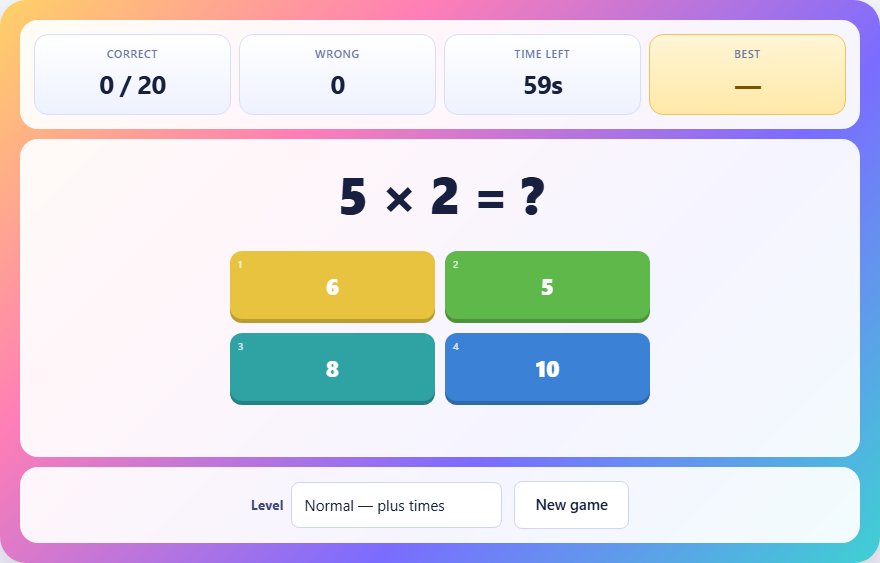
What happens when you press start
A sum appears in the middle of the screen with four numbered buttons below it. One of those buttons is the right answer. The other three are wrong, but they are close to the right one on purpose. You cannot rule them out by size alone.
Above the game area, three stats tell you what is going on. Correct shows how many you have answered right out of twenty. Wrong counts your mistakes. Time left counts down from sixty seconds.
The clock starts the moment the first question appears. It does not wait for you to read it. Sixty seconds is the total for all twenty questions, not per question.
The rules in full
Pick the right answer and the next sum appears straight away. Pick the wrong one and three things happen. The clock loses three seconds, the game briefly shows you the correct answer, and after a short pause the next question loads.
You need twenty correct answers before the timer reaches zero. There is no cap on wrong answers, but each one costs three seconds. Two mistakes in a row eat six seconds, which is enough time to have answered three questions properly. Guessing is always worse than pausing to think.
When you answer all twenty correctly, the game records how many seconds you had left. That leftover time is your score, and a lower number of wrong answers means more time on the clock.
What each difficulty level includes
Easy uses addition and subtraction only. The numbers go up to about twenty. A typical question might be 14 + 9 or 17 - 6. There is no multiplication and no division. This level is good for warming up or for younger players working on basic sums.
Normal adds multiplication. You will see questions like 7 times 8 or 11 times 4 alongside the addition and subtraction. Multiplication never uses zero or one, so every question takes real thought. There are no trick answers and no free marks.
Hard adds division on top of everything else. Division questions are built so they always come out to a whole number. You will never face 17 divided by 3 and have to pick between 5 and 6. If the question is a division, the answer is exact. That fairness matters because a wrong guess costs three seconds.
Controls on keyboard and touchscreen
On a phone or tablet, tap the button with the answer you want. The buttons are large and well spaced.
On a computer with a keyboard, press 1, 2, 3, or 4 to pick the answer in that position. The buttons are laid out in a row, and the key number matches the position from left to right. This is noticeably faster than moving a mouse to the button and clicking. The difference of half a second per question adds up across twenty questions. If you are chasing a high remaining-time score, the keyboard is the way to do it.
There is no need to press Enter or confirm. The instant you press the key, the answer registers. Keep your fingers ready over 1 through 4 the whole game so you can respond without looking down.
Why the wrong answers are close to the right one
The three incorrect options are generated within a few digits of the real answer. If the answer is 42, the others might be 39, 44, and 46. You cannot glance at four choices and throw out the obviously silly one.
This design stops a common shortcut. In many quiz games, one answer is clearly too big or too small, so you eliminate it without doing any work. Here, all four sit in the same neighborhood. You have to actually solve the sum to know which is correct.
The closeness also creates a specific kind of trap. On a multiplication like 8 times 7, the answer is 56. But 54 and 58 both look right if you are working fast and not double-checking. That is intentional. The game rewards accuracy, not guessing speed.
Speed tricks for each operation
For addition, pair numbers that make ten. If you see 7 + 8 + 5, think 7 + 8 = 15 rather than trying to hold three numbers at once. For two-digit addition like 26 + 17, add the tens first (20 + 10 = 30), then the ones (6 + 7 = 13), and combine (43).
For subtraction, count up instead of down. For 43 - 27, think: 27 plus what equals 43? From 27 to 30 is 3, from 30 to 43 is 13, so the answer is 16. Counting up is usually faster than borrowing.
For multiplication, know your times tables cold up to 12. There is no shortcut here. If you have to work out 9 times 8 from scratch each time, you will run out of clock. The tables are simply worth memorising.
For division, flip it around. Instead of asking what is 72 divided by 9, ask yourself 9 times what is 72. If you know the multiplication table, the division comes free.
The three-second penalty and when to skip thinking
Three seconds is a lot. At a pace of three seconds per question, you could answer twenty in sixty seconds with no room to spare. A single penalty wipes out an entire question's worth of time.
That said, spending more than five seconds on a hard division is also costly. If you have been staring at a question for four seconds and still do not know, a guess is better than running the clock down to nothing. The break-even point is roughly four seconds: if you have spent that long and still have no answer, take a guess, accept the risk, and move to the next one.
But on easy and normal, you should almost never need to guess. Addition and subtraction take one or two seconds. Multiplication takes two or three if your tables are solid. The penalty only becomes a real trade-off on the hard division questions.
Using Maths Blitz for practice
The game is well suited for daily arithmetic drill. Set it to normal if you want to sharpen your times tables. Set it to hard if you want to practise division. Play three rounds in a row and compare your remaining time across the three.
For children learning their tables, normal mode is ideal. Every multiplication skips zero and one, so every question is a real test. There is nothing to buy, no account to create, and no progress that needs tracking. Just open the page and play.
Teachers can use it as a warm-up exercise too. The sixty-second time limit is short enough for a quick round before class, and the three difficulty levels let you match the game to different age groups. Easy suits ages six to eight. Normal suits anyone learning times tables. Hard is for older students comfortable with all four operations.
Mistakes that cost the most time
- Tapping before reading the question fully. The sum and the answers appear at the same time. Read the sum first, work it out, then look at the buttons. If you look at the buttons first, you are guessing from four close numbers.
- Guessing on easy-level questions. Addition and subtraction are fast enough that guessing never pays off. Even a two-second pause is cheaper than a wrong answer.
- Using the mouse when a keyboard is available. The number keys are faster, and over twenty questions the time saved adds up to several seconds.
- Playing the same level over and over after mastering it. Once you can finish easy with thirty seconds to spare, switch to normal. Staying on an easy level does not build new skill.
- Ignoring the wrong counter. If you see three or four wrong answers piling up, that is nine to twelve seconds lost. Slow down and focus on accuracy for the rest of the round.
Your answers stay in your browser
The sums are generated on your device using simple random number logic. No server picks the questions and no server grades them. Your best score sits in local browser storage and never travels anywhere. Once the page has loaded, the internet connection is not needed. You could fly across an ocean and play the entire flight without a signal.
Division questions are built backwards from the answer to guarantee they come out whole. The generator picks an answer and a divisor, then multiplies them to get the number shown in the question. That is why the sums are always fair. They are not random divisions that might have a remainder. They are constructed so the answer is clean.