
Clearing a tile layout by matching pairs from the top down
What makes a tile free, why some matches strand the board, the top-down strategy that keeps moves open, and how to read the free-pairs counter so you never get stuck without warning.
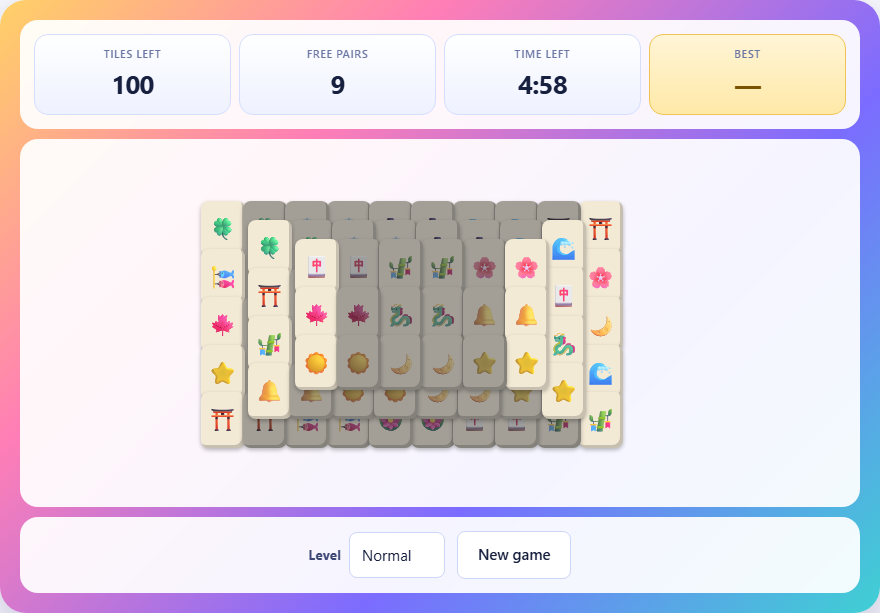
Tiles in layers
The board is a stack of tiles arranged in a pyramid shape. Each tile carries a symbol. Below the top layer sit one or two more layers, each wider than the one above. The tiles on the bottom layer hold up the tiles on top of them, and those lower tiles cannot be reached until the weight above is cleared.
Each tile appears exactly twice somewhere in the layout. Your goal is to match every pair and remove them all before the clock runs out. An empty board means you win. The symbols on the tiles are decorative icons rather than numbered suits, so you do not need to know anything about traditional tile games to play.
What makes a tile free
A tile can be taken only when two conditions are met. First, nothing sits on top of it. Even a partial overlap from a tile on the layer above blocks it. Second, at least one of its left or right sides must be clear. A tile with neighbours on both its left and right is pinned in place, even if its top is open.
Free tiles are shown bright. Blocked tiles are dimmed. The difference is easy to spot at a glance, and it updates the moment you remove a pair. A tile that was blocked a second ago might become free when its neighbour disappears.
How to match and remove tiles
Tap a free tile to select it. It gets a highlight. Then tap a second free tile that carries the same symbol. If they match, both tiles vanish from the board and the layers beneath them come closer to the surface.
If the two tiles do not match, the second one becomes the new selection and the first is deselected. Tap a selected tile again to deselect it without choosing another. There is no penalty for wrong guesses other than the time it costs.
If you tap a blocked tile, the game tells you it cannot be taken and explains why. The tile must have its top clear and one side free.
The stat panel and the clock
Three numbers sit above the board. Tiles left is the total number of tiles still on the board. Free pairs is the count of matches you can make right now. Time left is the countdown.
The free-pairs counter is the number to watch. If it drops to zero while tiles remain, the board is dead. No two free tiles share a symbol, so no move exists and the game ends. The game tells you when this happens rather than leaving you to search for a match that is not there.
On the easy level you get four minutes. Normal gives five minutes. Hard gives six minutes. The larger boards have more tiles and more layers, so the extra time is needed.
Why some boards become unfinishable
Every layout dealt by the game can be finished. Pairs are placed from the top layer downward during construction, so removing them in reverse order always works. But you are not forced to remove them in that order. If you match the wrong pair at the wrong time, you can strand the board.
Imagine four tiles with the same symbol. Two sit on the left side of the bottom layer and two sit on the right side of the top layer. If you match the two top tiles first, the two bottom tiles are still there. But if those bottom tiles block each other or are covered by something else, they may never both become free at the same time. The match you made was legal, but it killed the board.
The game cannot prevent you from making a bad match, because the bad match is perfectly legal at the time. But it does detect when no moves remain and ends the game immediately. It tells you how many tiles were still on the board, so you can see how close you were.
Clearing from the top down
The single most important habit is to take tiles from the top layers before the bottom layers. A tile on the top layer blocks everything beneath it. Removing it can free two, three, or even four tiles below. A tile on the edge of the bottom layer, by contrast, frees at most one neighbour.
When you have a choice between two identical matches, ask which one opens up more of the board. If one pair sits high in the stack and another pair sits on the exposed edges, take the high pair first. The edges will still be there later, but the tiles trapped under the top layer will not become available until the lid is removed.
On the hard level with three layers, this matters even more. The middle layer is usually the bottleneck. Clearing the top layer quickly gives you a full view of the middle, and from there the bottom layer opens up naturally.
Handling four matching tiles at once
When four tiles with the same symbol are all free at the same time, you have to pick which two to pair. The wrong choice can strand the other two. Before you match, look at what each tile is blocking.
If tile A sits on top of three other tiles and tile B is on the edge blocking nothing, pair A with B. That clears the blocker and the edge tile costs nothing. If you paired A with C instead, and C was blocking a different path, you might lose access to something you need later.
This is the hardest part of the game. There is no easy rule. You have to look at the board, picture what will be free after each possible pair, and choose the one that opens the most options. With practice it becomes a quick visual scan rather than a slow calculation.
Reading the board layout quickly
The pyramid shape means the centre of the board has the most layers and the edges have the fewest. Tiles near the centre are the hardest to reach and the last to become free. Tiles on the far left and far right are usually free from the start because they have no neighbours on one side.
Use the edges to plan ahead. If you see a symbol on the left edge and its match buried under two layers in the middle, you know that match is not happening soon. Leave the edge tile alone and look for a match that clears something above the buried tile.
The shape also means that as you clear tiles, the board shrinks from the top and the sides inward. A well-played game peels the pyramid layer by layer like an onion. A badly played game gouges holes in random places and leaves isolated clusters that block each other.
Common mistakes and what to do instead
- Matching the first pair you see without scanning the rest of the board. Spend a second looking for all available matches before you tap. The obvious pair might not be the best one.
- Clearing the bottom edges first because they are easy. Easy matches are tempting, but they leave the top layers untouched. Prioritise the top.
- Ignoring the free-pairs counter. If it drops to one, you are one bad move from a dead board. Slow down and think before you match.
- Panicking when the clock gets low. A calm scan of the board is faster than frantic tapping. Most of your time is spent looking, not clicking, so a few seconds of focused searching beats ten seconds of random clicking.
Playing on a phone versus a desktop
The board scales to fit the screen on any device. On a phone the tiles are smaller, which makes it harder to distinguish symbols at a glance. Tilting the phone to landscape mode gives the tiles more room and makes the layers easier to read.
The controls are the same on both devices. Tap to select, tap again to match. There are no keyboard shortcuts or drag gestures. The game is designed to work with a single finger or a single mouse click. On larger screens you can see more of the board at once, which makes the four-tile decisions easier. But the puzzle itself plays the same way on every screen size.
Everything runs on your own machine
The tiles are dealt, matched, and scored entirely in your browser. No tile layout is sent to a server, no account is needed, and your scores are stored in local storage on this device. You can load the page, disconnect from the network, and play as many rounds as you like. Nothing about your game leaves your machine.