
Filling the gaps in a number grid where every line adds up
What makes a square magic, how to read the coloured totals, the arithmetic shortcut that removes most of the guesswork, and a step-by-step walkthrough of a solve on the 3x3 board.
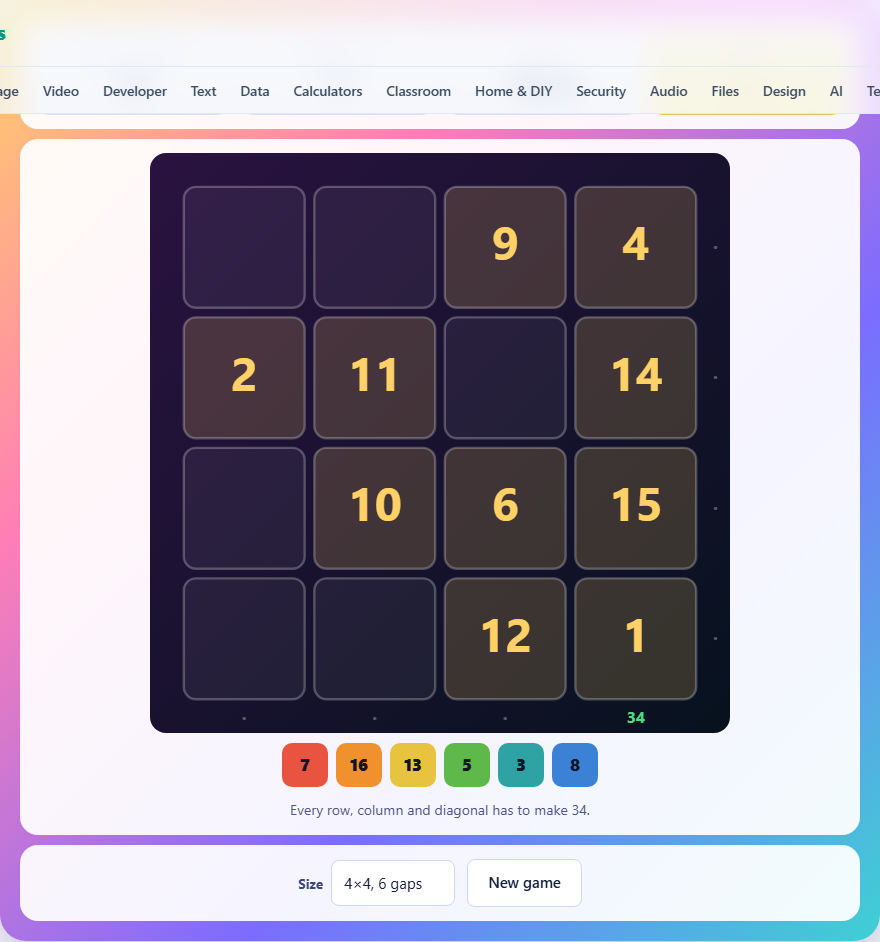
What a magic square is
A magic square is a grid of numbers where every row, every column, and both diagonals add up to the same total. The numbers are consecutive, starting from 1 and going up to the square of the grid's side. A 3x3 grid uses the numbers 1 through 9. A 4x4 grid uses 1 through 16.
The target total depends on the size of the grid. For a 3x3 square it is 15. For a 4x4 square it is 34. The game shows this number in the stat panel so you never have to work it out yourself. If you want to know the formula, it is the side length times the side length squared plus one, divided by two.
How the puzzle is set up
The game starts with a complete magic square and then removes some of its numbers. The removed numbers appear in a tray below the grid. Your job is to put them back in the right places.
Every board has exactly one solution. The game tests each number it removes by trying every possible way of putting the missing numbers back. If removing a number would allow two different correct arrangements, that number stays in the grid. So the gaps you see can always be filled in just one way.
Three difficulty levels are available. The easy level gives you a 3x3 grid with four gaps and two minutes. The normal level is a 4x4 grid with six gaps and two and a half minutes. The hard level is a 4x4 grid with eight gaps and just under three minutes.
Controls and how the board responds
Tap a number in the tray to pick it up. It gets a highlight to show it is selected. Then tap the empty cell where you want to place it. The number moves from the tray into the grid.
If you change your mind, tap the number you already placed and it goes back into the tray. You can rearrange as many times as you want. The only thing counting against you is the clock.
Along the right-hand side and the bottom of the grid, running totals update as you place numbers. A total turns green when its row or column adds up to the target. It turns red when the sum is wrong. A dot shows where the row or column still has empty cells and no total can be computed yet.
The one-gap rule that solves most cells
The most powerful move is finding a line with only one empty cell. If a row has all its numbers except one, the missing number must be the target minus the sum of the others. On a 3x3 board with a target of 15, a row holding 2 and 7 needs a 6 in the gap. There is nothing to guess.
After you fill that cell, look again. The number you just placed might have completed a column or a diagonal down to one gap. Fill that one too, and keep going. A single forced cell often starts a chain that clears half the board.
On the 3x3 grid, the first one-gap line almost always appears immediately. On the 4x4 grid with six or eight gaps, you may need to place one number by a different method before the chains begin.
Using the diagonals as a second check
Beginners tend to focus on rows and columns and forget that both diagonals must also hit the target. The main diagonal runs from the top-left corner to the bottom-right corner. The other runs from the top-right to the bottom-left.
The diagonals are especially useful when the rows and columns each have two or more gaps. A diagonal might have only one gap even when its row and column do not, because it pulls one number from each row. Check both diagonals before you try anything harder.
On the 4x4 board, the two diagonals share the four corner cells and the four cells in the centre. If you know three of those four on one diagonal, the fourth is forced, and that often settles a row or column at the same time.
A worked example on the 3x3 board
Suppose the grid arrives looking like this. The top row is blank, 7, 6. The middle row is 9, blank, 1. The bottom row is 4, 3, blank. The tray holds 2, 5, and 8. The target is 15.
Start with the top row. It has 7 and 6, which add up to 13. The missing number is 15 minus 13, which is 2. Place the 2 in the first cell.
Now look at the left column. It reads 2, 9, 4, which already adds up to 15. That column is done. Check the middle column. It reads 7, blank, 3. That is 10, so the gap needs a 5. Place the 5.
The middle row now reads 9, 5, 1. That adds up to 15 and turns green. The bottom row is 4, 3, blank. That is 7, so the last cell needs an 8. Place the 8 and the board is complete. Three forced cells, no guessing at all.
What to do when no line has a single gap
On the harder levels you may face a board where every row, column, and diagonal has two or more gaps. When that happens, look at which numbers are in the tray and which cells are empty. If two gaps share a row and a column, the intersection of their constraints may narrow the choices down to one.
For example, a row needs two more numbers that together add up to 11, and the tray holds 3, 5, 8. Only 3 and 8 make 11. Now check which of those two fits the column. If the column already has a 3 in it, then placing another 3 there would repeat a number that belongs only once. The 8 goes in that cell and the 3 goes in the other.
This kind of two-cell reasoning is rarely needed on the 3x3 grid, but it comes up regularly on the 4x4 hard setting with eight gaps.
Mistakes that slow you down
- Placing a number without checking the diagonals. A number can sit happily in its row and column while breaking a diagonal. The diagonal total only turns red once the line is full, so the error might not show until later.
- Forgetting you can take a number back. If a row turns red, tap the number you suspect is wrong and it returns to the tray. There is no penalty for changing your mind.
- Ignoring the colour of the totals. Green means the line is correct. Red means it is wrong. A dot means the line still has gaps. Reading those signals saves you from recounting by hand.
- Trying to fill the board from left to right. The best order is forced cells first, wherever they are. Jump around the grid and follow the chains.
Speed tips for beating your own time
Do the arithmetic in your head rather than counting on the grid. On the 3x3 board you only ever subtract from 15, which is fast enough to do without pausing. On the 4x4 board subtracting from 34 is slightly harder, but with practice it becomes automatic.
Pick up the number before you scan for its cell. If you know a 5 is needed somewhere, tap the 5 in the tray first, then tap the gap. That saves one tap compared to scanning first and then going to the tray.
On the 4x4 hard level, spend two seconds at the start scanning every line for a single gap. Fill all of those before you think about anything harder. That first sweep usually places at least two numbers and opens up the rest.
Another habit that saves time is memorising the common pairs that add up to the target. On the 3x3 board, the pairs that sum to 15 are 1 and 14, but since the largest number is 9, the useful pairs are 6 and 9, 7 and 8. On the 4x4 board, pairs that sum to 17 make up the middle of the grid. Knowing these lets you spot what goes where almost instantly when a line has two gaps and one of the numbers is already on the board.
Your numbers stay on your own device
The magic square is built and solved entirely in your browser. The grid is generated, the gaps are chosen, and the solution is checked all on your own device. No data is sent anywhere, no account exists, and your best times are stored locally. You can disconnect from the internet after the page loads and the game keeps working. Closing the tab leaves nothing behind on any server.