
Rebuilding a pile of cubes from two photographs
What the silhouette numbers mean, how the cube count works as a third constraint, the full controls for raising and lowering stacks, and a method that solves most boards without guessing.
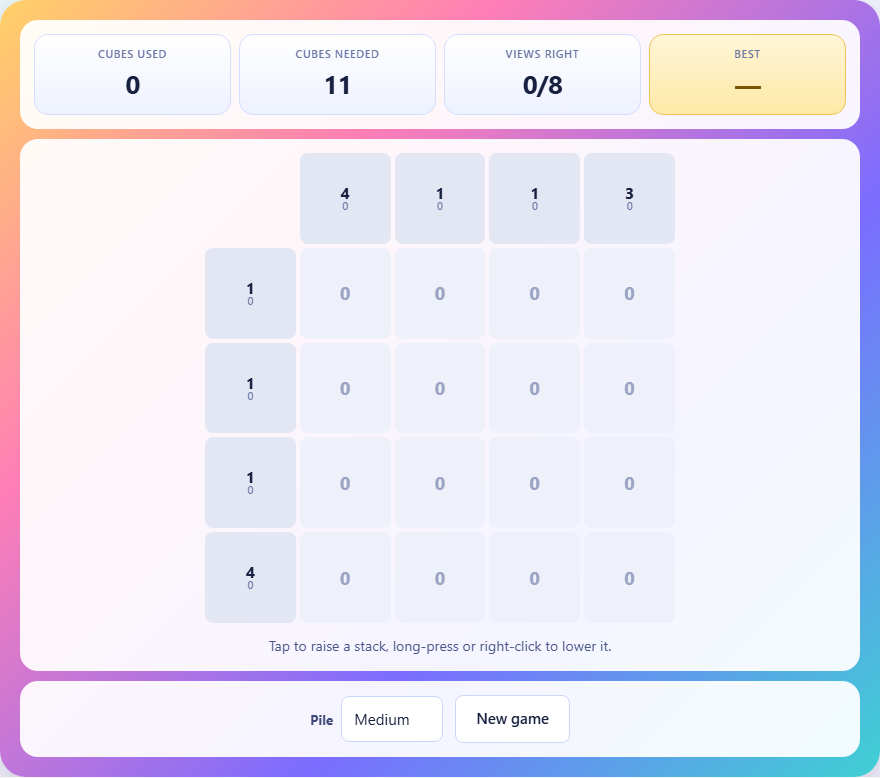
Two views and a number
Somebody stacked cubes on a square grid and took two photographs. One from the front, one from the side. Each photograph is reduced to a single row of numbers. The number along the top of a column is the height of the tallest stack in that column. The number beside a row is the tallest stack in that row.
A silhouette number of four means one stack in that line is exactly four cubes tall and none is taller. It says nothing about the other stacks. They could be zero, one, two, three, or four. The silhouette only records the peak.
You are also told the total number of cubes used. The two photographs plus the total together define the puzzle. Your job is to build any pile that matches all three.
How the grid works
Each square on the grid holds a stack of cubes. The height can be zero, meaning no cubes at all, up to the maximum for that board size. The number shown inside each square is the current height of that stack.
The column headers run across the top. The row headers run down the left side. Below the headers, a small number shows what the current tallest is in that row or column, so you can compare it to the target as you work.
When both the row view and the column view match their target, the header turns green. The puzzle is solved when every header is green and the cube total is exactly right.
Controls for raising and lowering
Tap or click a square to raise its stack by one cube. Right-click or long-press to lower it by one. If you raise past the maximum height, the stack wraps back to zero. If you lower past zero, it wraps to the maximum.
On a phone, lowering is done by tapping repeatedly past the top. There is no separate button for it. If a stack is at height four on a medium board and you tap once more, it goes back to zero.
A dropdown labelled Pile offers three sizes. Small is a three by three grid with stacks up to three. Medium is four by four with stacks up to four. Large is five by five with stacks up to five. The New game button generates a fresh puzzle.
Place the peaks first
Every row must contain at least one stack at exactly its silhouette height. The same is true for every column. A row labelled three needs a stack of exactly three somewhere in it. Start by placing those mandatory peaks.
Look for a square where a large row number meets a large column number. If row four crosses column four, that square is a strong candidate for a stack of four. It satisfies both constraints at once.
Placing the peaks first gives you a skeleton to build on. Once the tallest stacks are in position, the remaining work is adjusting the shorter stacks to reach the total.
Upper bounds that rule out most of the board
A square can never be taller than its row number or its column number. If the row says two and the column says five, that square cannot be higher than two. The smaller of the two numbers is always the ceiling.
On most boards this rule immediately limits a large number of squares. A row labelled one forces every stack in that row to be zero or one. A column labelled two caps everything in it at two. Before placing a single cube, scan the headers and mark the squares that are already nearly decided.
This is where small numbers help most. A header of one is the strongest constraint. Exactly one square in that line must be one, and every other square must be zero. That alone can place several cubes with certainty.
Using the cube count to finish the job
The two silhouettes rarely pin down a single answer on their own. Several different piles can photograph the same way from both sides. The cube count is the third piece of information that narrows the field.
Once the peaks are placed and the views are all green, count your cubes. If you are short, raise the stacks that are hidden behind taller ones. A stack behind a peak can go up without changing the silhouette, as long as it stays at or below the peak.
If you have too many cubes, lower the stacks that are not serving as peaks. Any stack that is shorter than the tallest in its row and column can be reduced freely without breaking a view.
Think of it as budgeting. The views decide where the tall stacks go. The total decides how full the rest of the grid should be.
A worked example on a small board
Suppose you have a three by three grid. The row headers read 3, 2, 1 from top to bottom. The column headers read 2, 3, 1 from left to right. The total is 9.
Row three needs a stack of three. Column three also needs a stack of three. The square where they cross can hold a stack of three, satisfying both. Place it there.
Row one says the tallest stack is one, so every square in that row is either zero or one, and exactly one must be one. Column one says the tallest is two, so the third-row square in column one is capped at one by its row. Column three says the tallest is one, further limiting the bottom row.
Fill in the remaining squares so that each peak is present and the total reaches nine. There may be more than one valid arrangement. The game accepts any pile that matches both views and the total.
Why more than one answer can be correct
The game does not compare your pile against the original. It checks whether your pile would photograph the same way from both sides and uses the same number of cubes. If two piles are identical from the outside, there is no honest way to tell them apart, so both are accepted.
This is a deliberate design choice. The generator builds a real pile, records its views and total, and hands you those numbers. Your job is reconstruction, not mind reading. Any pile that fits the evidence is right.
Strategy for larger boards
On a five by five grid the number of possible piles is enormous, but the method stays the same. Peaks first, ceilings second, total last.
Scan the headers for ones and twos. Each one forces its entire row or column to hold nothing taller than that value, and exactly one square must hit it. That alone can fix a dozen cells before any real thinking starts.
After placing peaks, count your cubes. If you are well below the total, look for hidden squares. A square in a row with a peak of four can be raised to three without changing the view, because the peak is still the tallest. Raise those hidden stacks steadily until the count matches.
If two headers share the same peak value, the peak could live in either square where they cross. Try one. If the total cannot be reached, try the other. With practice, the right placement becomes obvious from the surrounding constraints.
Common mistakes and how to fix them
- Treating silhouette numbers as sums. A row labelled three does not mean the row adds up to three. It means the tallest stack in that row is three. The sum can be much higher.
- Raising stacks above their ceiling. A stack cannot exceed the smaller of its row and column numbers. If you push past that, some other square in the row or column now sets the peak, and the view can break in a way that is hard to trace.
- Matching the views but ignoring the total. Two green rows and two green columns feel like a win, but if the cube count is wrong the puzzle stays unsolved. Always check the total before calling it done.
- Lowering a peak by accident. If you reduce the only stack of height three in a row that needs three, the view goes red and you may not notice which square you changed. Place peaks deliberately and avoid tapping them again.
- Forgetting that zero is a valid height. Not every square needs cubes. Sparse piles are common, and leaving squares empty is often correct.
Everything runs on your own machine
The puzzle generator, the view check, and the cube counter all run inside your browser. No data is sent to any server. You can play offline. The board exists only in your tab and is gone when you close it.