
Finding the flaw in a spinning kaleidoscope
A guide to spotting the odd wedge in a turning kaleidoscope pattern, covering what kinds of flaws appear, how the difficulty climbs, and the scanning habits that keep you ahead of the clock.
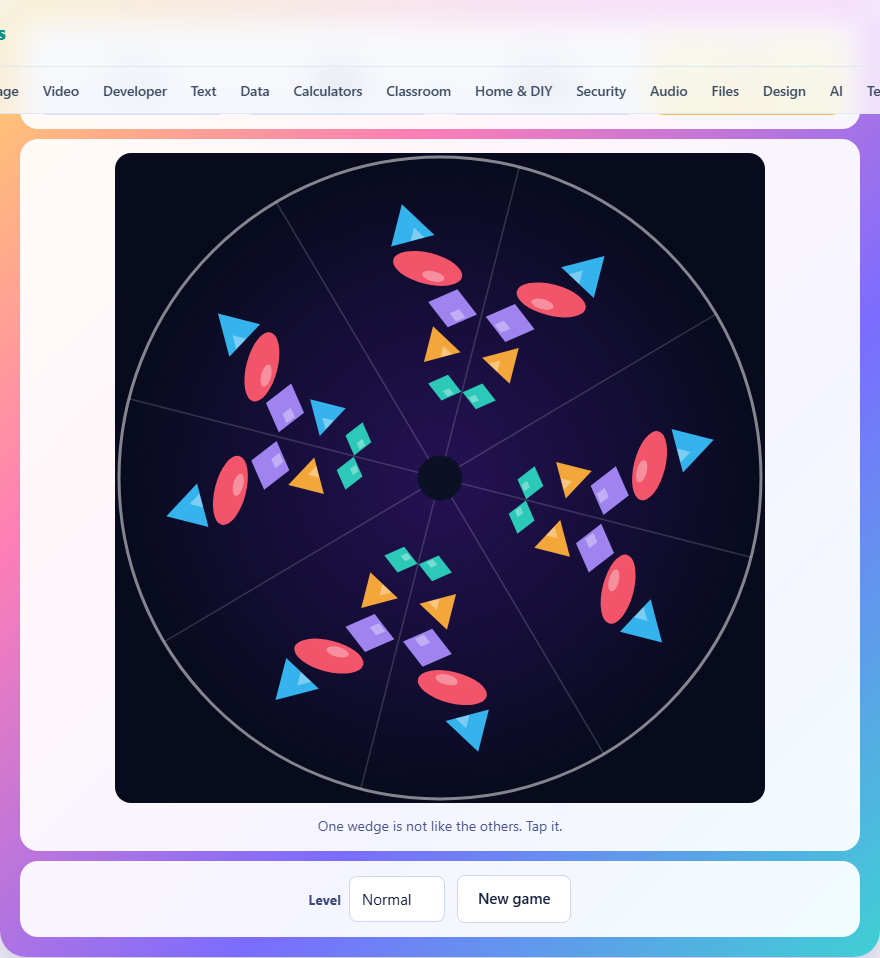
What the kaleidoscope shows you
A real kaleidoscope repeats one wedge of shapes around a circle. Every other wedge is a mirror image of the one before it, and together they fill the full turn with a pattern that looks the same from every angle. This game does the same thing, then breaks one wedge on purpose.
The break is always small. One shape in the bad wedge has the wrong colour, or it is the wrong size, or it has slid closer to the centre or further away. Everything else in that wedge is still correct. Your job is to tap that wedge before the timer runs out.
The circle also turns while you look at it. It does not spin fast, but it spins fast enough that you cannot memorise a position on the screen and come back to it. The flaw is at the top one moment and somewhere else the next. You have to compare wedges against each other, not against the screen.
The three kinds of flaw
On Easy the only change is colour. One shape in the flawed wedge is a different hue from the same shape in every other wedge. Early rounds shift the colour by a wide step, so the mismatch jumps out. Later rounds shift it by a single step around the colour wheel, and two similar hues side by side are much harder to tell apart.
Normal adds size. The wrong shape may be noticeably bigger than it should be. Because all the other copies of that shape keep their original size, a scan around the ring will find one that bulges.
Hard adds position. The wrong shape may sit at a different distance from the centre. It keeps its colour and its size, but it is not where it should be. This is the subtlest flaw, because a shape shifted inward by a small amount does not look obviously wrong until you compare it carefully with its twin in the next wedge.
How the difficulty climbs
The circle starts with six wedges on Easy, eight on Normal, and ten on Hard. Every three rounds the count rises by two more. A round-one Easy circle has six slices to check, but by round four it has eight, and by round seven it has twelve.
More wedges means a narrower angle per wedge, so each one holds fewer pixels on screen and the shapes crowd together. The flaw itself also gets quieter as the rounds pass. A colour shift that was three steps apart at the start becomes just one step, and a size change that was fifty-five percent bigger shrinks to thirty-four percent.
The timer counts down from seventy seconds on Easy, sixty on Normal, and fifty-five on Hard. That time covers every round, not each one separately. A slow first round eats into the budget for the rest.
Controls and scoring
Tap or click anywhere inside the wedge you think is wrong. You do not need to hit the shape itself. Anywhere within the boundaries of that slice counts, from the rim all the way to the middle.
You start with three lives. A wrong tap costs one life. Losing all three ends the game immediately. Running out of time also ends it. If you clear every round before the timer expires, your score is the number of seconds you had left. The level selector lets you choose Easy, Normal, or Hard, and the New game button deals a fresh set of rounds.
Scanning by radius, not by eye
The fastest way to find the flaw is to pick one ring of the circle and scan it all the way round. Every wedge has a shape at roughly the same distance from the centre, and each one should be the same colour, the same size, and at the same spot. One that breaks the pattern is the answer.
Imagine the circle as a target with rings. Start at the outer ring and sweep your eye around the whole circle. If nothing looks wrong, step inward to the next ring and sweep again. This works because you are comparing identical things. A red diamond among seven other red diamonds is invisible, but a pink one stands out the moment your eye passes it.
Trying to take in the whole circle at once is slower. The brain can compare two things side by side very quickly, but it struggles to hold the details of six or eight wedges at the same time. A ring-by-ring sweep turns one hard comparison into several easy ones.
Do not be fooled by the mirror
Every other wedge is a mirror image. A triangle pointing left in one wedge points right in the next. A petal leaning clockwise leans the other way in its neighbour. This is not the flaw. It is how a real kaleidoscope works, and the game copies it faithfully.
What the mirror never changes is colour, size, or distance from the centre. A red circle at half radius in one wedge is still a red circle at half radius in the mirrored wedge beside it. If those two differ in colour, that is a real flaw, and one of them is the odd wedge.
Players on their first game sometimes tap a mirrored wedge because a flipped triangle looks wrong. That costs a life and wastes time. Once you know that mirroring is normal, you will stop seeing it as a threat and focus on the things that actually change.
Comparing neighbours instead of the whole ring
You do not need to scan every wedge. Pick any two neighbours and compare them shape by shape. If they match, move to the next pair. The flaw can only be in one wedge out of the whole ring, so every matching pair rules both members out.
On a circle with eight wedges, four comparisons cover every one. On a circle with twelve, six will do. That is much faster than holding the first wedge in memory and checking it against all the rest.
Because the circle is turning, your window of time with any two neighbours side by side is short. Work with whatever pair is in front of you right now. If it matches, flick your eye one slice further. Do not wait for a favourite pair to come back around.
Mistakes that cost lives and time
Tapping the mirrored wedge is the most common first mistake. It looks different because of the flip, but the flip is built in. Train yourself to ignore orientation and focus only on colour, size, and radial position.
Rushing a guess is the second. With three lives and a running clock, it feels smart to tap quickly and recover if you are wrong. But each wrong tap leaves fewer lives for the harder rounds ahead, and the later rounds are where you need them most.
Watching the rotation instead of the shapes is the third. Players sometimes track a wedge as it moves, trying to follow the flaw around the circle. That costs time because you stop comparing and start chasing. The flaw does not move within its wedge, so comparing any two wedges at rest gives you the answer.
- Do not tap a mirrored wedge. Flipped shapes are normal in a kaleidoscope.
- Save your lives for later rounds, where the flaw is harder to spot.
- Compare shapes at one radius rather than trying to see the whole circle.
- Do not chase the rotation. Pick two neighbours and compare them where they are.
Making the most of the early rounds
The first round or two are gifts. The flaw is bold, the wedges are wide, and the circle is small. Clear them quickly and bank the saved seconds for later.
By round four or five the difference between a correct shape and the flawed one is genuinely subtle. A colour shift of one step on the palette can look almost identical unless the two hues are side by side. That is when a careful ring scan matters, and that is when you need the time you saved earlier.
If you find yourself stuck, do not panic and tap randomly. A calm sweep at one radius will usually find the flaw within a few seconds. Random taps will burn a life, and three wrong taps end everything.
Everything stays on your own machine
The kaleidoscope is drawn on a canvas element inside your browser. The shapes, colours, and rotation are all computed locally. No round data is sent to a server, and there is no account to sign into. Your best score is saved in your browser's own storage on this device. Closing the tab is all the cleanup there is.
Once the page has loaded, the game works with no network connection at all. You can turn off your Wi-Fi and keep playing. Nothing changes, because there was nothing on the other end to begin with.