
Climbing two thousand metres on bouncing alone
How the bouncing works, what the three platform colours mean, why the screen wrap matters, and the habits that separate a clean ascent from a quick fall.
What the game asks you to do
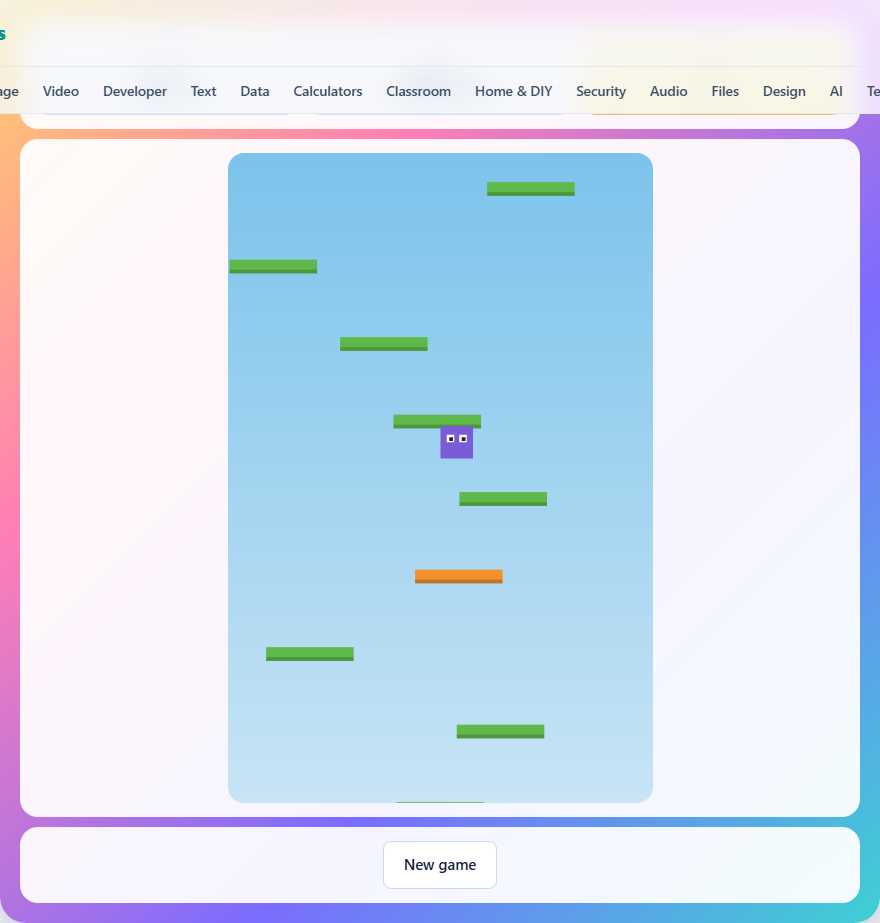
A small character stands on a platform near the bottom of the screen. The moment the game starts, the character bounces upward. Your job is to steer it left and right so it lands on the platforms above. Each landing sends it bouncing again. Keep going until the height counter reaches two thousand metres.
You do not press a button to jump. Bouncing is automatic. Every time the character lands on a platform while falling, it springs back into the air. The only input you control is the sideways movement. This makes the game simpler to learn but harder to master, because your timing depends on where you steer, not when you press.
Steering and controls
There are three ways to move. On a keyboard, use the left and right arrow keys. The A and D keys also work. On a phone or tablet, hold the left half of the screen to move left and the right half to move right. Below the game area, two arrow buttons let you tap or hold for the same effect.
The character accelerates when you hold a direction and slows down when you let go. It does not stop instantly. There is a small amount of slide, so releasing the key a moment before you want to stop keeps you from overshooting a platform. At full speed, the character covers the width of the playing area in about two seconds.
One-way platforms and why you fall through
Platforms are one-way from below. When the character is rising, it passes straight through every platform in its path. When the character is falling, it lands on the first platform its feet touch. This is not a bug. It is the mechanic that makes the game work.
If platforms were solid from both sides, every upward bounce would hit the underside of the next platform and send the character back down. The climb would stall on the second platform. One-way collision lets you rise freely and catch platforms on the way down, which is how the ascent keeps going.
The three platform colours
Green platforms are solid. They stay in place and you can land on them as many times as you like. In the early part of the climb, most platforms are green.
Orange platforms move side to side. They slide back and forth across the screen, bouncing off the edges. Landing on one works the same as landing on a green platform, but the platform is not where you last saw it. You need to time your fall so you meet it in mid-slide. Orange platforms start appearing as you climb higher, and their share of the total grows with altitude.
Red platforms crumble. You get one bounce off them. The moment you land, the platform breaks apart and disappears. It will not be there for a second visit. Red platforms appear at greater heights and can create gaps in the climbing path if you are not careful about which ones you use.
The screen wrap
If the character slides off the left edge of the screen, it reappears on the right edge at the same height. The same happens in the other direction. This wrap-around is not just a convenience. It is a critical tool.
When a platform sits on the far side of the screen and you are falling on the near side, steering across the full width takes too long. Sliding off the closer edge brings you out next to the platform in half the distance. On the upper sections of the climb, where platforms are fewer and spaced further apart, the wrap is often the only way to reach the next one in time.
How the difficulty ramps up
There is no difficulty selector. The game gets harder as you climb. In the first few hundred metres, almost every platform is green and the gaps between them are small. By a thousand metres, about one in three platforms is orange or red, and the vertical spacing has widened.
Near the top of the climb, you will see stretches where the only platform in reach is orange and moving. Or the nearest solid platform is on the other side of the screen and requires a wrap. The sky darkens as you rise, giving you a visual sense of altitude without needing to watch the number. A dark sky means you are close to the goal.
Strategy: look ahead, not down
The most important habit is to look at the platform above the one you are aiming for, not the one you are about to land on. If you steer perfectly to the nearest platform but that platform sits under empty space, your next bounce has nowhere to go.
Plan your path two platforms ahead. While you are falling toward one, check where the next one sits and start steering early so the bounce sends you in the right direction. This lookahead is what makes a smooth climb instead of a panicked scramble.
On red platforms, the lookahead is even more critical. You get one bounce. If the only reachable platform after the red one is another red one, you need to chain them cleanly or the path collapses.
The camera and the death rule
The camera scrolls up to follow the character but never scrolls down. Once a platform drops below the bottom of the screen, it is gone. If you miss a landing and fall past the lowest visible platform, the run is over. There is no way to recover from a fall. The game ends and your height is recorded.
This means every bounce matters. A platform you passed on the way up is not a safety net on the way down. The upward-only camera creates a natural pressure: each bounce is progress, and each miss is final. Knowing this changes how you play. You stop treating low platforms as fallback options and start treating the current bounce as the one that has to land.
Choosing between two platforms
Often you will be falling with two platforms in reach, one on each side. The safe choice is usually the green one, even if it means a longer steer. A green platform gives you time to plan the next move. A red one forces you to react instantly, and an orange one may have moved by the time you get there.
When both options are green, pick the one that leads to a better cluster above it. A green platform sitting under three more platforms is worth more than one sitting under empty sky. The few seconds you spend scanning upward while falling are the most valuable seconds in the game.
If the only option is red, commit to it fully. Steer directly, do not hesitate, and have your next target picked before you land. Half-hearted approaches to a crumbling platform are the most common way to end a run early.
Common mistakes and how to fix them
- Overcorrecting. Holding a direction too long pushes the character past the platform. Tap or pulse the key instead of holding it flat.
- Ignoring the wrap. Steering all the way across the screen wastes time you do not have at higher altitudes. Use the edge shortcut.
- Landing on a red platform with no plan for the next one. Before you touch a red platform, know where the bounce after it will go.
- Watching the height counter instead of the platforms. The darkening sky tells you how close you are. Keep your eyes on the landing spots.
- Panicking when an orange platform slides away. It will come back. Wait for the return pass instead of chasing it across the screen and overshooting.
Scoring and personal records
Your score is the highest altitude you reach, measured in metres. If you hit two thousand, you win and the run ends. If you fall before that, the game records whatever height you reached. Your best height is saved and shown when you play again.
There is no leaderboard and no competition against other players. The goal is to reach the top, and the record is there to show how close you got on each attempt.
Nothing leaves your browser
The platforms, the physics, and the score are all calculated inside your browser. No game data is uploaded anywhere. Your best height is stored in your browser's local storage on this device and is never sent to a server. The game works offline once the page has loaded, and closing the tab is all the cleanup there is.