
Thinking in jigsaw shapes instead of boxes
How irregular regions change the way a sudoku plays, which standard tricks still work, which ones break, and how to read the board so the shapes help you instead of tripping you up.
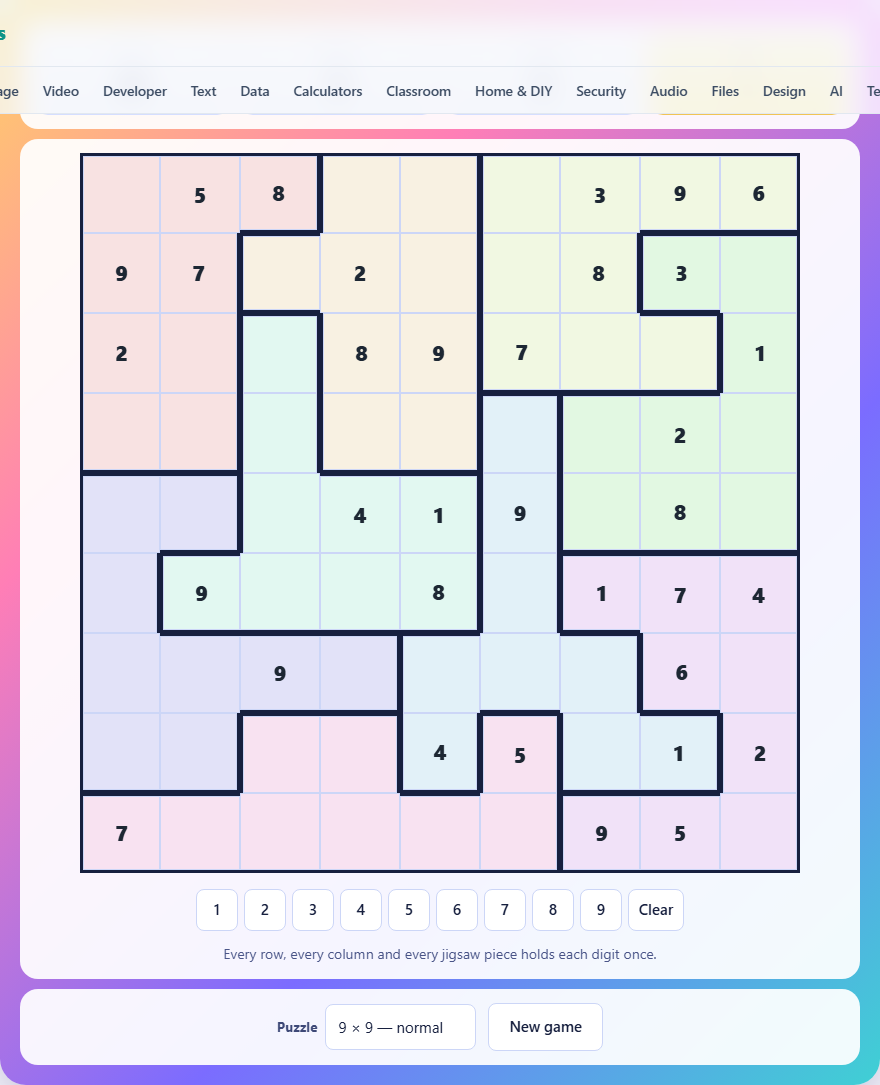
The familiar rule with an unfamiliar twist
The core rule is the same as ordinary sudoku. Every row holds each digit once. Every column holds each digit once. And every region holds each digit once. The difference is in the regions. Instead of the usual three-by-three boxes, the regions are irregular jigsaw shapes. They can be long, thin, bent, or wrapped around a corner. Each shape holds exactly as many squares as the grid is wide, and no two shapes overlap.
This single change reaches deep into the puzzle. Most of the tricks you rely on in standard sudoku assume that the box, the row, and the column overlap in a fixed, predictable way. When the box becomes an L-shape that touches six rows, those tricks stop working and different ones take their place.
Grid sizes and difficulty
The puzzle selector offers three settings. The 6 by 6 gentle grid uses digits one through six and six shapes of six squares each. It is the right place to start if you have never played a jigsaw variant before, because the small grid lets you see every constraint at once without scrolling or counting.
The 9 by 9 normal grid is closer to a newspaper sudoku in feel. Nine shapes of nine squares each, digits one through nine, and enough given digits that you can usually find a starting point without hunting. The 9 by 9 sparse grid uses the same dimensions but strips more digits away, so fewer clues are on the board and each deduction has to do more work.
Every puzzle is checked by a solver before it is served. If the puzzle would have two answers, the generator puts a digit back and tries again. So you never need to guess. If you are stuck, there is a logical path you have not seen yet.
How to enter digits
Tap an empty square to select it. A highlight marks the active cell. Then tap a digit on the number pad below the grid, or press a number key on your keyboard. Pressing Backspace or Delete clears the cell. The Clear button on the pad does the same thing.
Given digits appear shaded. They cannot be changed. If you place a digit that clashes with another in the same row, column, or shape, both turn red at once. The stat bar above the board shows how many empty cells remain, how many moves you have made, and how many clashes are currently on the grid.
The technique that matters most here
In a standard sudoku, the most common move is scanning a box to find which cell a digit fits in. That scan works because a three-by-three box overlaps with three rows and three columns in a tidy, repeating pattern. On a jigsaw grid the pattern is gone, but a stronger version of the same idea takes its place.
Look at each shape and ask: where can digit X go? List the blank cells in the shape that are not blocked by a row or column. If every candidate for that digit sits in a single row, then that digit is locked into that row within the shape. No other shape can place that digit in that row. Cross it off everywhere else in that row.
This locked-candidate trick fires far more often on jigsaw grids than on standard ones. A shape that stretches across six rows might only be able to place its 4 in cells that all happen to share one row. That one observation can eliminate three or four candidates at once and crack the puzzle open.
What stops working from standard sudoku
Pointing and claiming, naked pairs in a box, and X-wing patterns that rely on the three-by-three geometry do not carry over in a useful form. If you have memorised box-row or box-column reduction rules, set them aside. They assume a shape that is no longer there.
The good news is that the replacement is simpler. You need only two ideas to solve most jigsaw puzzles. First, the locked-candidate check described above. Second, plain elimination: for each blank cell, list which digits are blocked by its row, column, and shape, and see if only one is left.
Between these two, almost every 6 by 6 and most 9 by 9 normal boards can be solved without notes. The sparse 9 by 9 boards sometimes need you to pencil in candidates mentally, but even then the shapes tend to force digits faster than a standard grid would.
Reading the shape boundaries
Thick lines on the grid mark where one shape ends and another begins. When a thick line runs between two cells, those cells belong to different shapes and follow different region constraints. When two cells share a thin line, they belong to the same shape.
Get used to tracing the outline of a shape before you start working on it. Know which rows and columns it touches. A shape that fits neatly in two rows behaves almost like a normal box. A shape that snakes through five rows gives you five rows of elimination data to work with, and that extra reach is where the puzzle rewards you for paying attention.
On the 6 by 6 grid, shapes are small enough to take in at a glance. On the 9 by 9 grid, some shapes can be large and irregular. Follow the thick lines and count the cells if you are unsure whether a shape is complete.
A walkthrough on the small grid
Imagine a 6 by 6 board where a given 3 sits in row two, column four, and its shape stretches down through rows two, three, and four. You know that the 3 is placed for this shape. You also know that row two cannot hold another 3 and column four cannot hold another 3.
Now look at the shape to the left, which also touches row two. Suppose its cells in row two are in columns one and two. Neither of those can be 3 either, because row two already has one. So this second shape must place its 3 somewhere in a lower row. If that shape only has one cell below row two, the 3 goes there.
That chain of reasoning, from a given digit to a row exclusion to a forced placement in a neighbouring shape, is what a typical jigsaw solve feels like. Each step is small. The shapes just make the steps fall differently than you are used to.
Common mistakes and how to fix them
- Treating a jigsaw shape like a box and assuming it occupies a fixed block of rows and columns. It does not. Trace the outline every time.
- Placing a digit that satisfies the row and column but forgetting to check the shape. The red clash alert catches this, but checking before you place saves a move.
- Ignoring shapes that span many rows. Those are the shapes most likely to give you a locked-candidate deduction, not the ones to skip.
- Starting with the hardest, emptiest region. Start with the shapes that have the most given digits. Fewer blanks means fewer possibilities.
- Counting cells wrong on a large shape. The shape has exactly as many cells as the grid is wide. If you count eight in a nine-wide grid, you missed one.
Moving from the gentle grid to the harder ones
Once you finish a few 6 by 6 boards in under two minutes, move to the 9 by 9 normal. The jump is not as harsh as it looks. The locked-candidate technique scales up directly, and the bigger grid gives you more given digits to start from.
When you are comfortable with normal, try sparse. The sparse boards strip away more given digits, so you may find a board with only a third of its cells filled in. The first scan will turn up fewer instant placements, and you will need to chain two or three locked-candidate steps together before a digit falls. The reward is a puzzle that takes real thought, and the satisfaction of knowing every step was logic, never a coin flip.
Your data stays right here
The shapes, the solution, and every digit you enter live inside your browser. Nothing is sent to a server at any point. Your best move count is stored locally, on this device only, and does not follow you to another machine or another browser. Once the page has loaded, you can disconnect from the internet and keep playing. Closing the tab is all the cleanup there is.