
Building a gear train that turns the right way
Gear Train is a puzzle about meshing, direction, and arithmetic. This guide explains how gears connect, why every other gear reverses, and how to read the board so you can solve it before the clock runs out.
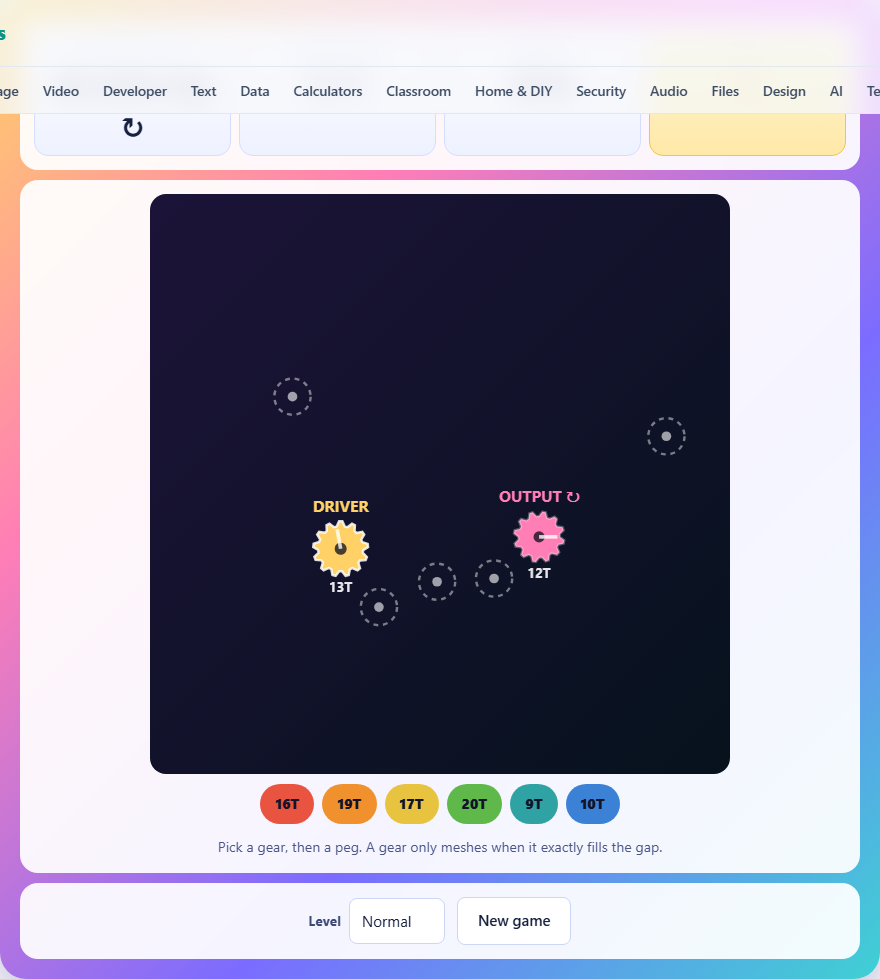
What the puzzle is about
A yellow driver gear is spinning on the left side of the board. A pink output gear sits on the right. Between them are empty pegs. Below the board is a tray of gears with different tooth counts. Your job is to pick gears from the tray, drop them onto the empty pegs, and build a chain that carries the drive from the yellow gear all the way to the pink one.
There is a twist. The output must turn in a specific direction, shown by an arrow next to it. Every gear in the chain reverses the one before it. So the number of gears you place, not just their sizes, decides whether the output spins the right way.
How meshing works
Two gears only mesh when they are at exactly the right distance from each other. Each gear has a radius measured in pixels, and that radius is 1.75 pixels for every tooth. A 12-tooth gear has a radius of 21 pixels. A 20-tooth gear has a radius of 35 pixels.
For two gears to mesh, the distance between their pegs must equal the sum of their radii. If a gear with 12 teeth sits on one peg and another peg is 56 pixels away, the second gear must have a radius of 35 pixels, which means 20 teeth. Any other size will not connect.
When a gear meshes with the chain it turns blue and starts spinning. A gear that is sitting on a peg but not connected to anything stays grey and still. That visual check is the fastest way to spot a break in the chain.
Controls on desktop and mobile
Tap a gear chip in the tray below the board. The chip highlights to show it is selected. Then tap any empty peg on the board. The gear drops onto that peg and, if it meshes with a neighbour, starts turning.
To remove a gear you placed, tap it on the board. It goes back to the tray. Only the timer is against you, so feel free to experiment. The driver and output gears are fixed and cannot be moved.
A dropdown labelled Level offers Easy, Normal, and Hard. Easy gives you two middle gears to place, with fewer spare pegs and more time. Hard gives you four middle gears, more decoy pegs, and less time. Press New game at any point for a fresh board.
Direction is about counting, not sizing
This is the single most important idea in the game. Every gear reverses the direction of the one driving it. If the driver turns clockwise, the first gear you add turns anticlockwise. The next turns clockwise again, and so on.
That means you can work out the output direction before you place a single gear. Count the empty pegs you plan to use. If you fill an odd number, the output will turn the opposite way from the driver. If you fill an even number, it will turn the same way. Compare that to the arrow and you know whether your plan works.
The size of the gears in the middle does not change the direction. A huge gear reverses just as surely as a tiny one. Size only decides which gear fits a given gap. Direction is decided by the count.
How to read the board quickly
Before you touch the tray, look at the board and count the pegs between the driver and the output. If the arrow says the output should turn the same way as the driver, you need an even number of gears in the chain between them. If the arrow says the opposite way, you need an odd number.
Next, look at which pegs are close enough to each other that a gear from the tray could bridge them. The tray holds gears from 9 teeth up to 20 teeth, which means radii from about 16 to 35 pixels. Two pegs that are 100 pixels apart need two gears whose radii add up to 100. That is roughly a 14-tooth and a 14-tooth, or a 9-tooth and a 20-tooth. Run through the tray and see what fits.
Hard boards add spare pegs that are not part of the intended solution. They are there to distract you. Not every peg needs a gear on it.
Scoring and the timer
The game runs on a countdown. Easy gives you 110 seconds, Normal gives 95, and Hard gives 85. Your score is the number of seconds remaining when you solve the board. More time left means a better score.
If the timer runs out before the output is turning the right way, the game ends with a loss. There is no penalty for removing and replacing gears, so speed comes from reading the board correctly at the start, not from frantic clicking.
Strategy for harder boards
On Hard you have four gears to place and up to four spare pegs. Start by solving the direction problem. Count the pegs on the most direct route from driver to output and check whether the parity matches the arrow. If it does not, look for a route that goes through one more or one fewer peg.
Then match gears to gaps. Starting from the driver, measure the distance to the nearest peg. Subtract the driver's radius. The remainder is the radius you need. Find that tooth count in the tray. Repeat for the next gap, using the gear you just placed as the starting point.
If no gear in the tray fits a particular gap, that peg is a decoy. Move on and try a different route. The tray always holds enough gears to build at least one working chain.
Mistakes that cost time
- Placing gears without checking direction first. You can build a perfect chain that meshes end to end and still lose because the output spins the wrong way. Count before you place.
- Trying the biggest gear first. Size has nothing to do with quality. The gap decides the gear, not your preference. Measure the gap and pick the gear that fits.
- Forgetting that removing a gear is free. If a gear is not turning blue, pull it off and try the next size. Every second you spend staring at a grey gear is a second wasted.
- Ignoring decoy pegs. Not every peg on the board is part of the answer. Hard boards add spare pegs specifically to slow you down. If a peg does not sit on a sensible route, skip it.
- Rushing the last gear. The final connection is where most mistakes happen. If the parity is off, the entire chain is wrong. Double-check the count before you drop the last gear.
A worked example
Imagine a Normal board. The driver is a 14-tooth gear turning clockwise. The arrow says the output should turn anticlockwise. There are three empty pegs forming a loose path from left to right. Three gears between driver and output means three reversals, which gives anticlockwise. The direction is right.
The first peg is 49 pixels from the driver. The driver's radius is 24.5 pixels, so you need a gear whose radius is 24.5 pixels, which means 14 teeth. Check the tray. A 14-tooth chip is there. Place it and it turns blue.
The second peg is 42 pixels from the first. The first gear's radius is 24.5, so the second needs a radius of 17.5, which is a 10-tooth gear. Place it. The third peg is 59.5 pixels from the second. The second gear's radius is 17.5, so the third needs 42 pixels, meaning 24 teeth. But the tray only goes up to 20. That gap is too big. The third peg is a decoy. Skip it and look for a peg closer to the second.
Every board has a solution
The boards are not random scatterings of pegs. Each one is built by laying out a working gear train first and then putting the pegs where the train needs them. Extra pegs and extra gears in the tray are added afterward. So a route always exists, and any other route you find that meshes and turns the right way is equally valid.
If you think you are stuck, you have probably picked a route that includes a decoy peg. Step back, remove everything, and look for a different path from driver to output.
Nothing leaves your browser
The entire game runs on your own machine. No board data is sent anywhere, there is no account to create, and your best score is saved in your browser's local storage on this device alone. Once the page has loaded you can play offline. Close the tab and there is nothing to clean up.