
Building trusses that actually hold weight
How the bridge solver works, why triangles carry loads and squares collapse, what the colours tell you about each beam, and how to design a truss that survives every position of the lorry.
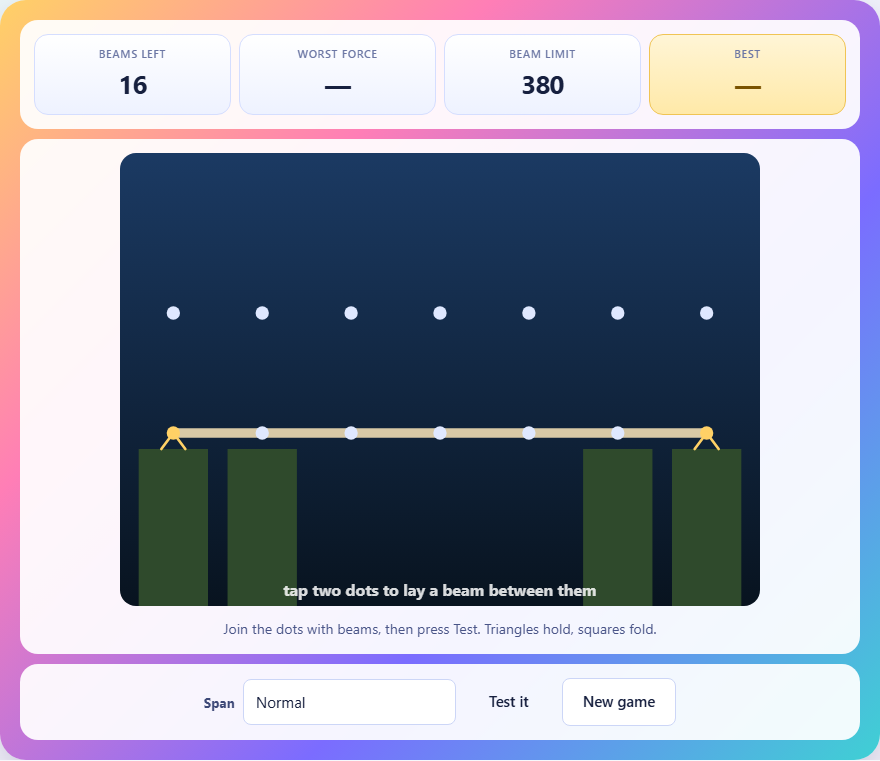
What the game asks you to do
A gap cuts across the screen. The roadway is already drawn across it, but it has nothing holding it up. Below the road there is empty space, and at each end there is an anchor point drawn in yellow. Your job is to connect the dots with beams until the structure can carry a lorry from one side to the other.
You have a fixed number of beams to spend. The count depends on the span you choose. Once they are gone you must take one out before you can put a new one in. The roadway itself is locked in place and cannot be removed.
Placing and removing beams
Tap or click one dot, then tap another. If the two dots are close enough, a beam appears between them. If they are too far apart, you are told the beam would be too long. Tap the same two dots again and the beam is taken back and added to your supply.
There are two rows of dots. The lower row sits at road level. The upper row sits above it. You can connect any two dots in any combination as long as the distance is short enough. Diagonal beams that cross between the two rows are not only allowed, they are the whole point.
Why triangles hold and squares fold
Picture four beams in a square. Each corner is a hinge, and a hinge can rotate. Push the top to the side and the square leans over into a diamond. None of the beams got longer or shorter, but the shape changed. That is a mechanism, not a structure.
Now draw a line from one corner to the opposite one. The square becomes two triangles. Try to push it over and the diagonal has to get longer, which it cannot do. The shape is locked. This is why every working bridge in the game is made of triangles.
When you press Test it and the message says the frame folded up, it means there were panels that had no diagonal. The solver tried to balance the forces at every joint and could not, because the frame would move before it could resist.
What happens when you press Test it
The solver places the lorry on the first joint of the roadway and works out the force in every beam. Then it moves the lorry to the second joint and does it again. It keeps going until the lorry has stood on every joint, and the worst force any beam ever felt is the one that counts.
At each position, two equations are written for every joint. The horizontal forces must add to zero and the vertical forces must add to zero. Collect all those equations and solve them at once, and the tension or compression in every beam falls out. This is the same method engineers use for real trusses.
If the worst force in any beam is bigger than the beam limit, that beam snaps. The limit depends on the span you chose. A narrow gap allows stronger beams, a wide gap gives you weaker ones.
Reading the colours
After a test, every beam changes colour. Blue means the beam is in tension. It is being pulled from both ends, like a rope. Orange means the beam is in compression. It is being squeezed from both ends, like a column.
The strength of the colour tells you how much force the beam is carrying. A faint blue beam is barely working. A deep orange beam is close to its limit. A red beam has already broken.
This colour map is the fastest way to see where your bridge is struggling. If one beam is much brighter than the rest, the load is not spread evenly. A good truss should show moderate colour across most of its members.
The three span settings
The dropdown at the bottom offers three choices. Narrow gap gives a short span, fourteen beams, and a generous strength limit. Normal widens the gap, adds two more beams, and lowers the limit. Wide gap with weaker beams stretches the span further, gives eighteen beams, and drops the limit again.
The wider the gap, the bigger the forces in the beams. That is not a game rule. It is simple physics. A beam near the middle of a long span carries more load than one near the middle of a short span, because the bending moment grows with length.
Strategy for a strong bridge
Start with the supports. The load has to travel from wherever the lorry is standing to the yellow anchors at each end. If any part of your structure is not connected to those anchors, it does nothing at all. A beautiful frame floating in mid-air carries zero weight.
Work in triangles from each end toward the middle. Every panel should have a diagonal. If you run short on beams, the diagonals near the centre matter more than the ones near the supports, because the forces are highest there.
Use the upper row of dots. A truss that stays flat along the roadway is shallow, and a shallow truss puts huge forces into its beams. Raising the structure above the road gives it depth. A deeper truss carries the same weight with smaller forces in every member. The difference is large. A flat bridge might demand forces three or four times higher than one that rises to the upper row.
Mistakes that snap beams or fold the frame
- Leaving a panel as a square. It takes only one missing diagonal to turn a stable truss into a mechanism. The solver will say it folded up.
- Ignoring the middle. The roadway is tested at every joint, not just the ends. A bridge that holds at the edges but has nothing in the centre fails when the lorry reaches the midpoint.
- Staying flat. Using only the lower dots means every beam is at road level. There is no depth, so the forces are enormous. Go up.
- Spending all your beams on one side. The lorry crosses the whole span. If the left half is a perfect truss and the right half is bare, the bridge fails halfway.
- Wasting beams on beams that are too long. Each pair of dots has a maximum reach. Planning a layout that needs a beam across the entire width is not going to work. Keep the connections between neighbours.
A worked example on the normal span
On a normal span you have seven columns of dots and sixteen beams. The roadway uses six beams, leaving ten. Start at the left anchor. Put a diagonal from the first lower dot up to the first upper dot. Then connect that upper dot to the second upper dot. Drop a diagonal back down to the second lower dot. That panel is two triangles and it is rigid.
Repeat across the span. Each panel costs three beams: one horizontal on top and two diagonals. With ten spare beams you can brace three full panels and have one diagonal left over. Place that last diagonal in the centre panel, because that is where the force peaks.
Press Test it. If the beams all come back in blue and orange without any red, the bridge holds. The score is the number of unused beams. In this layout, that is zero, but the structure stands. To improve, look for beams with very faint colour. Those are doing almost no work and could be moved to a spot where they would share the load more evenly.
How scoring works
When the lorry crosses safely, the game reports the number of beams you did not use. More leftover beams means a better score, because you solved the problem with less material. The worst force in the structure is also shown, along with the beam limit for that span.
There is no time pressure. You can think about the layout as long as you like before pressing Test it. If the test fails, you can rearrange and try again without penalty. The only thing that counts is whether the bridge survives and how many beams you have to spare.
Everything stays on your machine
The solver runs inside your browser. The equations are assembled and solved right there on your device. No server is involved, no data is sent, and there is no account to create. Your best score is saved in local storage and stays on this device only. Close the tab and the whole thing is gone except for that one number.