
Solving crate puzzles without painting yourself into a corner
Why pushing is harder than it sounds, how each of the four levels raises the difficulty, when to lean on the undo button, and the wall and corner traps that catch everyone on their first attempt.
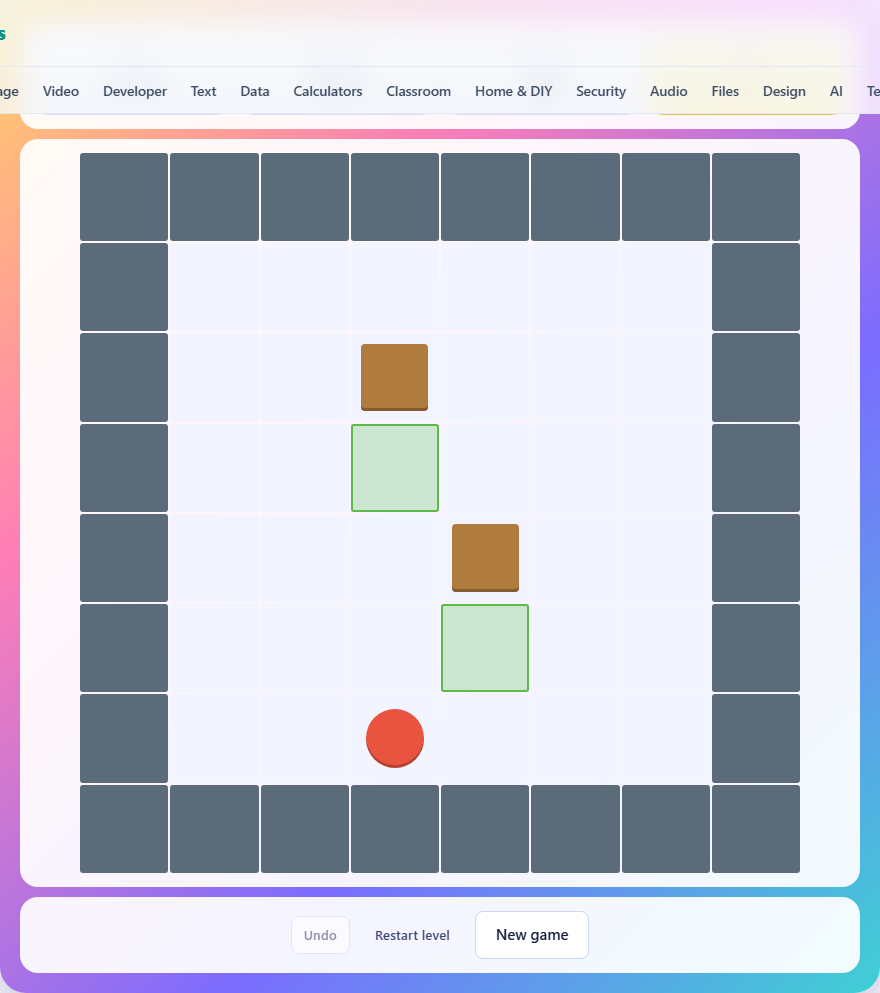
The single rule that makes it hard
You can push a crate by walking into it, but you cannot pull. That sounds like a small restriction. It is not. It means every push is a one-way decision. A crate shoved into a corner can never be moved again, because there is no square behind you to stand on and drag it out. A crate flat against a wall can only slide along that wall, never away from it.
The puzzle is built entirely around this asymmetry. If you could pull, every level would be simple. Because you cannot, every push has to be planned ahead. Walking up to a crate and nudging it without thinking about what is behind it is the fastest way to make a level impossible.
Controls and how to move
Arrow keys move you one square in any direction. On a phone, swipe in the direction you want to go, or use the on-screen direction pad below the board. The W, A, S, and D keys also work if you prefer them.
To push a crate, just walk into it. If the square behind the crate is empty, the crate slides one square and you step into where it was. If the square behind it is a wall or another crate, nothing happens and you hear a short buzz.
Pressing Z or U undoes your last move. The Undo button below the board does the same thing. You can undo as many times as you like, all the way back to the start if needed. Each undo costs one move from your budget, but the budget is generous enough to handle plenty of corrections.
The Restart Level button resets the current level to its starting state without touching your overall move count. New Game sends you back to level one.
The four levels
There are four levels, played in order. Each one is hand-designed rather than randomly generated. Random generation for this kind of puzzle almost always produces boards that are either trivially easy or completely unsolvable, so every level here has been placed by hand and tested.
Level one has two crates on a simple open floor. The target move count is low, and the budget gives you about twenty moves to finish. It is there to teach the controls and the feeling of how a push works. Level two adds a wall in the middle that blocks the obvious path. Level three has three crates separated by internal walls, and you must route each one around them. Level four has four crates arranged around a pair of walls, and the order you move them matters more than where any single crate goes.
Finishing all four levels in a single run records your total move count. Fewer moves is a better score.
Why corners are the enemy
A crate in a corner is stuck forever. No combination of pushes can get it out. The only recovery is to undo until the crate is back in open space. Recognising a corner trap before you push the crate into it is the most important skill in the game.
A corner does not have to be the edge of the map. Any two walls meeting at a right angle create a corner. If a crate is touching one wall and the next square along that wall is also a wall, the crate is trapped. The walls do not even need to be next to each other. Two walls that box in a section of floor create the same effect.
The same logic applies in a softer form to walls on their own. Once a crate is flat against a wall, it can only slide along it. If the target square is not along that wall, the crate is in the wrong place and no amount of sliding will fix it. Always check whether the target is reachable from the wall before you let the crate touch it.
Planning pushes before you walk
The most useful habit is to pause before each push and ask two questions. First, where will the crate end up? Second, where will I be standing after the push? Both matter. Getting the crate to the right square is obvious. Standing in the right place afterward is less obvious, and it is where most people get stuck.
Suppose a crate needs to go right and then up. You have to push it right first, which means standing to its left. After the push, you are standing where the crate used to be, to the left of it. To push it up next, you need to be below it. That means walking around the crate without bumping it again. If the path around it is blocked by a wall, you needed to push it up first, not right.
The order of pushes is the real puzzle. The crate's destination tells you the last push direction. Work backward from there to figure out the right sequence. Each push has a precondition: you must be on the correct side of the crate, with open space behind it. Checking those two things before you commit saves more time than any other habit.
Using undo without shame
Undo is not cheating. The game includes it on purpose. A level can become unwinnable while looking perfectly normal. There is no visual warning that a crate is stuck until you try to move it and realise there is nowhere useful it can go. Undo is the only way to recover from that.
The best time to undo is the moment you feel doubt. If you push a crate and immediately think that might not have been right, undo it now. The longer you wait, the more moves you pile on top, and the further back you have to unwind. One undo costs one move. Twelve undos because you kept going cost twelve.
On the harder levels, a good strategy is to push tentatively. Move the crate one square, look at what opened up and what closed off, and decide whether to continue or undo. Treat each push like a test rather than a commitment.
Working backward from the targets
Each target square is outlined on the board. A crate sitting on a target changes colour to show it is home. On levels with multiple crates, the crates are not assigned to specific targets. Any crate on any target counts, as long as every target ends up covered.
That freedom matters. On level four, the obvious pairing of crates to targets is often wrong. Swapping which crate goes to which target can shave several moves off your count, because one crate might have a clear path to a far target while the other is blocked by a wall on the way to the near one.
Before you start pushing, study the targets and the crates. Think about which pairing requires the fewest direction changes. Every direction change means walking around the crate, and every walk-around uses moves from your budget.
The mistakes that end a level early
- Pushing a crate into a corner. This is the top reason for needing a restart. Always look at the two walls around the square you are pushing toward before you commit.
- Walking yourself into a dead end behind a crate. You cannot pull, so if the only exit is through the crate and the crate cannot move, you are stuck and must undo.
- Pushing one crate onto the path another crate needs. With multiple crates on the board, clearing the route for all of them is part of the puzzle. Moving the closest crate first is not always right.
- Forgetting that undo exists. Stubbornly trying to fix a mistake with extra pushes almost always makes things worse. One clean undo beats three creative workarounds.
- Running out of moves by walking in circles. Every step counts against your budget, not just the pushes. Walk direct routes and plan your path to the crate before you start moving.
Nothing leaves your machine
All four levels are built into the page. The logic that checks whether a crate is on its target, the move counter, and the undo history all run inside your browser. Nothing is sent to any server. Your best score is stored in your browser's local storage on this one device. Once the page has loaded, the whole game works offline. Close the tab and the session is done.