
Guiding every flight home without losing separation
Air Traffic puts you behind a radar screen where aircraft arrive from every edge and fly in a straight line until you tell them otherwise. Your job is simple to describe and hard to do: land each one on the runway, keep every pair far enough apart, and make sure none drifts off the screen. This article walks through the rules, the controls, the scoring, and the thinking that turns a crowded sky into a clean scorecard.
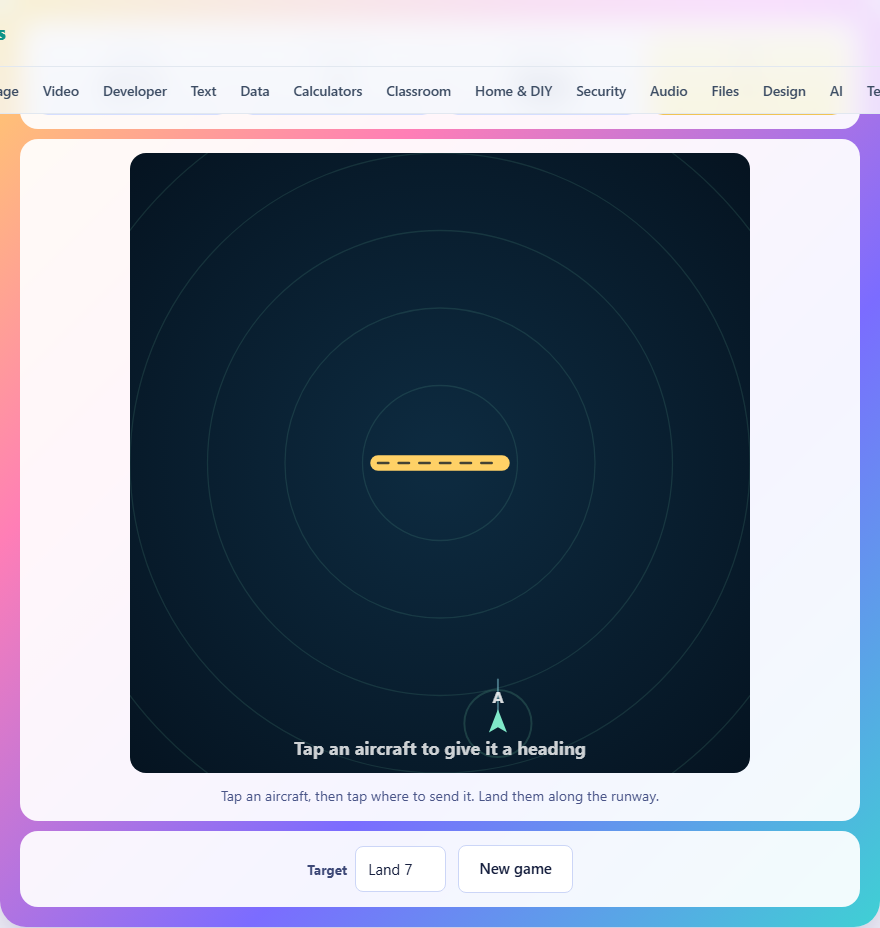
How the game works
Aircraft appear at the edges of a square radar screen and fly straight ahead at a fixed speed. They never change heading or speed on their own, so every aircraft will keep going in the same direction forever unless you step in. A yellow runway sits in the middle of the screen, running roughly east to west. To land a plane, you must bring it over the runway while it is flying along that line, not across it. A plane that crosses the runway sideways simply misses it.
Each aircraft has a separation circle drawn around it. If two of those circles overlap at any moment, the game ends at once. That is the only way to lose. A plane that wanders off the edge is announced as lost and removed, but the game carries on and a fresh arrival soon replaces it.
Controls and how to give orders
Tap or click an aircraft to select it. It turns yellow and its separation circle brightens. Every aircraft has one drawn around it the whole time, so you can read the spacing without selecting anything. Then tap anywhere else on the screen, and the selected aircraft begins turning onto a heading that points toward that spot. The turn is gradual, not instant. It takes a couple of seconds for the aircraft to roll onto its new course, which means you must give the order while there is still room.
On a phone, the same two taps work and the radar scales to fit the screen. The Target dropdown underneath lets you choose how many aircraft you need to land: five on easy, seven on normal, or nine on hard. A New game button restarts with a fresh set of arrivals.
How scoring and landing work
Your score is the number of aircraft you land successfully before the game ends. On normal difficulty, you need to land seven. New aircraft keep arriving while you work, so you are always handling several at once. The game tracks your best score in your browser, and that number never leaves your device.
An aircraft that flies off the edge is removed and you are told which flight it was. It never comes back, and it never counts as a landing, so every stray plane is time you have spent for nothing while the target stays where it was. To land successfully, the aircraft must be over the runway and heading along it. Flying roughly east or roughly west both count, but anything close to north or south will not register as a landing. Timing the approach matters too. If two aircraft reach the runway at the same moment from opposite ends, their separation circles may overlap right there on the landing strip, ending the game at the worst possible time.
Turn early and leave yourself room
The single most important habit is to give orders while aircraft are still far apart. A turn takes several seconds, and during that time the aircraft sweeps through a wide arc. If you wait until two separation circles are close to touching, there may not be enough room for the turn to complete before they overlap.
Think of it this way: deciding while two aircraft are far apart costs nothing. The same decision made three seconds later, with the circles nearly brushing, is a coin flip. Early decisions are free. Late ones are the ones that end your game.
Use the long way round
A tempting approach is to aim every aircraft straight at the runway as soon as it appears. That packs all of them into the same narrow strip of sky, right around the landing area, and separation becomes nearly impossible to maintain. The better move is to send an aircraft out wide first, then bring it back on a heading that runs along the runway from a comfortable distance.
Picture an aircraft arriving from the north. Instead of pointing it straight south toward the runway, send it east first. Let it clear the traffic in the center, then turn it south and finally west so it approaches the runway from one end, lined up and well away from everything else. The path is longer, but every step of it is under control. Two aircraft can share the runway approach if they are staggered, one further back than the other, but that takes planning.
Predicting where everything will be
Because aircraft fly in straight lines at a constant speed, you can work out exactly where each one will be in five or ten seconds. This is not a guess; it is arithmetic. A plane heading east at a fixed speed will be a known distance further east after any given time. Use that knowledge before every order you give.
Before you tap to redirect a plane, look at the whole screen and project forward. Ask where each aircraft will be by the time your selected one finishes its turn. If two paths are going to cross, deal with the problem now, not when the circles are already close. The more aircraft there are in the air, the more valuable this forward thinking becomes, and the less you can afford to react only to what is happening right now.
Do not let aircraft leave the screen
It may be tempting to park a difficult aircraft by pointing it at the edge and forgetting about it. That does not work. An aircraft that flies off the screen is counted as lost, and you are told about it. The boundary of the radar area is a hard wall for your purposes. Every aircraft must either land on the runway or stay inside the area until it does.
This means you cannot use the edges as a waiting room. If an aircraft is heading toward a border, you need to turn it back into the center before it reaches the edge, and that turn still takes the usual time. Plan for it the same way you plan for separation.
Common mistakes new players make
Several patterns trip people up in their first few games, and all of them have simple fixes once you see them.
- Waiting until two aircraft are close before acting. The turn time makes last-second corrections unreliable, and a near miss ends the game instantly.
- Crossing the runway sideways. The aircraft must be flying along the runway, roughly east or west, to land. A plane heading north that happens to pass over the runway does not count.
- Ignoring aircraft near the edges. A plane heading toward the border at full speed will leave the screen in seconds. Forgetting about it until it is almost gone leaves no time for a turn.
- Sending every new arrival straight at the runway. This creates a dense cluster in the center where separation is almost impossible to maintain. Spread them out first.
Difficulty levels and what changes
The three settings change the target and a good deal else with it. Easy asks for five landings, normal for seven, and hard for nine. Moving up also makes the aircraft fly faster, turn more slowly, arrive more often, and carry a wider separation circle. So hard is not simply a longer version of easy. The sky fills quicker, each plane needs more room around it, and the extra seconds a turn takes are exactly the seconds you no longer have.
Start on easy to learn the rhythm of selecting, turning, and landing. Once five landings feel routine, move to normal. The jump from seven to nine is the steepest, because with nine aircraft arriving over the course of a game, the sky is rarely quiet for more than a few seconds and every decision you make affects several others. On hard, you will often have four or five aircraft in the air at once, and keeping them all separated while feeding them onto the runway one at a time is where the real skill lies.
Everything stays on your device
The whole game runs inside your browser. Nothing is uploaded, there is no account, and once the page has loaded it works offline. Your best score is stored in this browser only, on this device. It is never sent to a server, and clearing your browser data is the only way to lose it.
That also means there is no limit on how many games you play, no waiting, and no registration step. The page is ready the moment it finishes loading.