
Finding the word when you only have part of it
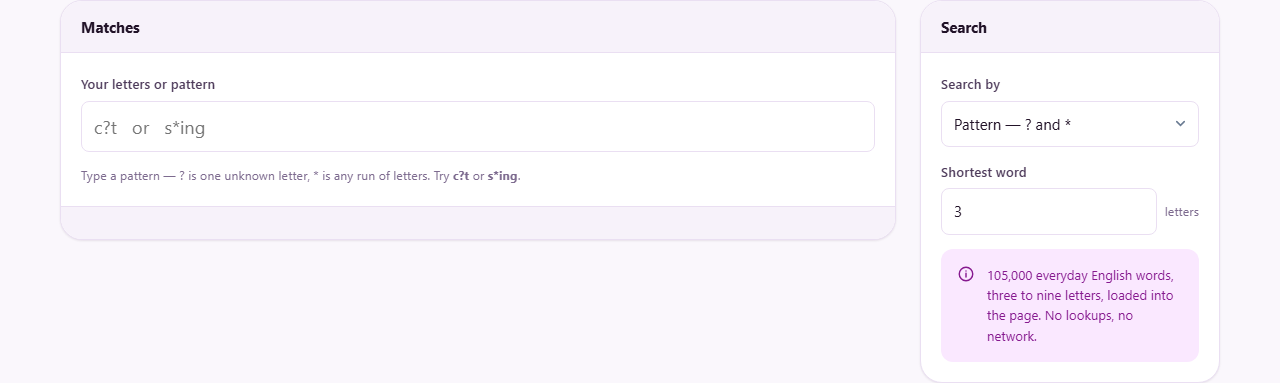
The panel above shows the two search modes. This guide goes deeper. It explains how the question mark and star behave, how a rack of letters becomes a list of playable words, how the scores and grouping are worked out, and where the built-in dictionary stops. Two searches are followed step by step so you can see the whole thing in motion.
Who searches a dictionary this way
Sometimes you know part of a word but not all of it. A crossword hands you three letters out of six. A tile game leaves you staring at seven letters with no idea what they spell. A quiz setter wants every word of a certain length that fits a shape.
This page answers all three from a single box. You type what you already know, and the words that fit appear straight away, with no button to press.
It is built for players and puzzle makers, not for looking up meanings. It confirms that a word exists and tells you what it would score. It does not tell you what the word means.
The two ways to search
Search by, in the panel on the right, sets the mode, and the two modes work quite differently. Picking the right one is half the job.
Pattern is for when you know positions. You lay the word out with gaps where the unknown letters go, and the tool fills them in with real words.
Letters I have is for when you are holding a jumble of tiles and want every word you could spell from them. Here the order does not matter at all; only which letters you have does.
The box at the top of the page takes your input in either mode. As you type, the results refresh under it. A short note keeps count of how many matched.
Pattern mode, symbol by symbol
A question mark stands for exactly one unknown letter. Three question marks in a row mean three letters, no more and no fewer.
A star stands for any run of letters, including none at all. So the pattern c star t catches cat, coat and current, while c question t catches only three-letter words like cat and cot.
Length is strict with question marks. If the answer is six letters long, your pattern must be six characters long. A pattern one mark too short will never find the word you want.
Anything that is not a letter, a question mark or a star is simply ignored. Stray spaces, dots or dashes in what you type do no harm, so you can paste a clue in roughly and let the tool clean it.
A pattern worked through
Suppose a crossword answer is six letters. You know it starts with g, has d as the fourth letter and n as the last. You type g, two question marks, d, a question mark, then n.
The results show garden and golden, along with anything else that fits the shape. Each word sits on a small button with a number beside it, and garden scores eight.
The clue is about flowers, so garden is your answer. You click the button and the word is copied, ready to write into the grid or paste wherever you need it. The score is ignored when you copy, so you get the clean word.
Had you left off the final n by mistake, the pattern would be only five characters and garden would never appear. When nothing shows up, a miscount of the length is the first thing to check.
Letters mode and blank tiles
In this mode you type the letters you are holding, up to fifteen of them. The tool then finds every word that can be built using each letter at most once.
A question mark works as a blank tile. It can stand in for any single letter, which opens up the results considerably, exactly as a blank does on a real board.
Type the letters t, a, b, l, e, s and the six-letter words come first: tables itself, worth eight. Below them sit the five-letter words such as table, worth seven, then the fours, then the threes.
Nothing longer than your rack can appear, because you do not hold enough tiles to build it. That is why the longest group is never longer than the letters you typed, plus any blanks.
A letters search worked through
Now a game example. You are holding the tiles r, a, i, s, e and one blank, and you want the longest word you can lay down.
You switch Search by to Letters I have, then type r, a, i, s, e and a question mark for the blank. The tool works down its list and keeps every word your tiles can build.
The six-letter group sits at the top, because the blank lets you reach one letter beyond your five real tiles. Words like raised and praise appear there, the blank quietly playing the missing letter. Below them come the five-letter words such as raise and arise, then the fours and threes.
Each word carries its score, and within a group the biggest scorer leads. You pick the highest word that also lands on a good square in your own game, click it to copy, and play it. The blank you actually hold decides which letter it becomes on the board.
Reading the results
Matches are grouped by length, with the longest group placed at the top. Inside each group, the highest-scoring words come first, so the most valuable plays are the easiest to spot.
The small number on each word is its base tile score, using the standard English letter values. Rare letters like q and z are worth ten each, while common ones like e and a are worth one.
That score is before any board bonus. A double-word square or a triple-letter square depends on where you actually place the word, so those extras cannot be counted here.
The tool shows up to 800 matches at once. A very loose pattern, with lots of stars and few fixed letters, can reach that ceiling, and the note tells you when it has. Tighten the pattern to bring the list back to something useful.
Shortest word sets the smallest length you care about, from 2 up to 9. Raise it to hide the little words and leave only the ones worth playing or writing in.
The dictionary behind it
The search runs over a list of roughly 105,000 everyday English words, each between three and nine letters long. It is the same word list that the puzzle games on this site draw on.
Because the list stops at nine letters, a longer valid word will not turn up, however real it is. And because it is a general list rather than an official competition dictionary, a handful of very obscure words are missing from it.
For crosswords and ordinary tile games at home, that coverage is more than enough. For ranked tournament play, always check a doubtful word against whatever dictionary that particular competition names as its own.
Common slip-ups
- No results in pattern mode: the pattern is almost always the wrong length. Count the squares again and match the number of characters to them exactly.
- Waiting for a ten-letter word: the list ends at nine letters, so it is simply not in there. That is a limit of the list, not a fault in the search.
- Mixing up the symbols: the question mark is one letter and the star is many. Swap them and a tight search becomes a flood, or a flood collapses to nothing.
- Nothing spells from your letters: with only common low-value tiles and no blank, a few short words may be all there is. Add a question mark if you genuinely hold a blank tile.
- Typing whole clue text: only letters and the two symbols are read, so a full sentence of clue words will confuse the shape. Enter just the letters and gaps.
When to reach for something else
If you want a word's meaning rather than its existence, this is not the tool. It verifies a word and scores it and stops there. A dictionary is what does the defining.
If you are shortening a piece of writing or checking how long it is, the writing tools on this site are the right aisle. This page is aimed squarely at puzzles and games.
And if you need words longer than nine letters, or a specific tournament word list checked to the letter, you have outgrown this page. A dedicated competition solver is the better fit for that.
Searched on your own device
The whole word list is loaded into the page the moment it opens. Every search after that runs on your machine, with no request sent to any server and no connection needed once the page has arrived.
So nothing you type is logged anywhere. That is not because the words are secret; it is simply how the tool is built. Your searches leave no trail on the way to an answer.
It has a pleasant side effect too. Because the dictionary already lives in the page, the tool keeps working on a train or a plane with the signal long gone, which is often exactly when a crossword comes out.