
Fixing the case without retyping a word
Text arrives in the wrong case all the time. A heading typed in a hurry, a list that came out in capitals, a variable name that needs to become a file name. Retyping it by hand is slow and you will miss one. This page has fourteen ways to reset the case, grouped by the kind of job. This guide walks through each group, shows the one setting that really matters, and points out the names no rule can get right.
One menu, three families
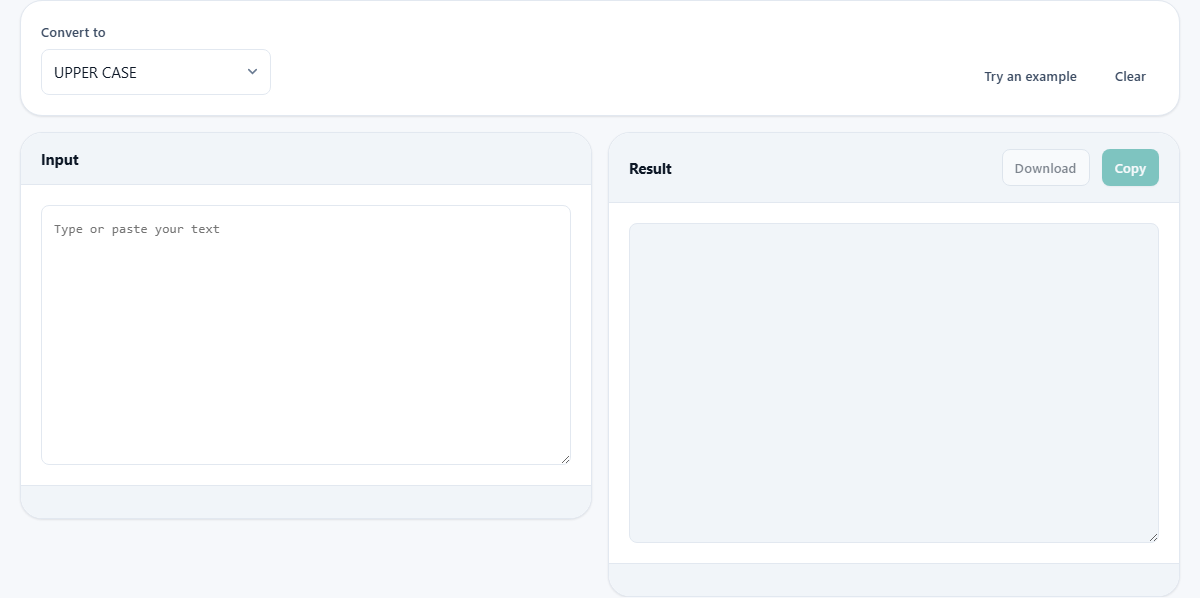
The only control you must touch is the Convert to menu near the top. Everything else follows from your choice there. The menu is split into three groups so you are not hunting through a flat list.
The first group, Everyday, holds the styles for normal writing: headings, sentences and lists. The second, Programming, holds the naming styles that code uses, the ones with underscores, dashes and joined-up words. The third, Fun, holds three playful styles you will reach for far less often. Pick a style and your text changes at once in the box on the right.
The everyday styles
UPPER CASE turns every letter into a capital. lower case does the reverse. Sentence case is the gentle one: it drops everything to small letters, then puts a capital at the start of each sentence, so a paragraph that arrived shouting comes back calm.
Then there are the two that look alike but are not. Capitalise Every Word puts a capital on the front of every single word, no exceptions. Title Case is the clever one. It follows the rule real titles use, and it is worth its own section below. If you are ever unsure which of the two you want, that section explains the difference.
What real Title Case protects
Plenty of tools claim to do title case and simply capitalise every word. That gives you a heading where small joining words are wrongly raised. Proper style keeps short words like of, and, the, to and in lower, unless one of them is the first or last word of the title. This page follows that rule.
It guards one more thing. Any word that already has a capital inside it is left exactly as you typed it. So a product written as iPhone stays iPhone, and a name like McDonald keeps its middle capital, instead of being flattened. That small habit is what separates a real title-case tool from a blunt one, and it is why the result is usually ready to use as it stands.
The programming styles
Code has its own naming habits, and the second group covers the common ones. camelCase joins the words and starts small, giving you something like myFirstName. PascalCase does the same but starts with a capital, giving MyFirstName. snake_case joins them with underscores and stays lower. kebab-case uses dashes instead. CONSTANT_CASE is snake_case shouted in capitals. dot.case joins with full stops.
The useful trick here is that these styles understand a name you already have. Feed in a camelCase word and ask for snake_case, and it finds the joins between the words and splits them properly, rather than treating the whole thing as one lump. So converting between naming styles is a single step, not a rebuild.
Each style has its natural home. CONSTANT_CASE is where fixed settings live in most languages. dot.case turns up in config keys and some file names. kebab-case is the friendly one for the web. You do not need to memorise any of that to use the page. You only need to know which shape the place you are pasting into expects, then pick it from the menu and let the tool match it.
The playful three
The last group is for effect rather than work. tOGGLE cASE swaps the case of every letter, so whatever was capital becomes small and the other way round. AlTeRnAtInG ignores what you typed and lays down a fixed up-down-up rhythm starting with a capital. aLtErNaTiNg does the same rhythm but starts small.
People use these to make text look odd on purpose, most often for a joke or a meme. They are genuinely reversible only in the case of toggle, where running it twice brings the original back. The alternating pair overwrite your original casing, so keep a copy if you might want it later.
A run through, step by step
Start by pressing Try an example. It drops in the line the lord of the rings and the return of the king. Now choose Title Case from the Everyday group. The result reads The Lord of the Rings and the Return of the King. Notice that of, and and the stayed small in the middle, while the first and last words were raised. That is the rule doing its job.
Now do a programming one. Clear the box, type userProfileImage, and choose snake_case. Out comes user_profile_image. Switch the menu to kebab-case and it becomes user-profile-image. Switch to CONSTANT_CASE and it becomes USER_PROFILE_IMAGE. The same three words, dressed for three different places, and you never touched the letters yourself.
Rescuing a paragraph in capitals
Here is a second, everyday job. Someone sends you a note with the caps-lock stuck on: WE SHIP EVERY ORDER ON FRIDAY. PLEASE REPLY IF THE DATE DOES NOT SUIT YOU. It reads like a shout, and you want it calm before you forward it.
Paste it in and choose Sentence case. Back comes: We ship every order on friday. Please reply if the date does not suit you. Each sentence now starts with a capital and the rest sits in small letters. One word needs your eye, though. Friday came back small, because the tool cannot tell a weekday from any other word once the whole line has been lowered. You raise that single F by hand, and the note is done. That is the shape of most real jobs here: the tool fixes the ninety-nine, and you fix the one it could not know about.
The two boxes and the buttons
The left box, Input, is where you type or paste. The right box, Result, holds the answer and cannot be edited, so you never change it by accident. It works line by line, so you can paste a whole list and every line is converted together.
Above the result are two buttons that stay greyed until there is something to hand over. Copy puts the result on your clipboard. Download saves it as a plain text file named converted.txt. Up by the menu sit Try an example, which loads the sample, and Clear, which empties the input for a fresh start. A small pair of counts under the result show the number of characters and the number of words, handy when a field has a length limit.
The mistakes to watch for
No case rule knows the world. Sentence case will lower a weekday or a person's name that sits mid-sentence, because it cannot tell a proper noun from an ordinary word. Convert a shouted paragraph and you may need to re-raise a Monday or a Sarah by hand afterwards.
Title Case has its own blind spots. It cannot know that a surname like van Gogh keeps a small van, or that PhD is not a normal word. And remember the internal-capital rule cuts both ways: if you genuinely want a word with a middle capital flattened, this tool will refuse, because it assumes you meant it. The habit that saves you is simple. Read the result before you publish it. The tool does the heavy lifting; your eye does the last mile.
When another tool suits better
This page changes case and nothing else. If what you actually need is a clean web address, kebab-case gets you close, but a dedicated slug tool also strips accents and odd marks, which case conversion leaves in place. Reach for that when the output is going into a link.
If you need to fix spelling, trim spaces, or swap one word for another, that is a job for a find and replace tool, not this one. And if you want to count words or characters as an end in itself rather than as a side note, a counter gives you far more detail. Use this page when the letters are right and only their case is wrong. That narrow focus is a strength. There is one menu, no set-up, and the answer appears the instant you paste.
Nothing leaves the page
All of this happens inside the tab you are looking at. The conversion is done by your own browser, so the text you paste is never sent anywhere and never stored on a server. That holds true whether you are tidying a shopping list or reshaping a column of customer names.
Your choice of style and your last input are remembered on this device, so the page opens the way you left it. That memory is local to this browser alone. There is no account and nothing to sign into, and the moment you clear the box the text is gone.