
Reading every number a block of text can give you
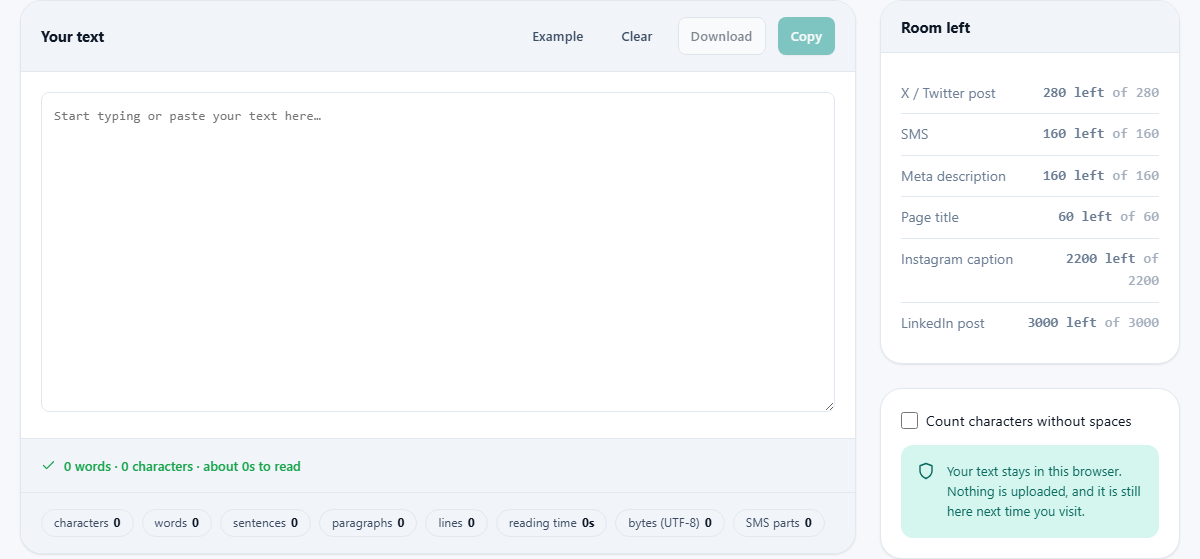
The help block covers the basics of typing and reading a count. This article walks through each of the eight figures under the box, every entry in the room-left panel, the one switch on the right, and a full example you can check by hand. It also explains, in plain terms, why the character number here can differ from the one another tool shows.
The jobs this tool is really for
Writing is often judged by length. An essay has a word target. A post on X is capped by characters. A text message quietly splits into parts once it runs long. A search-result summary gets chopped off if it overruns. None of these are about the quality of the words, but all of them can trip you up.
So the counter does two things at once. It tallies the plain totals as you type, and it counts down against the limits people actually bump into. You paste a draft, glance at the panel, and know straight away whether it fits where it is going.
Type, and everything moves
The large box is the whole input. Type into it or paste from somewhere else, and every figure updates on the same keystroke. There is no button to press to make it count.
Four small buttons sit above the box. Example drops in a sample sentence so you can see the tool working. Clear empties the box. Download saves whatever you have typed as a plain text file named text.txt. Copy puts the text on your clipboard. The buttons act on the text itself, not on the counts.
Just under the box, a single status line sums the text up in one sentence: the word count, the character count and the rough reading time together. It is the headline figure, there for a glance when you do not need the full spread of tiles.
The eight figures under the box
Below the box is a row of small tiles, each a different measure of the same text:
- characters: everything you can see, spaces included.
- words: runs of non-space split apart, the essay measure.
- sentences: worked out from full stops, question marks and the like.
- paragraphs: blocks separated by a blank line.
- lines: every line break counts, even without a blank line between.
- reading time: based on 238 words a minute, shown in seconds for short text and minutes for long.
- bytes (UTF-8): the size the text takes as stored data.
- SMS parts: how many message segments the text would need.
The room-left panel
On the right, under the heading Room left, is a list of well-known limits with a live countdown against each. It reads how many characters you have to spare, and how many the place allows in total.
Six limits are tracked: an X or Twitter post at 280, an SMS, a meta description at 160, a page title at 60, an Instagram caption at 2,200, and a LinkedIn post at 3,000. The number turns a warning colour as you close in, and flips to how far over you are once you pass the cap. It is a quick way to trim a title or a summary to fit without guessing.
Counting characters without spaces
One switch sits in the panel on the right: Count characters without spaces. Off, the character tile counts spaces along with the letters. On, it drops every space, tab and line break and counts only the visible marks.
Both figures have their uses. Forms and databases usually count spaces, since a space is a real character you have typed. Some style rules and old-fashioned character quotas count only the printing marks. Flick the switch to get whichever number the rule in front of you is asking for.
A worked example you can check
Press Example and the box fills with a classic test sentence: The quick brown fox jumps over the lazy dog. Pack my box with five dozen liquor jugs.
The tiles then read: 17 words, 85 characters with spaces, and 69 with the switch turned on. Two sentences, one paragraph, one line. Because this is plain English with no odd symbols, the byte figure is also 85, the same as the character count. Reading time shows as roughly four seconds, and SMS parts shows one.
Now look at the room-left panel for those 85 characters. The X or Twitter line reads 195 left of 280. The meta-description line reads 75 left of 160. The page-title line, capped at 60, reads 25 over, in the warning colour, because the sentence is longer than a title should be. That single glance tells you the text is fine for a tweet, fine for a summary, and too long for a title.
Sentences and paragraphs are best guesses
The word and character tiles are exact. The sentence and paragraph tiles are clever guesses, and it helps to know how they are made so you trust them the right amount.
A sentence is counted wherever the tool finds a full stop, a question mark or an exclamation mark. That works for most prose, but it can be fooled. An abbreviation such as Dr. or e.g. carries a full stop that ends no sentence, so a paragraph full of them may report one or two sentences too many. No simple counter can tell the two apart, and this one does not pretend to.
Paragraphs are counted by blank lines: leave an empty line between two blocks and they count as two paragraphs. Lines are counted by every line break instead, so text that wraps by itself in the box is still one line until you press Enter. If a paragraph count looks wrong, check whether your blank lines are really empty or just look empty.
Making the reading-time figure useful
The reading-time tile assumes 238 words a minute, which is the average speed for an adult reading plain English, drawn from a large review of the research. For a short note it counts up in seconds, and for anything longer it rounds to whole minutes.
Treat it as a guide, not a stopwatch. Light, familiar writing is read faster than that average, and dense or technical material is read a good deal slower, because the reader stops to think. If you are timing a speech or a video script, read a paragraph aloud against the estimate once and you will quickly learn how your own pace compares.
Why the character number can disagree
You may paste the same text into another tool and see a different character count. That is not a mistake in either one. It comes down to what you decide to call a character.
This tool counts what a person sees. A single emoji counts as one, even when the computer stores it as several numbers joined together. A letter with an accent counts as one, whether it was typed in one press or as a plain letter with an accent added on top. Some tools count those hidden pieces instead and report a larger figure.
This is why the byte total is shown on its own. Bytes are what a storage field or a message system truly measures. For plain English the byte count matches the character count almost exactly. Add an accent, a curly quote or an emoji and the bytes climb, because those take more room to store than a plain letter does.
SMS is the awkward one
The SMS figures deserve a note, because a text message is stranger than it looks. A message written with ordinary letters fits 160 characters in a single part. Go over that and it splits into more parts, each a little shorter.
The moment you add one emoji, or an unusual symbol, the whole message switches to a wider way of storing characters, and the limit per part drops from 160 to 70. So a short message can suddenly need more parts than you expected, all because of a single smiley. The SMS parts tile shows the effect straight away, which is useful if you are billed per part or writing for a system that is.
The numbers make it clear. A plain message of 200 characters needs two parts. Drop one emoji into that same message and it needs three, because every part is now capped at 70 rather than 160. Nothing about the wording changed; the storage did.
When to reach for a different tool
This counter measures one block of text. If your real question is what changed between two versions of a paragraph, a compare tool will serve you far better than watching two counts. If you want to reshape the words themselves, a case or formatting tool is the place for that.
The counter is at its best while you are drafting to a limit, or checking that a finished piece lands inside one. For that job it is quicker than any manual tally, and it never makes you press a button to see the answer.
The draft never leaves your device
Every count is worked out by code running in the page you have open. The text you type is not sent anywhere, and there is no server doing the sums. That holds whether you type a line or paste a whole chapter.
Your draft is also kept in this browser between visits, so a piece you were part way through is still in the box next time. It stays on your machine only. Press Clear, or clear your browser data, and it is gone.