
Converting writing between British and American English
British and American English part ways in more places than most people keep track of: a scattering of spellings, a few doubled letters, and a long list of everyday words. This page rewrites a passage from one into the other, in either direction, and lays out every change so you can wave through the safe ones and rule on the handful that turn on your meaning. This guide is about driving that review, not relisting the spelling rules the help above already sets out.
The two directions, and who needs them
The tool runs both ways, and each way has its regulars. A British writer preparing a piece for an American outlet wants the u gone from colour and the ending flipped in centre. An American student submitting to a British journal needs the mirror image. A subtitle editor matching the dialect of a show, a company pulling its documents into one house style, a novelist holding a character's voice steady: all of them come through here.
Because the same page works in either direction, you can also mark your own homework. Convert a paragraph the opposite way and the list of changes points out every spot where your draft was already leaning the wrong way without your noticing.
The kinds of change it knows
The differences it handles fall into a few families, and the Why column labels each one so you can see at a glance which is which.
- The dropped or kept u, as in favour against favor and honour against honor.
- Endings that turn around, like theatre against theater and metre against meter.
- A letter that doubles on one side, as in labelled against labeled.
- Older vowel pairs from Latin and Greek, such as the oe in manoeuvre.
- Entirely different words, like boot against trunk or holiday against vacation.
The panes and the flow
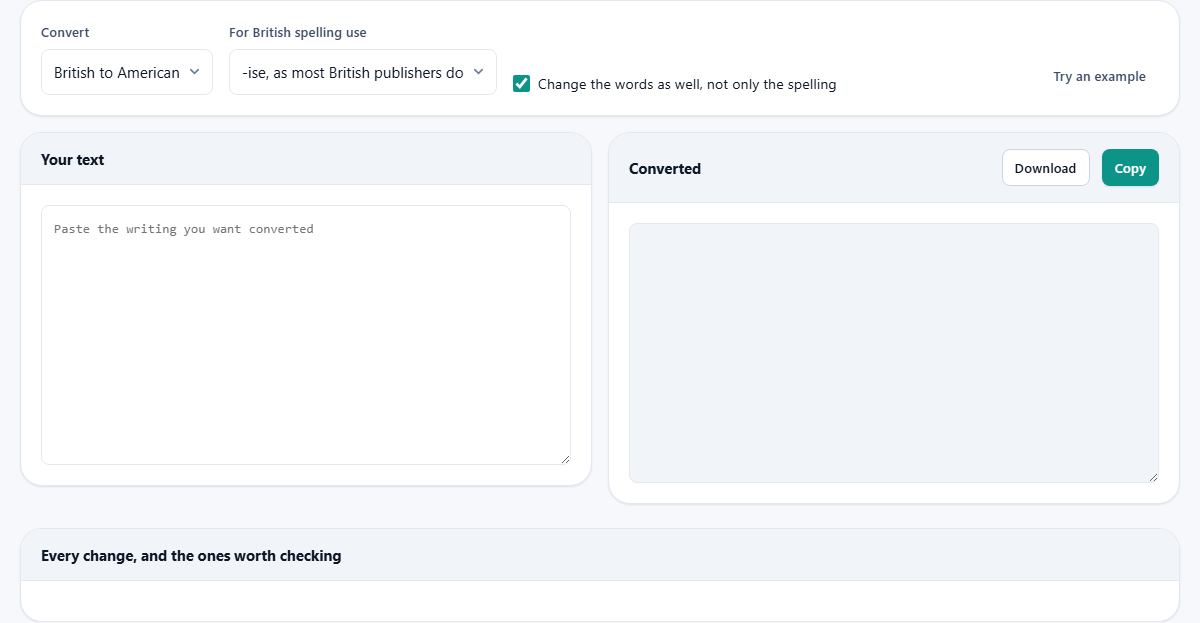
The layout is two boxes side by side. Your text on the left takes whatever you paste, and Converted on the right fills in as you type, with no button to press. Beneath them sits the part that lifts this above a plain find-and-replace: a table headed with every change, and the ones worth checking.
So the rhythm is simple. Paste, glance at the converted text to see the shape of it, then drop to the table to read exactly what moved and to overrule anything you disagree with.
Choosing the direction
The first menu, Convert, sets which way the rewrite runs: British to American, or American to British. It is the control you touch most, and everything else keys off it. Switching it rebuilds both the converted text and the change table from scratch, so any decisions you had made about single words begin again.
If you are ever unsure which way you need, glance at the first row of the table. A wrong direction gives itself away at once, showing color turning into colour when you meant to head the other way.
Which British spelling to use
The second menu, For British spelling use, only comes into play when British is one end of the trip. It offers two answers that are both correct. One follows the -ise ending that most British newspapers and publishers print. The other follows the -ize ending that Oxford and several journals prefer. Neither is a mistake; the choice is a matter of house style, so set it to match the guide you are writing under and hold it steady.
Whichever you land on, a small group of words that merely look as though they carry that ending are passed over, since altering them would introduce an error rather than mend one.
Change the words as well
The tick box Change the words as well, not only the spelling decides how far the rewrite reaches. Left on, it moves past letters into vocabulary, so a lift can turn into an elevator, autumn into fall, a pavement into a sidewalk. Turned off, it keeps to spelling and leaves the word choices untouched.
Switch it off when you are only smoothing spelling for consistency and do not want the flavour of the text rewritten. Leave it on when you truly want the passage to read as though it were written on the other side of the ocean.
The change table
The table below the boxes is where the real work shows. Each row is one word it changed, or offered to change. A column marked Use it carries a tick you can clear; From shows the original, To shows the replacement, Times counts how often the word appears, and Why says in a word or two whether it is a spelling swap, a different word, or a case that hangs on meaning.
Most rows come ticked and already applied. The ones that turn on meaning are highlighted and left unticked on purpose, because the letters alone cannot tell the tool which sense you intended. Read those rows, and tick the ones that fit your sentence. Every tick and untick reshapes the converted text the instant you make it.
The count and the warning
A short line beside the table adds it up: how many words were changed, and how many were set aside for you to decide. Whenever some of those undecided cases exist, a notice above the table says so and steers you toward the highlighted rows, so a meaning-dependent change is never slipped in behind your back.
If there was nothing to alter, the table says that plainly, either because the text already uses the spelling you asked for or because it holds none of the words that differ between the two.
A worked example
Press Try an example with the direction on British to American. In goes a paragraph about a centre running a programme of colour workshops, a neighbour, some travellers, a car park a few metres from the theatre, a grey kerb, an aluminium railing and a refund after the first instalment.
The converted pane returns center, color, neighbor, travelers, meters, theater, gray, curb, aluminum and installment, and with vocabulary switched on the car park becomes a parking lot. The count reports how many words moved. Two rows sit highlighted and unticked: programme could become program, and autumn could become fall, but each turns on a choice you might not want, so they wait for your tick. Look too at what stayed put. The word humorous keeps its spelling because it never had a u to lose, and exercise is left exactly as written, since its ending only resembles the one that swaps.
Taking the converted text
Once the converted pane reads the way you want, two buttons above it close the job out. Copy places the whole result on your clipboard. Download saves it as a file named converted.txt. Both take the text as it stands after your ticks rather than before, so what you carry away is the version you actually signed off.
Convert in pieces when the table grows
There is no length limit, so a whole document can go in at once, but a long passage produces a long table. When a piece carries many meaning-dependent words, it is often calmer to convert it a section at a time, settle the highlighted rows for that stretch, copy it out, and move on to the next. The finished text comes out identical either way; splitting it just keeps the review small enough to hold in your head.
Common mistakes to avoid
A few habits cause needless trouble. The first is copying the result without ever reading the highlighted rows. Those are exactly the words the tool was unsure about, so skipping them is how an ambiguous word slips through in the sense you did not intend.
The second is changing the direction after you have carefully ticked and unticked rows, then being caught out that the decisions are gone. Switching direction starts the review fresh on purpose, since choices rarely carry any meaning across a reversal.
The third is expecting it to mend grammar or phrasing. It changes spellings and swaps a fixed set of words; it does not rework a sentence. Keep that job for a proper editor or a writing aid.
When another tool fits better
This shifts writing between two settled dialects of one language. It is not a grammar checker and not a translator across languages. If your sentences are clumsy rather than wrongly spelled, a writing aid is the better port of call. If your text is French or Spanish, this has nothing to offer it.
It also works one word at a time, so it will not rewrite an idiom or smooth a turn of phrase that is merely more common on one shore than the other. Treat it as a careful speller and a vocabulary swapper, and trust your own ear for everything past that.
Where it runs
All of the matching and rewriting happens inside your browser. The passage you paste is not uploaded, and the long word lists the tool leans on are built into the page itself, so nothing is fetched across the network while you work.
That keeps a draft private the whole time you are converting it. Whether it is a work report, a school essay or a book chapter, the text stays on your machine from the moment you paste it to the moment the tab closes.