
Turning accented and non-Latin text into plain ASCII
This page rewrites text so that every letter is a plain, unaccented Roman one. An accented e turns into a bare e, a word written in Cyrillic is spelled out in Latin letters, and so is a word written in Greek. Below the short help box you will find what each checkbox really does, how to read the two counters, a full run through the built-in sample, and the cases where a different tool is the right call.
The boring problem it solves
Most people land here with a small, practical headache. A web address, a file name or a database key has to be plain ASCII, and the title it is built from is stuffed with accents. Leave them in and you get broken links, files that refuse to sync between machines, and keys that quietly fail to line up.
So you paste the fancy version and carry away a clean one. A dessert named creme brulee becomes a slug that will not trip anything up. A photo folder named after a cafe in a Swiss city loses its umlaut. A column of Russian or Greek place names is spelled out in letters an English reader can actually sound out. The aim is never to translate what the words mean, only to swap the shapes of the letters.
Where a strip earns its keep
A handful of jobs bring people back to this page over and over. They are rarely glamorous, but each one falls apart the moment a stray accent sneaks through.
- Building URL slugs from headlines that carry accents or non-Latin names.
- Making file names that copy cleanly between Windows, macOS and Linux.
- Generating database keys or short codes that have to be matched exactly.
- Tidying a mailing list so an accented name does not choke an older system.
- Writing a foreign place name in a form an English reader can pronounce.
Putting your text in
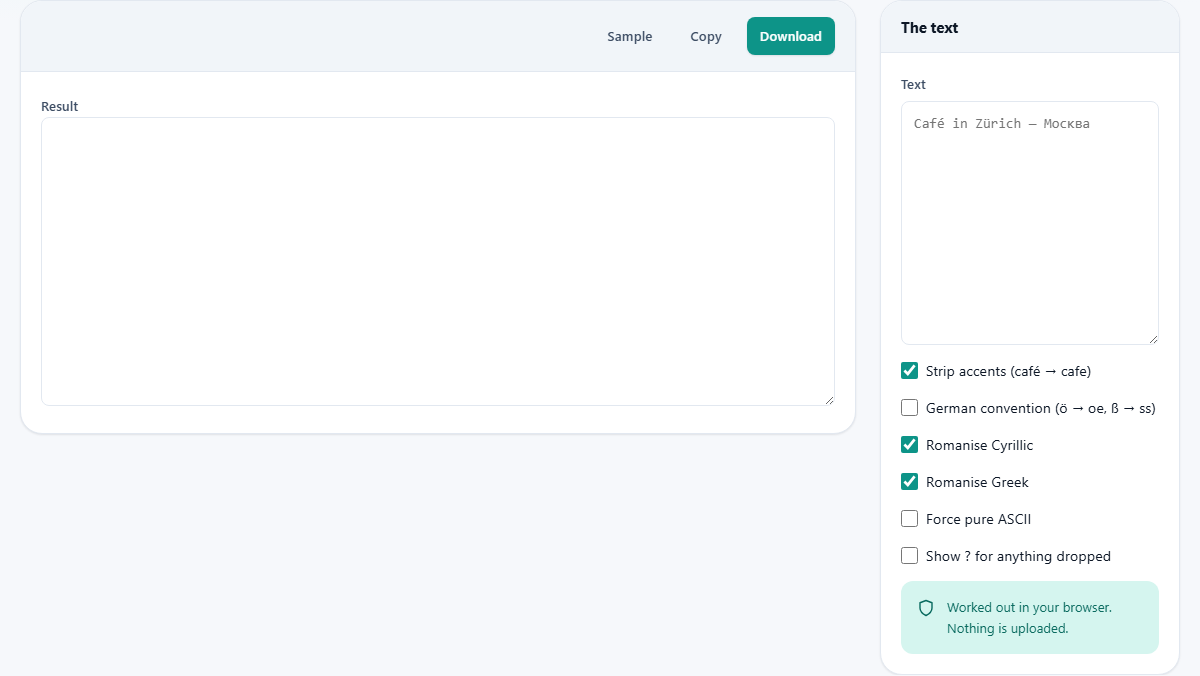
The box on the right, labelled Text, is where your writing goes. Type or paste into it and the tidied version shows up on the left after a brief pause. There is no convert button to go looking for; the result keeps pace with whatever you change.
If you would rather watch it work before trusting it, press Sample. That drops in a deliberately messy line mixing French, German, Russian, Greek, Polish and Turkish, so every rule has something to bite on.
Strip accents
This box is the core of the tool and is ticked from the start. It pulls each accented letter into two pieces, the base letter and the mark riding on top of it, and then throws every mark away in one sweep. An e with an acute, a c with a cedilla, an n with a tilde: each of them comes back as the plain letter underneath.
The neat part is that it needs no list of languages. Because it removes the marks as a whole class rather than one by one, it copes with an accent it was never taught about just as well as a common one. Vietnamese, with its stacked tone marks, comes out as readable Latin letters in the same pass that handles a French acute.
The German convention
German has an agreed way to write its dotted vowels when the dots are not on hand: an o with an umlaut is written oe, an a becomes ae, a u becomes ue. Plain accent stripping would instead hand back a bare o, a and u, which reads as wrong to a German eye. Tick German convention to get those spelled-out pairs. Under the same convention the sharp s, the letter called eszett, is written as the two letters s and s.
Leave it switched off for anything that is not German, since turning a French or Dutch o into oe would introduce a mistake of its own. It is a pointed, one-language choice, which is exactly why it is not on by default.
Romanising Cyrillic and Greek
Two more boxes, both on to begin with, turn whole alphabets into Latin. Romanise Cyrillic spells out Russian and its relatives, so the Russian name for Moscow arrives as Moskva. Romanise Greek does the equivalent for Greek, so the Greek name for Greece reads as Ellada.
Each of these follows one widely used romanisation scheme. Rival schemes exist and disagree on a handful of sounds, so treat what comes out as one accepted spelling and not the single true answer. If a piece of text holds no Cyrillic or Greek at all, the boxes simply sit there doing nothing.
Force pure ASCII, and the question mark
The rules above cover a great deal, but not every writing system on the planet. Force pure ASCII is the blunt tool for whatever survives them. With it on, anything that is still not a plain ASCII character after the earlier passes is removed outright, so the output is safe even for the fussiest old system.
Show ? for anything dropped works hand in hand with that switch. Rather than silently deleting a character it cannot map, the tool leaves a question mark standing in its place, so you can see at a glance where something went missing. On its own, with Force pure ASCII left off, this box has nothing to act on.
The two counters and the yellow notice
Above the result runs a short line of figures: how many non-ASCII characters went in, and how many remain in the output. Watching that second number drop to zero is the fastest way to know the strip is complete.
When a character cannot be reduced to Latin and you have not forced ASCII, a yellow notice lists it. Each leftover is shown with its Unicode code number, something like U+4E2D. Chinese, Japanese, Arabic and Hebrew all end up here, because turning any of them into Roman letters needs genuine translation rules, not a letter swap. Nothing is invented to fill the gap, which is precisely why those are reported to you instead of hidden.
A worked example
Press Sample to load the mixed line. It carries a French cafe, the name of a Swiss city with an umlaut, the Russian name for Moscow, the Greek name for Greece, a German word for street, a Polish city with a crossed l, and a Turkish city that opens with a dotted capital.
With the default boxes, the accents fall away, the Cyrillic and Greek are spelled out, and awkward letters such as the crossed l and the sharp s are traded for plain ones. The counter might read roughly twenty non-ASCII characters in and zero out. Now tick German convention: the umlaut in that Swiss city name becomes ue rather than a plain u. That one flip shows the gap between a general strip and a German-aware one.
Taking the result away
Three buttons sit above the output. Copy places the clean text on your clipboard. Download saves it as a file named transliterated.txt. Sample you have already met.
From there the plain text slots straight into a slug, a file name, a form field or a spreadsheet cell, with no hidden accent tagging along to cause trouble later.
Common mistakes to sidestep
The most frequent slip is to build a slug first and strip accents afterwards. Done in that order, the slug step tends to drop the accented letters wholesale, leaving holes in the middle of the word. Strip here first, then feed the plain result to the slug maker.
Another is expecting the accented and unaccented forms to still be told apart down the line. They cannot be. The word for a coffee shop, accent and all, flattens to the same plain letters as its bare spelling, and after that no later step can pull the two back apart. Strip only when you genuinely want that difference gone for good.
A third is handing it a script it does not romanise and then wondering why the letters are still there. Chinese and Arabic will sit in the output untouched, exactly as warned. That is the tool being honest: it would sooner leave them and flag them than fake a spelling nobody agrees on.
When another tool suits better
This is a tool about the shapes of letters, not their meaning. It will never tell you what a Russian sentence says; it only rewrites the characters. For meaning you want a translator instead.
It is also not a repair kit. If your text is already broken, with odd paired symbols standing where accented letters should be, the real fault is a mangled encoding, and a tool built for that undoes it cleanly. Pushing the wreck through here would only shave the wreckage down into smaller wreckage.
Where the work happens
Every step runs inside your browser, on the machine in front of you. The text you paste stays within the page. It is not transmitted to any server, not written to a log, and nothing of it survives once you leave.
That is worth knowing when the thing you are cleaning is a list of real customer names or a private set of folder paths. You can normalise any of it on this page without one character travelling off your device.