
Scoring how alike two pieces of text really are
This guide goes past the basics of the Text Similarity tool. You will learn what the three clean up options do, what each of the five scores measures, which one to trust for your question, and how to read a real result. A worked example with exact numbers shows why the five can disagree, and why that gap is the useful part.
What it is good for
The word similar hides a lot. Two texts can share every word in a new order, or say the same thing in fresh words, or differ by a single typo. Each of those is a different kind of alike, and one number cannot tell them apart.
So this tool gives you five scores at once. That helps in real jobs: spotting two records that are almost the same, checking whether a paragraph was reworded or just moved, matching a name against a list, or comparing two drafts to see how far they drifted.
The three clean up options
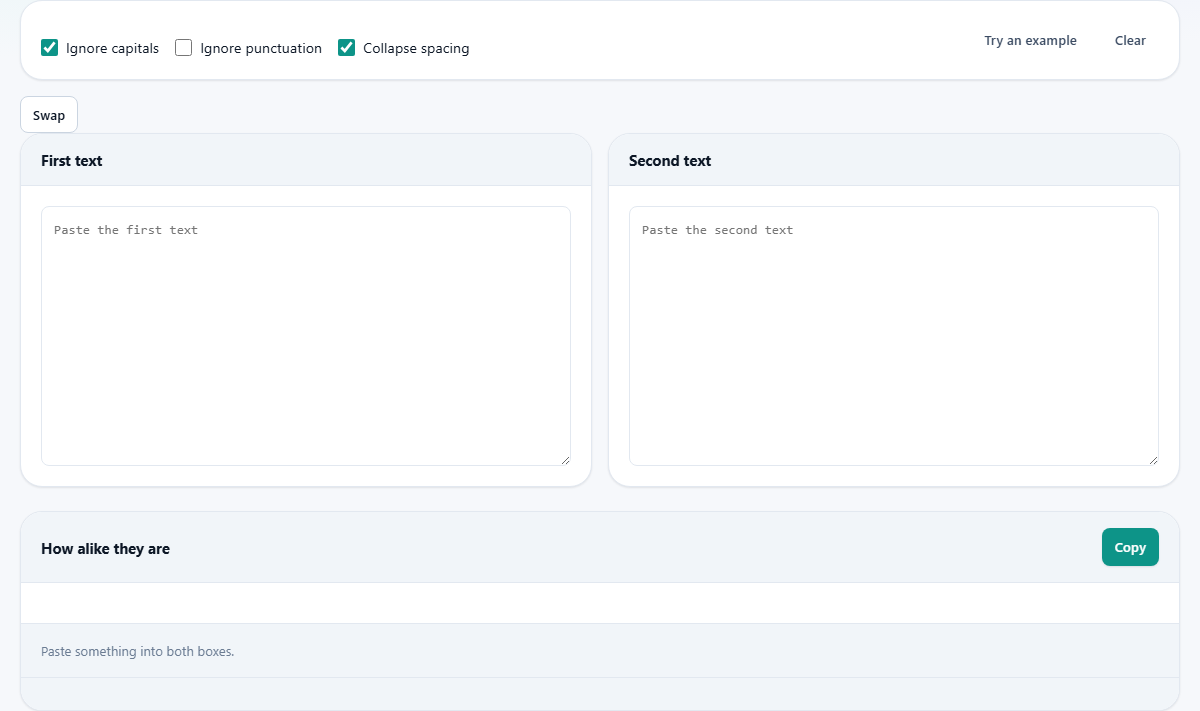
Before it scores, the tool can tidy both texts so small differences do not swamp the real ones. Three tick boxes control that.
- Ignore capitals is on by default. It treats an upper case letter the same as a lower case one, so a capital at the start of a line does not count as a difference.
- Ignore punctuation is off by default. Turn it on to drop commas, full stops, and the like, which is wise when the two texts came from different sources with different house styles.
- Collapse spacing is on by default. It squeezes runs of spaces, tabs, and line breaks down to single spaces, so layout does not sway the score.
The two boxes and the buttons
Paste one text into First text and the other into Second text. The scores appear below and refresh as you type. There is no run button to press.
Three buttons sit above the boxes. Try an example loads a matched pair so you can see the scores move. Clear empties both boxes. Swap flips the two texts, which is handy when you realise you pasted them the wrong way round, though most of the scores read the same in either order.
The five measures, in plain words
Each score is shown as a bar and a percent, where a hundred means identical under that one measure. Here is what each looks at.
- Character edits counts how many single letter changes turn one text into the other. It is strict, and it is the one for typos and other short, small differences. It is skipped when either text runs past about twelve thousand characters, because the work would lock the page up.
- Jaro-Winkler is built for short strings and names. It rewards a matching start, since that is where most spellings of a name agree.
- Letter pairs looks at the two letter chunks the texts share. It cares which letters are present, and barely at all about their order.
- Shared words is the share of distinct words the two have in common. Order and repeats are ignored.
- Word frequency is like Shared words, but it also counts how often each word shows up, so heavy repetition of a word tells.
Choosing the right measure
The scores are not meant to agree, so you pick the one that fits your question. For a misspelled name or a near miss between two short codes, read Character edits and Jaro-Winkler. For two write ups of the same topic, read Shared words and Word frequency, since meaning lives in the words, not the exact letters.
Letter pairs sits in the middle and is a fair all round choice for medium strings. The one trap is using Jaro-Winkler on long paragraphs. Its reward for a matching start means little there, and it can report a high score for two texts that merely open the same way.
The extras below the scores
Under the bars are a few small chips. They show the character count of each text, the word count of each, how many distinct words they share, and the length of the longest run of text they both contain. When that shared run is more than a few characters, it is also printed out in full, since a copied passage is what people point at first.
The Copy button puts the scores and chips on your clipboard. There is also a small Save this comparison bar. It can download the whole result as a plain text file, save it as an image, or copy it. The saved report leads with an average of the measures, then lists every score, a note on what each one means, the counts for both texts, and the longest shared passage, with a clear caveat that these are string measures and not a verdict.
A worked example with real numbers
Put the name Jon in the first box and John in the second, with Ignore capitals on. The five scores tell five different stories.
Character edits reads 75.0 percent, because a single inserted letter turns one into the other. Jaro-Winkler reads 93.3 percent, high because both share the strong start J and o. Letter pairs reads 40.0 percent, since they share only the pair jo. Shared words reads 0 percent, and Word frequency also reads 0 percent, because as whole words Jon and John are simply two different words.
The chips read characters 3 and 4, words 1 and 1, shared words 0, and longest run 2 characters. Because that shared run, jo, is only two characters, the full passage box stays hidden. This one pair shows the whole idea: the letter based scores see a near miss, while the word based scores see two different words.
A second example: the same words moved around
Now imagine two sentences with the very same words in a different order. Shared words climbs close to a hundred, because the set of words matches. Word frequency stays high too, since each word appears the same number of times.
Character edits, though, drops well down, because moving words about means many single letter changes to line them up. That gap is the finding. A high word score with a low character score tells you the text was rearranged, not rewritten. Reading one number alone would have hidden that.
Matching a name or a short code
A common task is checking whether two records point at the same person or thing. Say one file lists a supplier as Catherine and another as Kathryn. Character edits will look low, because many letters differ. Jaro-Winkler will read higher, because it is built for exactly this and rewards the shared shape of a name.
The trick is to compare like with like. Feed in just the two names, not whole address blocks, so the score reflects the names alone. Then lean on Jaro-Winkler and Letter pairs, and glance at the longest shared run. Do the same for two product codes or reference numbers that might be the same with a small typo. Short strings are where these two measures earn their keep.
Reading the result well
Treat disagreement between the scores as information, not noise. Where they split is exactly where you learn how two texts relate. A single headline figure throws that away.
Keep two cautions in mind. A hundred percent means identical under that measure only, so two texts with the same words in a new order can still hit a hundred on Shared words. And a high score is never proof of copying. Two people writing from the same source will score high without either copying a thing. Use any number here as a reason to read both texts, not as a ruling.
Common mistakes and their fixes
- Using Jaro-Winkler on paragraphs: it is a name measure, so read the word measures for prose instead.
- Expecting Character edits on two long documents: it is dropped past about twelve thousand characters, and the other four still work.
- Reading one score as a plagiarism verdict: no single number proves copying, so open both texts and look.
- Comparing with case or punctuation you meant to ignore: check the three tick boxes match what you actually care about before you trust the numbers.
When a different tool fits better
This tool compares two texts you already have. It cannot search the web or a library to find where something came from, so it is not a plagiarism scanner in that sense.
If you want a line by line view of what changed between two versions of a file, a comparison or difference tool shows that far more clearly, with the added and removed parts marked. Here the job is a set of quick, honest scores for a single pair, plus the longest passage they share.
Both texts are compared on your device
Everything happens inside this page. The two texts are read and scored by your own browser, none of it is uploaded, and there is no account and no limit on how much you compare.
Since no server is involved, the tool keeps working with the network off once the page has loaded. That means you can safely compare private or sensitive material, from two contract drafts to two answers to the same exam question, without any of it leaving your machine.