
Spelling a name or code so it survives a bad phone line
Some letters sound almost the same out loud. B, P, D, T and V blur into each other over a phone or a radio, and a single wrong letter in a reference number causes real trouble. This tool swaps each letter for a whole word that cannot be confused, and reads those words back into letters again. Below is how each direction works, every control on the page, a full example, and where the work quietly takes place.
What it is for
Reach for this whenever a letter absolutely must arrive intact. You are on the phone giving a booking reference and the person keeps writing M for N. You are reading a car registration to a garage. A support agent is dictating a long licence key and you want to repeat it back without slips. In each case, spelling with full words removes the guesswork.
The reverse is just as useful. Someone leaves you a code already spelt out in these words, perhaps in a voicemail or a note, and you need the plain letters back. Paste what they gave you and the tool unwinds it for you, so you are not decoding by memory.
Two directions, two boxes
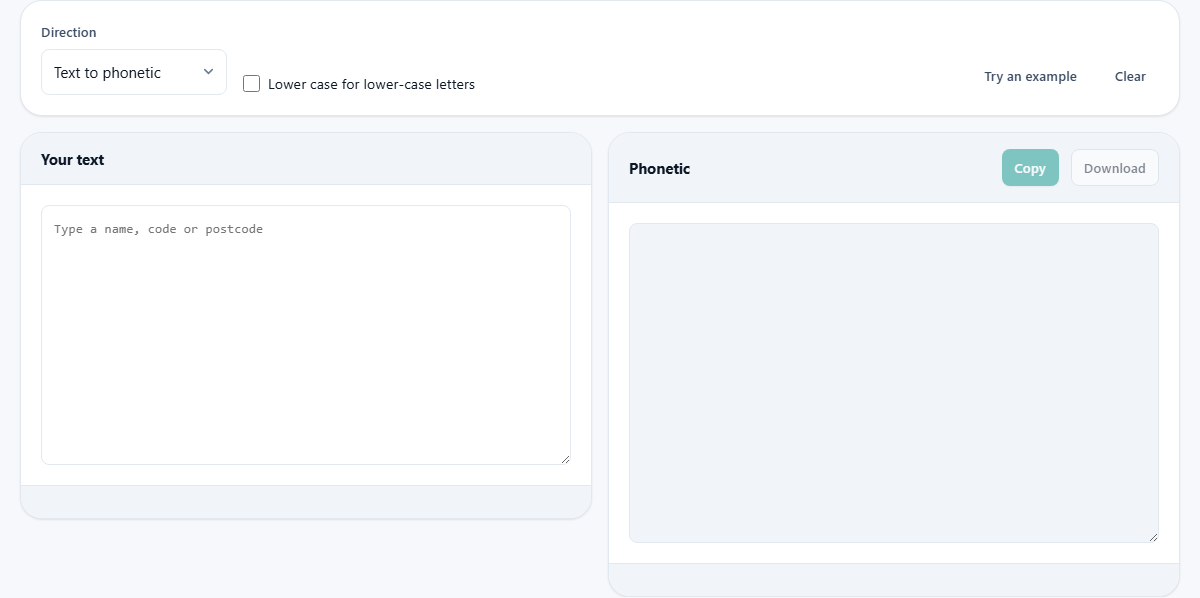
The Direction menu chooses the job. Text to phonetic turns your letters into code words. Phonetic back to text takes code words and returns the letters they stand for. The two settings share the same pair of boxes.
You type or paste into the box on the left, headed Your text. The answer appears on the right, in the box headed Phonetic, and it keeps pace as you type. A status line under your text confirms which way it ran, reading Spelt out or Decoded, and a small chip counts how many letters and digits were spelt.
What comes out when you spell
Each letter becomes its code word, and the words are laid out one after another with a space between them. Digits are not left bare; they are written as their spoken forms, so 2 becomes Two and 5 becomes Five. A space in your text becomes a raised dot, which keeps the word breaks visible in a long run of code words. Line breaks are kept, so a two-line address stays on two lines.
Anything that is neither a letter nor a digit simply passes through as itself, so a dash or a bracket sits in the output unchanged. You will also spot a few official spellings that look odd on purpose: Alfa ends in an f, Juliett carries two t's, and the number nine is written Niner. The tool uses these because they are the agreed forms, and they are what a trained listener expects to hear.
Mixed codes, letters and numbers together
Real codes rarely hold only letters. A postcode, a number plate or an order reference mixes letters and digits, and this tool spells both in a single pass. Type a code such as SW1A 1AA and each letter turns into its word while each digit turns into its spoken number. The gap in the middle shows as a raised dot, so the two halves stay clearly apart.
That saves you switching between spelling letters by word and reading numbers off by hand. The whole string arrives ready to say aloud in one unbroken run, which is exactly what you need when the person on the other end is writing it down as fast as you speak.
The lower-case tick box
Normally every code word comes out capitalised, whatever case you typed. The box labelled Lower case for lower-case letters changes that. Tick it and a small letter in your text produces a small code word, while a capital still produces a capital one. The output then mirrors the exact case of what you wrote.
This matters when case carries meaning. Some reference codes and passwords are case-sensitive, so the difference between a capital and a small letter is real information. With the box ticked, the person reading your spelling can see which letters were upper and which were lower, rather than guessing.
Reading phonetic back to text
Switch the Direction to Phonetic back to text and the tool works in reverse. It is deliberately relaxed about what it accepts, because people type what they hear rather than the official forms. A raised dot or a plain slash between words is read as a space. A full stop or comma stuck on the end of a word is ignored. Common everyday spellings are welcomed too, so Alpha, Juliet, X-ray and Nine are all understood, not rejected.
If a word is not a code word at all, it is passed straight through untouched. That means a stray ordinary word stays visible in the result instead of disappearing, so you can see exactly where the spelling went off the rails. One thing to note: decoding hands the letters back in lower case, since the spoken words carry no case of their own.
For a quick feel, paste Sierra Whiskey One Alfa and the box returns sw1a. Put a full stop after any of those words, or divide them with a slash instead of a dot, and the answer does not change, because the decoder smooths those differences away before it looks each word up.
A worked example, step by step
Leave the Direction on Text to phonetic and press Try an example. The words Flight BA249 to Oslo drop into Your text. The Phonetic box fills at once. It reads Foxtrot Lima India Golf Hotel Tango, then a raised dot, then Bravo Alfa Two Four Niner, another dot, then Tango Oscar, a dot, and finally Oscar Sierra Lima Oscar.
The chip under the result says seventeen characters were spelt, and the status line reads Spelt out. Read it down the phone one word at a time, unhurried, and the listener writes the first letter of each word. To prove the loop, switch the Direction to Phonetic back to text and paste that spelling in; the letters flight ba249 to oslo come back, in lower case, exactly as promised.
Try your own next. Clear the box and type a short name followed by a house number. Watch each letter become a word and the number become its spoken form, with a raised dot wherever you left a space. Seeing your own text spelt out is the quickest way to trust the tool before a call where it counts.
Taking it away, and starting over
The Copy button places the spelling on your clipboard, ready to paste into a message or a ticket. The Download button saves it as a plain file named phonetic.txt, which is handy when you want to keep a spelt-out record of a long code. The Clear button empties Your text so you can start fresh.
The tool remembers your Direction and tick-box choices between visits, so it opens the way you last left it. Your text itself is not kept, which suits a tool you often use for one code at a time before moving on.
Common mistakes and easy fixes
A few things catch people out:
- The output is a jumble of ordinary words. The Direction is set to decode while you are trying to spell. Switch it to Text to phonetic.
- A word came through unchanged in the result. While decoding, that word was not a recognised code word, so the tool left it alone for you to see.
- Your capitals were lost after a round trip. Decoding always returns lower case; if case matters, note it separately.
- You expected a symbol to be spelt. Only letters and digits have code words; punctuation is passed through as it is.
- The reader still confused two letters. Slow down and leave a clear pause between words, since the words only help if each is heard on its own.
When another tool suits better
This alphabet is built for speaking letters aloud, one at a time. It is not a way to send a whole sentence quickly, and it is not a secret code, since anyone can read it. If you want to hear a message as tones rather than say it, the Morse tool is the better fit. If you need to hide a message, a text encrypter is the right place.
It is also overkill for text that will only ever be read on a screen. Its whole value is in the ear. If nobody is going to speak or hear the letters, plain writing does the job with far less clutter.
The whole alphabet lives on your device
The list that pairs each letter with its word is a small table held inside the page, and the swap runs in your browser as you type. Nothing you spell out is sent away, logged, or stored on a server, and closing the tab clears it from view. The Copy and Download buttons move the result to your clipboard or your disk directly.
That local handling is worth having, because the things people spell here are often personal: a name, a home postcode, a booking reference, part of a password. Keeping the conversion on your own machine means none of that has to travel anywhere to be turned into words and back.