
Putting a list of people in the right order
A pile of names never sorts as easily as it should. Below is a full tour of the parser: how each line is taken apart, what every menu and tick box changes, and what to do with the rows it refuses to guess about. There is a worked register built from a realistic mess, and a straight answer to the question of where van Gogh belongs.
Why a plain sort gets names wrong
Sort a column of names in a spreadsheet and you get alphabetical order by first letter. That is almost never what anyone wants. Vincent van Gogh files under V for Vincent. SMITH, JOHN drifts away from Smith, Jane because capitals can sort differently. Dr. Ahmed Khan lands in the D section, courtesy of his title rather than his name.
A useful order needs the surname, and the surname is buried somewhere inside each line. So the real job is not sorting at all. It is splitting: title, given name, middle names, surname, and any qualification on the end. Once the parts are known, both sorting and rewriting become trivial. The splitting is what this page is actually for; the tidy register falls out of it.
How each line is taken apart
The parser reads one name per line and decides what each word is doing. A recognised title such as Dr at the front is set aside. A recognised ending such as Jr after a comma is treated as a suffix. Whatever remains is divided into given names and a surname.
Commas need care because they carry two different meanings. Smith, John is a name that has already been turned around. John Smith, Jr is a name in natural order with a qualification tacked on. The only way to tell them apart is to test what follows the comma against the list of known endings, and that is the test applied here.
Small words are the other trap. The surname in Vincent van Gogh is van Gogh, not Gogh with a stray van floating loose. The parser walks backwards from the final word, collecting the little connecting words that belong to a surname. Capitals matter in that walk: a lower-case de or la joins the surname, while Al with a capital stays a given name, since plenty of people really are called Al.
Eight ways to write a name out
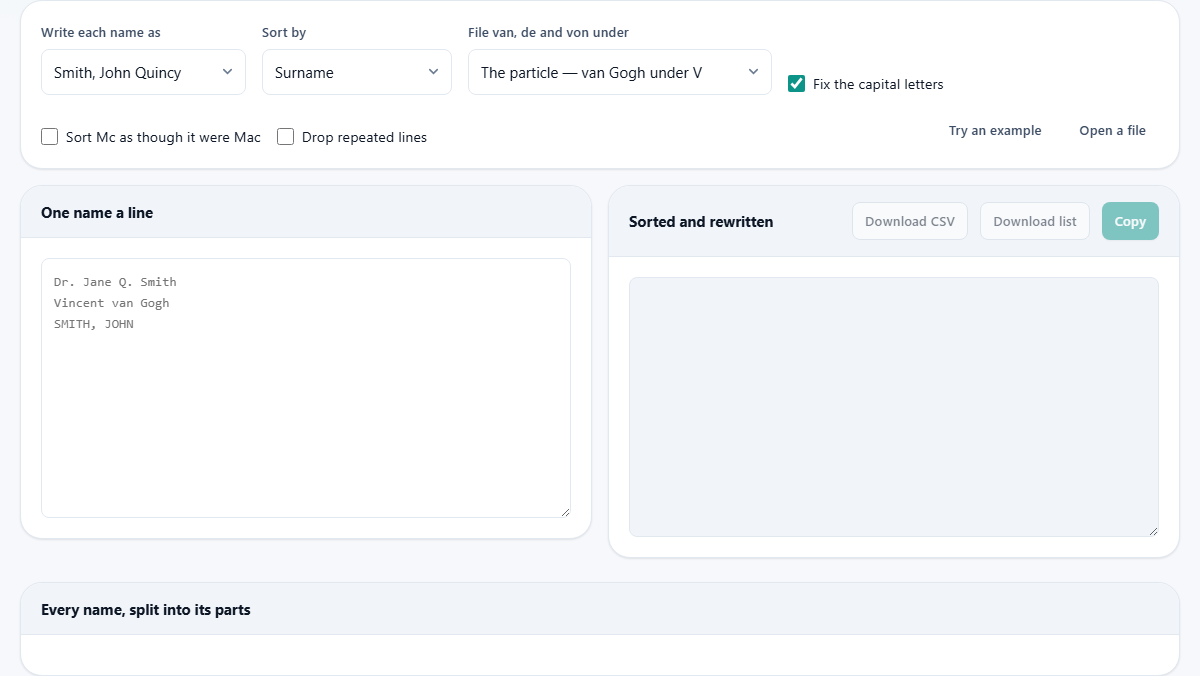
The Write each name as menu sets the shape of every line in the result. The options run from formal to bare:
- Smith, John Quincy - the full register form, surname first
- Smith, John Q. and Smith, J. Q. - the same shape with the middle or all given names shortened
- John Quincy Smith - natural order, for prose, programmes and place cards
- J. Smith - compact, for rotas and bylines
- JQS - initials alone, for badges and monograms
- Dr John Quincy Smith Jr - every part the parser found, restored
- Dear Dr Smith, - a ready-made opening line for a letter
Sorting is a separate decision
The Sort by menu offers surname, given name, or leaving the order exactly as pasted. Because each entry was split first, choosing surname sorts on the real surname, not on whatever word happened to come first on the line.
Rewriting and sorting do not depend on each other. You can keep the pasted order while rewriting everything as greetings, or sort by surname while printing names in natural order. A seating plan might want given-name order in full names; a register wants surname order with the surname in front. Both are two menu picks away from the same pasted list.
Where does van Gogh file?
One question has no single right answer, so the page asks it out loud. In Dutch and Belgian practice a person named van Gogh is listed under G; the little word is skipped when alphabetising. English-language references put him under V instead. Neither side is wrong. They are two settled conventions that happen to disagree.
The File van, de and von under menu lets you choose the rule, and the sensible choice is whichever one your readers already expect. A parish list in Amsterdam should follow the Dutch habit. A conference list in Chicago should not. Mixing the two, or sorting one way while checking against the other, produces a list that looks broken to everybody at once.
The three tick boxes
Fix the capital letters repairs shouting and mumbling. SMITH, JOHN becomes Smith, John; mcdonald becomes McDonald. The Mc prefix is always followed by a capital, so those corrections are safe to make automatically. Mac is genuinely ambiguous - Macmillan and MacDonald are both correct - so Mac names are left exactly as typed and flagged for a human decision instead.
Sort Mc as though it were Mac reproduces an old directory habit in which the two prefixes file together rather than several pages apart. Turn it on if the list you are matching against was built that way. Drop repeated lines removes exact duplicates, which earns its keep when two exports of the same group have been pasted end to end.
A choir register, start to finish
Imagine forty singers gathered from three separate emails. Some lines read NAIR, PRIYA. One reads Tom O'Leary. One reads Dr. Jane Q. Smith Jr. Paste the lot into the left pane, leave the style on the surname-first form and the sort on surname, and keep Fix the capital letters ticked.
The right pane fills immediately. Nair, Priya sits under N despite arriving in capitals and reversed. O'Leary keeps the apostrophe and files under O. Smith takes her place under S, with the Dr and the Jr held aside rather than sorted on. Underneath, the table headed Every name, split into its parts lays each singer out in columns, and a summary reports how many lines were read.
Two rows glow. One singer arrived as a single word, and one has a Mac surname the tool declined to re-capitalise. Type the missing given name into the first and confirm the second, and the register above re-sorts on the spot. Switch the style to the greeting and the same list becomes forty letter openings without touching anything else.
Highlights are questions, not errors
A highlighted row means the rules ran out of evidence. A single word might be a given name or a surname. A line in full capitals gives no clue where capitals belong. Three plain words can split two ways, and a stray Mac could be spelled several ways on purpose. Rather than guessing quietly and being wrong in print, the row is handed to you.
Whatever you type into a highlighted row becomes the truth for that person everywhere: the rewritten list, the sort position and the table all update together. Names written in another alphabet are treated with the same honesty. They are kept exactly as typed and marked, because splitting rules built on English word order would only mangle them.
Copy, list or spreadsheet
Three buttons take the result away. Copy puts the finished list on the clipboard. Download list saves a plain text file, one rewritten name per line, ready for a programme or a noticeboard. Download CSV saves the split version with each part in its own column.
The CSV is the quiet workhorse of the three. A mail merge wants the pieces separated so it can greet by given name while filing by surname. A membership database wants the same. Doing that split once here, with the odd rows corrected by hand, beats writing spreadsheet formulas that will stumble on the first O'Leary they meet.
When this is the wrong page
Feed it people, not organisations. Company names, venue names and usernames will be carved into given names and surnames they do not have, because the parser assumes every line is a person. A list that is already perfectly consistent needs no parsing either; a spreadsheet can reverse Last, First with one formula. And if you need addresses, phone numbers and birthdays attached to each person, you have outgrown a text tool altogether.
One more honest limit: the rules encode English-language naming habits. Lists dominated by naming customs the rules do not describe will produce more highlighted rows than settled ones. The highlights still make the manual work visible and quick, but on such a list you are the parser and the page is only the clerk.
The list never leaves your machine
A roster of real people is personal information, which raises the stakes beyond convenience. All of the splitting, sorting and rewriting here is done by the page's own script, running in your browser. Nothing you paste is transmitted anywhere, and the Open a file button reads the file locally in the same way. Close the tab and the list is gone. That makes it safe to tidy a staff list or a patient register without asking anyone's permission to hand the data to a third party, because no third party is involved.