
Finding a two-word name you can actually claim
A good handle, codename or working title is usually one lively adjective stuck to one solid noun. This page rolls those pairings out in batches and shapes each one for the job you have in mind. This guide covers the six shapes on offer, the number and tick boxes that tune them, how to grab a name you like, a full run-through with real settings, and why the tool cannot tell you whether a name is free.
What these names are for
The uses cluster around moments when your first choice is already taken or does not exist yet. You sign up somewhere and your own name is gone, so you need a handle that still reads like a person. A team starts a project and wants a codename to talk about it before it has a real one. A developer needs a label for a fresh repository. A designer needs a placeholder brand to drop into a mock-up.
In every one of those cases you do not want something clever or meaningful. You want something plain, sayable and unclaimed. That is the narrow job this generator does, and it does it by the armful so you can skim rather than agonise.
The six shapes
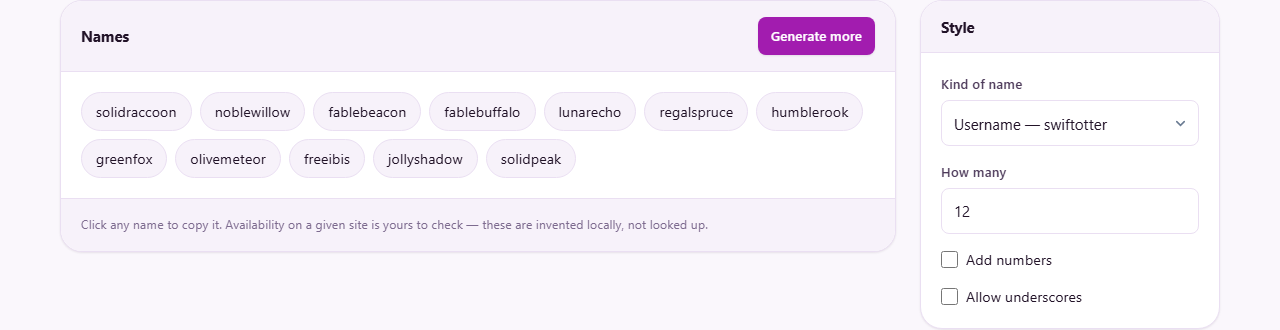
The Kind of name menu decides how each pairing is written. Every option is shown with the same example, swift and otter, so you can see the difference at a glance before you generate. The choices are:
- Username, run together in lower case, like swiftotter, for a login or a screen name.
- Handle, split by a dot, like swift.otter, for the sort of tag that sits after an at sign.
- Brand, each word capitalised and joined, like SwiftOtter, for a product or a company feel.
- Two words, capitalised and spaced, like Swift Otter, for a project title on a slide.
- Codename, both words in full capitals, like SWIFT OTTER, for a corridor conversation.
- Domain style, run together with a dot-com on the end, like swiftotter.com, as a starting point to check later.
How many, and rolling again
The How many box sets the size of each batch. It takes a whole number from 1 to 60 and starts at 12, which is a comfortable screen-full to scan. Ask for more when you want a wide field to choose from, or fewer when you only need a couple.
The Generate more button throws the whole batch away and rolls a fresh one. Because every draw is random, no two batches are the same, and the right name tends to jump out within the first handful of tries. Keep pressing until one sticks; there is no cost to another round.
Reading a batch at a glance
You do not need to weigh every name in a batch. Let your eye skip down the grid and stop only where a pairing clicks for you. Most will not, and that is the point of showing a dozen at once: rejecting eleven of them costs barely a second.
If nothing in a batch lands, do not force it. Press Generate more and start clean. A name you like usually turns up faster than you expect, and grinding through a weak batch only delays the better ones waiting behind it.
The two tick boxes
Add numbers tacks a two-digit number onto the end of a name. It applies to the username and handle shapes, so swiftotter might arrive as swiftotter42, and swift.otter as swift.otter42. This is the classic move for when the plain word pair is taken and you still want it.
Allow underscores lets some usernames join their two words with an underscore instead of running them straight together, turning swiftotter into swift_otter on part of the batch. The capitalised shapes, brand, two-word and codename, ignore both boxes, since a space or a capital already does the separating for them.
Grabbing the one you want
The batch appears as a grid of buttons under the heading Names. Each name is a button, and clicking it copies that name to your clipboard right away, ready to paste into a signup form or a document. There is nothing else to press.
A line under the grid repeats the important caveat: whether a name is free on any given site is yours to check. The tool builds these on the spot and does not look any of them up, so a copied name is a candidate, not a reservation.
Keeping a shortlist
Each press of Generate more wipes the previous batch, so a name you liked but did not copy is gone once you roll again. The fix is easy: copy every candidate that catches your eye before you re-roll. Since a single click copies a name, you can gather several in quick succession.
A tidy habit is to paste those copies into a plain note as you go, one per line. After a few rounds you hold a shortlist you can compare side by side, instead of a fading memory of a good name you can no longer find. Then run your checks on just the two or three finalists.
A worked example, from menu to clipboard
Say you are naming a small side project. Set Kind of name to Brand and leave How many at 12. A grid fills with pairings like AmberFalcon, CobaltHarbor and SilverMeadow, each two real words pushed together and capitalised. You read down the list and one of them fits the mood you were after, so you click it and it lands on your clipboard.
Now suppose you also want the matching login. Switch Kind of name to Handle and tick Add numbers. Press Generate more and the grid refills with tags such as amber.falcon and cobalt.harbor, some carrying a two-digit tail like swift.otter42. Click the one that pairs best with your chosen brand, and you have both a title and a handle in under a minute.
If a web address is next on your list, switch Kind of name to Domain style. The same sort of pairing now arrives with a dot-com already attached, like amberfalcon.com, giving you a neat string to drop straight into a registrar's search box and test.
No name twice in one grid
One quiet touch is worth knowing about. Within any single grid, no name repeats. The generator keeps track of what it has already placed and skips a pairing it has shown you, so a batch of twelve gives you twelve distinct options to weigh rather than the same one appearing again.
That makes a batch a genuine field of choices. When you widen How many toward its ceiling, you are asking for that many different pairings at once, which is handy when you want to scan a broad spread before settling on a direction.
The words behind the pairings
The two pools are hand-picked rather than pulled from a dictionary. The adjectives are concrete and positive, words like amber, cobalt, bold and swift. The nouns are things you can picture, like falcon, harbor, otter and meadow. Nothing rude or awkward is in either list, so any pairing is safe to show a client or a boss.
There are well over a hundred adjectives and a similar count of nouns, which multiply into many thousands of possible pairs before any style, number or underscore is added. The two halves of a name are always different words, so you will never see a name where the adjective and noun collide.
Common slips, and how to avoid them
Most confusion comes from the same few habits:
- A name you liked has vanished. You rolled a fresh batch before copying it. Copy first, then roll.
- You expected the same list back. Every batch is random, so Generate more never repeats the one before it.
- You assumed a copied handle was already yours. It is only a suggestion until you claim it on the site itself.
- The batch felt too samey. Try a different Kind of name, or raise the How many, to widen the field you are choosing from.
- You wanted a particular word included. The picker takes no input words at all, so keep rolling or pick by hand from what turns up.
Where it stops, and what to check yourself
This is a generator, not a search. It cannot tell you if a username is taken, whether a domain is registered, or if a phrase is trademarked. Those are separate checks you run on the platform or registrar that matters to you, using the copied name as your query.
Treat a name as a draft until those checks pass. Before building a business on one, look it up on your country's company register and run a trademark search, because two ordinary English words can coincide with something already in use, and the tool has no way to know that. For a name that must carry meaning or a specific story, a person will always beat a random pairing.
Made on your machine, which is why it cannot look things up
The two word lists live inside the page, and a simple random picker chooses from them each time you generate. No request goes out, no server is asked, and nothing you see or copy is recorded anywhere. Close the tab and the batch is gone, along with any memory of it.
This is the flip side of the availability caveat. The very thing that keeps the tool private, that it never contacts the outside world, is also the reason it cannot promise a name is free. It is inventing words in front of you, not checking them against the internet, and that trade is a deliberate one.