
Getting your real words back when the letters turn to gibberish
Sometimes text arrives wrong. A name, a price, a whole paragraph comes out stuffed with odd symbols. This tool works out what happened and hands your real words back. This guide explains the fault behind the mess, how to load your text, how to read the list of repairs it offers, the one kind of damage no tool can mend, and why none of it leaves your machine.
What the mess actually is
The garble has a name: mojibake. It is not a font bug and not a typing slip. Your text was saved using one kind of code and then read back using a different one. Modern text stores an accented letter as two small numbers, called bytes. An older reader takes those two bytes as two separate symbols. So one letter turns into two, and the wrong version gets saved on top of the right one.
Because the swap follows a fixed rule, it can be run backwards. Turn each odd symbol back into the byte it came from, then read the bytes the correct way. If the guess about the old code is right, your words return exactly as they were. This page tries every likely guess for you and keeps only the ones that produce real writing.
Where this trouble comes from
You meet it most often after data has changed hands. A spreadsheet saves a plain file without noting which alphabet it used, and the next program guesses wrong. An old database hands its rows to a newer one. An email is forwarded through a system that speaks a different code. Address books, subtitle files and web forms all fall into the same hole.
The clue is in the shape of the damage. A capital A wearing a little hat in front of every accented word points to one fault. A run of three symbols where a curly quote should sit points to another. A whole line of blocky letters points to a third. Each shape comes from its own wrong reading, and each needs its own cure.
Getting your text in
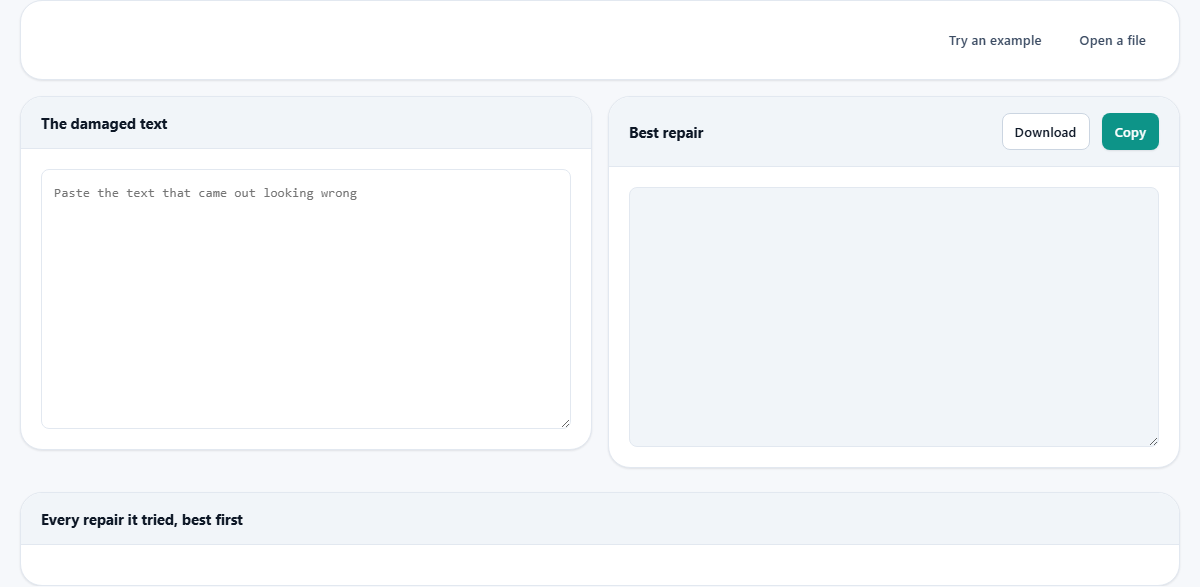
The box on the left is labelled The damaged text. Paste into it and the repair begins on its own after a brief pause; there is no button to press. A line or two is enough to pin down the fault, though you can drop in the whole document and mend all of it in one go.
Two buttons sit above the boxes. Try an example loads a broken sample, so you can watch the tool work before trusting your own words to it. Open a file reads a file straight off your disk, and it accepts plain text, comma-separated data, Markdown notes and subtitle files. The file is opened where you sit and is never uploaded anywhere.
Taking the best repair away
The box on the right is headed Best repair. The strongest candidate appears there the instant the tool finishes thinking. If the accents and the quote marks now look right, you are finished. The Copy button places the text on your clipboard. The Download button saves it as a file named repaired.txt.
You are not stuck with the first pick. Every attempt in the table below carries its own Use button. Press one and its result jumps up into the Best repair box. That lets you flip between two readings by eye and keep whichever one looks cleaner to you.
Reading the table of attempts
Under the two boxes sits a table titled Every repair it tried, best first. Each row is one guess. The first column names the wrong reading in plain words, such as text read once as a Western European alphabet, or once as Cyrillic. The middle column rates the row as very likely, likely, possible, or no better. The last column shows a short preview of what that reading produced.
A line above the table counts the trouble found, for example nine suspicious runs. The tool checks about a dozen older alphabets, covering Western European, Central European, Cyrillic, Greek and Turkish among others. It tries each one twice as well as once, because some text was damaged in two passes rather than one. Only the eight strongest guesses are listed, sorted so the cleanest sits on top.
How it decides which guess wins
The ranking is not magic. The tool scores each result on how much of it still looks broken. It counts the tell-tale pairs, the rare high symbols, and any lost-letter marks. A guess that wipes out the most damage rises to the top.
When two guesses score the same, the simpler story wins: one wrong reading is preferred over two. A correct repair is also always shorter than the mess it undoes, so length breaks any remaining tie. The rating is an honest estimate, not a promise, so if two rows score closely, read both before choosing.
Text that was broken more than once
Some text does not go wrong a single time; it goes wrong twice. It slips through the same faulty step on the way in and then again on the way out, and each pass piles on a fresh layer of symbols. One accented letter can end up as four or five odd characters stacked in a row, which looks hopeless at first glance.
The tool plans for exactly this. It applies each reading a second time on top of the first, so a two-layer fault gets a matching two-layer cure. In the table, those double repairs spell out both steps in order, such as read once as one Western alphabet and then read again as another. If your best result still looks slightly off, scan down for one of these stacked rows. A stubborn mess often needs that second round before it comes fully clean.
A worked example, step by step
Press Try an example. The sample reads like a cafe notice that has been through a shredder. Every accented vowel is trailed by a capital A and a stray mark. The apostrophes have become three-symbol clumps. A dash inside a price range looks wrong, and the final line, a Russian greeting, is pure blocky soup.
The Best repair box fills at once, and its row is rated very likely. The French now reads properly: the accent returns to the e in cafe, the chef's apostrophe is a real curly one, the price range carries a proper dash, and the Russian line reads as an ordinary hello. The count above the table drops to zero suspicious runs. That zero is the sign of a clean fix, and it is the number to aim for every time.
From here, finishing is quick. Press Copy to lift the mended notice onto your clipboard, then paste it back into whatever document needed it. Or press Download to keep it as repaired.txt. If you had loaded a real file rather than the sample, this is the moment to save the fixed version over the broken one, so the fault does not follow the file around.
Watch the count fall as you paste
The suspicious-run count is worth trusting as a quick health check. A high number means a lot of the text still looks wrong. Zero means the reading came out clean. You can even paste a fresh chunk and watch the number react, which tells you at a glance whether that chunk shares the same fault.
This is handy when a file mixes good and bad text. Perhaps only one column of an export is broken while the rest is fine. Paste a broken line on its own, confirm the cure, then apply the same knowledge to the wider file with confidence that you have the right reading.
The damage that cannot be undone
One box appears in a warning colour for good reason. If your text holds a plain question mark or a black diamond where a letter belongs, that letter is gone. An earlier program did not misread the byte; it threw the byte away. Nothing can rebuild a value that no longer exists.
When that happens, no reading offered here will help, and the tool tells you so rather than faking a confident answer. Your only route is to fetch the text again from wherever it started, before the losing step ran. Repairing the shredded copy is impossible; going back to the original is the fix.
Common slips, and how to dodge them
A few habits waste time. Steer clear of these:
- Keeping the broken copy after fixing it on screen. Save the repaired file, or the same garble greets you next time you open the source.
- Pasting a picture of the text. The tool needs the characters themselves, not a screenshot of them.
- Expecting a question mark or diamond to heal. Those marks mean lost data, as explained above.
- Grabbing a lower row because its wording sounds grand. Trust the rating and your own eyes; the top row is right almost every time.
When another tool fits, and where the work happens
This page mends text that was read through the wrong alphabet. It is not a translator and not a spell checker. If your words are spelled correctly but sit in a language you cannot read, reach for a translator instead. If the letters are fine but the spacing and line breaks are a mess, a plain text tidier is the better stop.
Everything here runs on your own computer. The byte tables are built inside the page as it loads, straight from your browser's own decoder, so they always match the reader your browser will use. Your text is read, scored and repaired in front of you, and none of it crosses the network. That matters, because a garbled export can still hold names, prices and private notes, and this way they stay with you.