
Finding out what your writing keeps saying
This page counts how often each word and phrase turns up in a piece of text, then shows the share of the whole that each one takes. It is a way to see a page the way a machine does, and to catch the words you repeat without meaning to. Below you will find what every control does, how to read the ranked lists, and a full example from paste to fix.
Who leans on a word counter like this
Anyone who writes for the web wonders, at some point, whether a page actually reads as being about its subject. You had a topic in mind. The words that ended up on the page might tell a different story. This tool settles the question by counting, so the answer comes from the text itself and not from a hopeful guess.
The uses spread wider than search work. An editor can spot a crutch word that appears in every other line. A student can check an essay that feels repetitive and find the phrase they lean on too hard. A copywriter can confirm a product name shows up often enough to register, without tipping into the drone of the same phrase over and over.
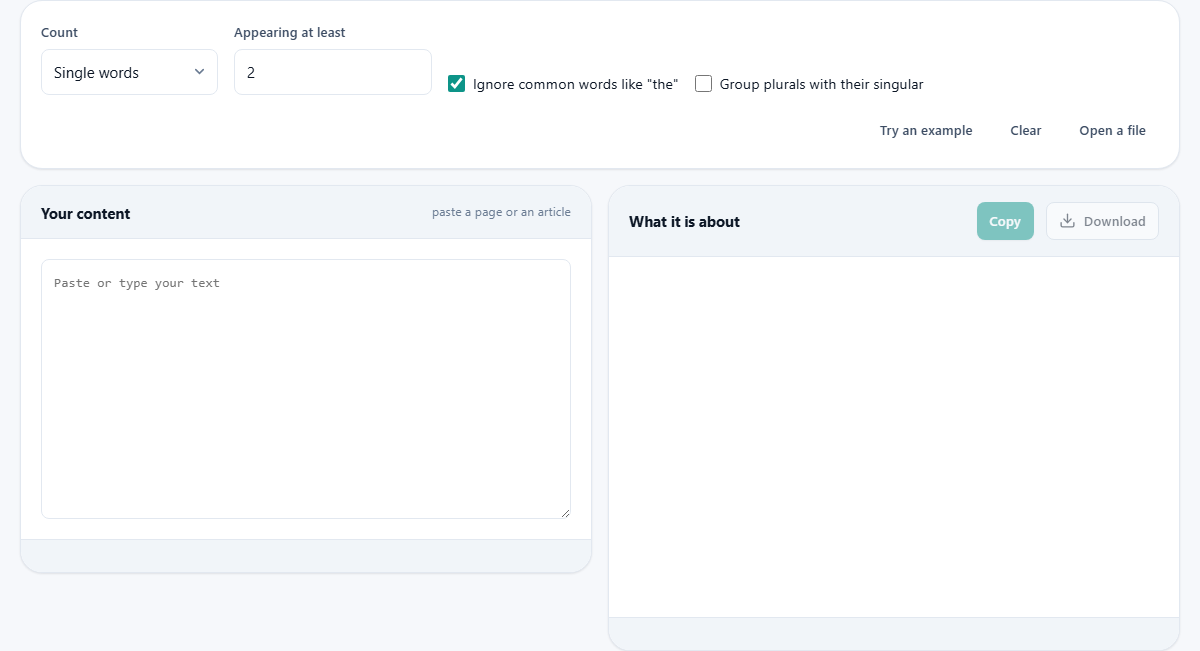
Single words or phrases: the Count menu
The Count menu is the first decision. Single words treats each word on its own. Two word phrases and Three word phrases count runs of neighbouring words, and All three together shows every level at once in separate lists.
Phrases usually tell you more than lone words. People search and think in phrases, so knowing that water bottle appears twelve times is far more telling than knowing water appears twenty times and bottle appears fifteen. A single-word list often just surfaces whatever noun the topic happens to hang on, while a phrase list shows the actual ideas the page returns to.
Setting the minimum count
The box labelled Appearing at least hides everything that turns up fewer times than the number you set. It starts at two, which drops the long tail of words used only once and leaves the repeats that matter. Raise it on a long article, where even three mentions may be background noise, or lower it to one when you want to see absolutely everything a short passage contains.
If nothing clears the bar, the list says so and invites you to lower the minimum or paste more text. That is a hint, not a fault. A short or varied passage simply may not repeat anything often enough to rank.
The two switches that clean up the count
Ignore common words like the is ticked to start with, and it does more than drop the obvious. Words such as the, and, of and is flood every text and describe none of it, so they are set aside. For phrases the rule is smarter than a blunt filter: a phrase is dropped only if it begins or ends on one of these words. One sitting in the middle, as in bank of england, is kept, because there the small word is part of the name.
Group plurals with their singular is off by default. Turn it on and obvious plurals fold into their base word, so boot and boots count as one entry rather than splitting the total between them. It handles the plain cases and deliberately leaves the tricky ones alone, so a word like bus is not mangled into something wrong.
Reading the results
At the top sits a small board of figures: the total words, how many different words there are, the share of the text those different words make up, and a rough reading time. Together they sketch how varied the writing is before you look at any single term.
Below that, a coloured line calls out the single most used term, how many times it appears, and its density, meaning that count as a percentage of all the words. If that figure climbs past about four per cent the line turns to a warning, since a term that dense tends to read as repetitive. Under it, each ranked list is drawn as a row of bars, longest at the top, with the count and the density beside every entry so you can see at a glance which words carry the page.
What the variety figures tell you
The count of different words, and the share it makes of the total, is a quiet measure of variety. A page of two thousand words that draws on only four hundred different ones is repeating itself a good deal, whether or not any single term tops the density line. A high share of different words points the other way, towards writing that keeps reaching for fresh vocabulary.
Neither reading is good or bad on its own. A technical guide repeats its key terms on purpose, and that is exactly right for it. A personal essay that reused the same handful of nouns would feel thin. Read the variety figures next to what the piece is meant to do, rather than against some fixed ideal, and they start to earn their place on the board.
A worked example: checking a product page
Ravi has written a page selling raised garden beds and thinks it is clearly about that. He pastes the copy in, leaves the Count menu on Two word phrases, and keeps the minimum at two. The top bar is not raised bed at all. It is garden soil, eight times, while raised bed shows up only twice.
That is the whole point of the check. The page reads as being about soil, not about the beds he is selling. He rewrites three sentences to name the product where he had been vague, pastes the new copy back, and now raised bed sits near the top with a healthy count. He does not chase a target number. He simply moves his real subject up the list until the counts match what the page is for, then stops.
Taking the numbers away, and the quick buttons
A Copy button puts the ranked lists on the clipboard, and a Download button saves them as a plain text file, with each term, its count and its density laid out in columns you can drop into a spreadsheet. The saved file goes a little deeper than the on-screen bars, listing more terms per level.
Three small buttons speed up the setup. Try an example loads a ready-made passage so you can watch the tool work before trusting it with your own writing. Clear empties the box for the next job. Open a file reads a text file straight into the input, which is easier than pasting when the piece is long.
A count is a mirror, not a goal
It is tempting to treat the density figure as a dial to tune, nudging a phrase up to some lucky percentage. That road leads straight to the stilted writing everyone recognises, the same phrase jammed into every third sentence. No such magic number has moved a page up the results for many years.
The honest use runs the other way. Write the piece as you naturally would, then paste it here to find the accidents. Perhaps your subject appears three times while a stray filler word appears thirty. The tool is good at surfacing that gap. It is not good at, and should not be used for, manufacturing emphasis you did not mean.
Mistakes that trip people up
The first is pasting too little. The counter needs at least a short run of words to say anything, and it will ask for more rather than pretend a handful of sentences reveals a pattern. Feed it the whole page, headings and all, the same text a reader would meet.
The second is reading the list as a full verdict on a page. A term used once in a big heading can matter more to a reader than one buried five times mid-paragraph, and a flat count cannot see that weight. Treat the ranking as a strong hint about emphasis, then use your own judgement about where those words actually sit.
When a different tool suits the job
If you only want the plain size of a piece, its total words or characters, a straight counter answers faster without the ranked breakdown. If your worry is padding rather than repetition, weak intensity words and hedges dragging a draft down, a writing checker is aimed squarely at that. And if you need to change a repeated phrase everywhere at once after spotting it here, a find and replace tool will do the swap in a single pass.
This page is for one question only: which words and phrases does the text lean on, and how hard. Keep it to that question and it is quick and sharp. Ask it to grade your writing and it will mislead you, because counting is not the same as judging.
Where the counting happens
All of the tokenising and counting runs in the page itself, on the machine in front of you. Whatever you paste, a rough draft, a client's unpublished copy, an essay you would rather nobody saw, is read by your own browser and handed to no server. When you close the tab it is gone from everywhere except wherever you keep your own work. That is worth knowing when the text you most want to audit is often the text you least want to upload.