
Ranking every word so the repeats rise to the top
Give this page a block of text and it tells you which words you used, and how many times you used each. That plain fact answers a surprising range of questions, from a writer hunting a crutch word to a reader trying to work out what a document is really about. This guide covers each option, how to read the table, and a full example with real counts.
The question it answers
At heart the tool does one simple thing: it tallies words. But that tally is the raw material for several different jobs. A novelist wants to know if she leaned on the word suddenly forty times. A teacher wants the vocabulary a class actually met in a chapter. A campaigner wants to see which ideas a speech kept circling back to.
You do not need to know in advance which word you are chasing. That is the difference between this and a plain search. A search checks one word you already suspect. This ranks the lot, so the surprises come to you rather than staying hidden. That is why it earns a place even when you think you know your own text well.
Getting your text in
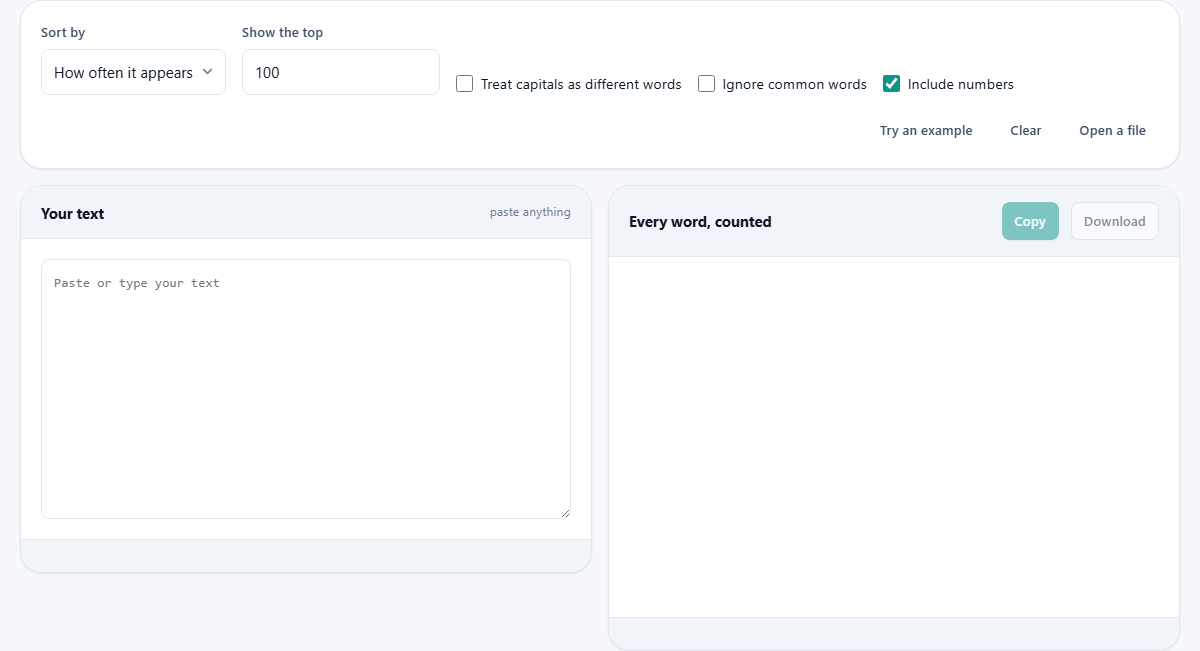
Paste into the box on the left, headed Your text, and the ranking appears on the right straight away. There is no button to press to start it. Type a little more and the counts shift as you go.
Three small buttons sit above. Try an example drops in a short passage so you can see the shape of the output. Clear empties the box for the next job. Open a file loads a plain text file, which is the better way to handle a whole book or a long transcript that would be slow to paste.
Sort by
The Sort by menu decides the order of the list. How often it appears puts the busiest words first, which is what most people want and the default. Alphabetically arranges the words A to Z, handy when you have a particular word in mind and just want to look up its count.
Word length puts the longest words at the top. That view has its own uses: it surfaces the mouthfuls and the jargon, and it is a quick way to spot a technical term that keeps recurring or a stray pasted-in web address.
Show the top
Show the top is a number box, set to 100 to begin with. It limits how many rows the table draws, not how many words are counted. Behind the scenes every word is still tallied; this only trims the display so a huge text does not paint ten thousand rows.
Set it to 20 for a quick headline of the busiest words. Push it high when you want to scroll the long tail of words used just once or twice. The heading above the table always tells you how many of the total it is currently showing.
Treat capitals as different words
By default the count folds capitals together, so Rose the name and rose the flower are added up as one word. That is usually what you want, because most of the time a capital only marks the start of a sentence.
Tick Treat capitals as different words and the two split apart. Rose and rose become separate rows with separate counts. Reach for this when the capital carries real meaning, such as separating a proper name from an ordinary word that happens to share its spelling.
Ignore common words
Leave this off and the top of any English list looks much the same: the, and, of, to, a. A small set of glue words makes up a large share of everything anyone writes, so an unfiltered ranking tells you little about the subject.
Tick Ignore common words and that glue is dropped, leaving the words that carry meaning. Turn it on when you want to know what a text is about. Leave it off when you are studying a writer's habits, because a high count of just or very or really says something real about the style.
Include numbers
This box is ticked from the start, so figures like 1999 or 250 are counted as words in their own right. That suits a report or a table where the numbers matter as much as the words.
Untick it and the tool ignores anything made only of digits. Do that when you are studying prose and the page numbers, years and quantities are just noise you would rather not see cluttering the ranking. A mixed token such as a model name keeps its letters and stays in the list either way.
How a word is decided
The tool splits your text on spaces and punctuation, then tidies the edges. A stray comma or full stop stuck to a word is dropped, so end and end, are the same. Hyphenated pairs are kept whole, so well-being counts as one word, not two.
Apostrophes are kept inside a word, which matters for English. That means don't stays a single word rather than breaking into don and t. Knowing these rules helps you read the list without being surprised by an odd entry.
Reading the summary and the table
Above the list sits a row of totals. Total words is every word counted. Different words is how many unique ones there were. Used once only picks out the words that appeared a single time, often the most interesting corner of a text. Most common names the runaway leader, and Average length gives the mean number of letters per word.
Below that is the ranking itself. Each row shows the word, how many Times it appeared, its Share as a percentage of the whole text, and how many Letters it has. The Share column is the quiet star: it turns a raw count into a sense of weight, so you can see that one word is not just frequent but dominant.
Copy and Download
Two buttons above the list save the result. Copy places the shown rows on your clipboard as plain text, each word followed by its count, ready to paste into a note or a message.
Download is richer. It writes a spreadsheet file, named for word frequency, with a column each for the word, its count and its share of the text. Open that in any spreadsheet program and you can chart it, filter it, or sort it further. This is the route to take when the numbers need to travel or be worked on.
A worked example with real counts
Press Try an example and it loads the famous opening that begins it was the best of times. The text is only forty-eight words long, but it repeats itself heavily, which makes it perfect for seeing the tool work.
The summary reports forty-eight total words and sixteen different ones, with eight of them used once only. The ranking is topped by it, was, the and of, each appearing eight times. Below them, age, epoch, season and times each show twice. Average length reads 3.6 letters. Now tick Ignore common words. The four leaders vanish, the glue is gone, and age rises to the top of a list that is suddenly all content and no scaffolding.
Finding a word you overuse
Here is the everyday writing use. You have drafted a long article, it feels repetitive, but you cannot say why. Paste the whole thing, leave the sort on how often it appears, and keep the common-word filter off. Now run your eye down the top thirty rows for a word that has no business being so high.
The offenders are rarely the grand ones. They are small words you reach for without noticing: actually, quite, thing, just, sort. Say one of them turns up twenty-two times in a piece that short. That is your crutch. Cut half of them and the writing tightens with nothing lost. Run the text again and watch the number drop, which is oddly satisfying and a habit worth building.
Common mistakes and better tools
The usual confusion is an unfiltered list that looks identical for every text. That is not a fault; it is the glue words at work, and the fix is the Ignore common words box. Another is expecting a phrase count. This tool ranks single words, so it will not tell you how often a two-word phrase appears.
If phrases and web pages are your concern, a keyword density tool is the better fit, since it counts short phrases and is aimed at online writing. If you want to trace where in a text a word appears rather than just how often, a search-and-highlight tool suits that better. For the plain question of which words, and how many, this page is hard to beat.
Nothing you paste is sent anywhere
All of the splitting, counting and sorting happens inside the browser tab you already have open. The passage you paste is not uploaded, not logged, and not shared. When you close the tab, it is gone.
That lets you study material you would not want to hand over: an unpublished manuscript, a private letter, a confidential report. Paste it, read its shape, and the only copy of it remains the one you started with.