
Styled letters that survive anywhere plain text goes
This article explains where decorated text like this comes from, why it can be pasted into boxes that strip every other kind of formatting, and how to pick a style that will not fall apart on somebody else's phone. It also covers the honest downsides, because a decorated name has real costs that only show up later.
Where the trick earns its keep
Most places you type on the internet accept plain text and nothing else. A profile bio, a display name, a comment box, a group chat title. Press the bold button in a document and the boldness lives in the file's formatting. Paste that into a bio field and the field keeps the letters but throws the boldness away, because the field has nowhere to store it.
That is the itch this generator scratches. People come here when a plain name feels flat next to everyone else's. A streamer wants a title that stands out in a crowded list. Someone setting up a music profile wants their artist name in script. A student wants a decorated heading in a note-taking app that offers no formatting at all. In each case the destination only accepts raw characters, so the decoration has to be built out of raw characters.
What is actually happening to your letters
The secret is a catalogue called Unicode, the shared list of characters that all modern software agrees on. It holds far more than the alphabet you type with. Buried in its maths section are complete alternate alphabets: a bold A meant for equations, a script A, a double-struck A, and dozens more. They were added so mathematicians could tell their symbols apart, not so anyone could dress up a nickname, but they are ordinary characters all the same.
When you type a word here, the tool walks through it letter by letter and swaps each one for its lookalike from a chosen alternate alphabet. Nothing about the swap is formatting. The bold-looking A is a different character from A the way Q is a different character from A. That is exactly why the styling cannot be stripped: there is nothing to strip. The decoration is the character.
The input area and its helpers
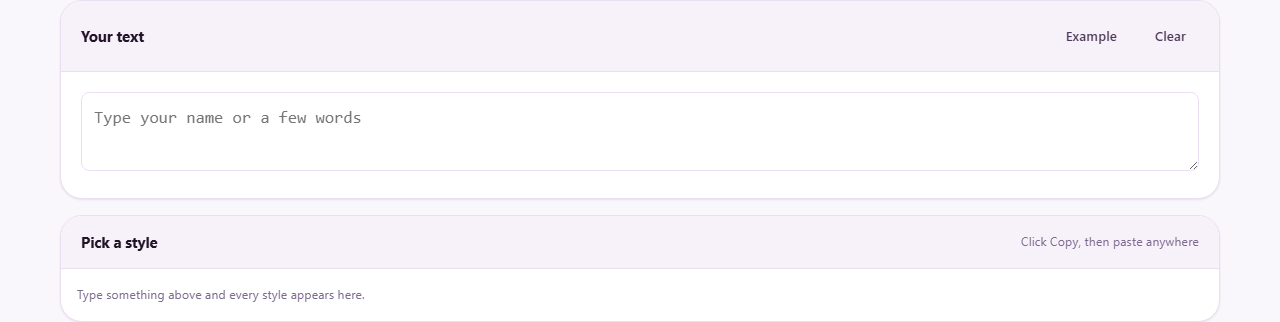
There is one box at the top of the page, labelled with a prompt to type your name or a few words. Everything below it reacts as you type, so there is no convert button to press and no waiting. A small counter near the box keeps track of how much you have typed, which matters because name fields elsewhere usually have tight length limits.
Two small buttons sit beside the counter. Example drops a sample phrase into the box so you can see all the styles filled in without thinking of anything yourself. Clear empties the box in one press when you want to start over. That is the whole control surface, and the simplicity is the point: the interesting decisions happen in the list underneath.
Twenty styles, four rough families
The results panel shows your words rendered twenty different ways, each row with its own copy control. It helps to see them as families rather than twenty separate choices.
The first family reshapes the letters themselves: thick strokes, slanted strokes, script curves, old-style blackletter, typewriter-like forms. The second wraps each letter in an enclosure, such as a circle. The third plays games with orientation, including a version that reads as if the whole line were turned upside down. The fourth family is different in kind: it keeps your ordinary letters and attaches small marks to them, which is how the crossed-out and underlined looks are made. That last family is the most reliable of all, because underneath the marks your real letters are still there.
A two-minute walkthrough
Say Maya streams puzzle games and wants her handle to stand out. She types maya plays into the box. The counter ticks up as she goes, and all twenty rows rebuild themselves with each keystroke. She scrolls the list once, top to bottom, just to see the range. The script version feels too formal for puzzle games and the upside-down one is a joke that would get old fast.
She settles on the thick bold style, presses the copy control on that row, opens her streaming profile in another tab, clicks into the display-name field and pastes. The bold letters land intact. She saves, then checks the profile from her phone as well, because her own phone is the cheapest test of how the name looks on a device that is not hers. Total time, about two minutes, most of it spent enjoying the scroll.
When squares show up instead of letters
Every device draws text using the fonts installed on it. The alternate alphabets live in odd corners of the catalogue, and cheaper or older devices sometimes ship without a font that covers those corners. When that happens the reader sees hollow rectangles, one per missing letter, and your carefully chosen name turns into a row of boxes.
You cannot fix another person's phone, but you can choose defensively. The bold and slanted families are the most widely supported. The enclosed and rarer decorative sets fail more often. If your audience skews toward older hardware, stay near the top of the list, and remember that the marked-up family from earlier displays almost everywhere because it is built on normal letters.
The costs nobody sees at first
Software that reads text does not see the resemblance between a bold-looking A and a real one. This has consequences worth knowing before you commit a name to it.
Search is the big one. If your profile name is written in an alternate alphabet, someone typing your name normally into a search box may simply not find you, because the characters do not match. Screen readers are the second: some read each decorated letter as a long technical description, turning a short name into a slow recitation, and others skip the characters entirely. A person using one may never hear your name at all. Keep the decoration to a name or a short flourish, never to sentences you need people to read.
Usernames are the hard case
Display names and bios are usually permissive. Usernames, the unique handle with the at-sign, are often not. Many platforms restrict handles to plain letters, digits and a few separators, and will either reject the paste or silently strip it back to nothing.
The safe pattern is to test before renaming anything you care about. Paste the styled version into the site's own edit field and watch what happens. If the platform refuses it, a common compromise is a plain username with a styled display name on top, which most services allow. What you never want is to discover the restriction halfway through a rename, which on some platforms starts a waiting period before you can change it again.
When this is the wrong tool
If the destination understands formatting, use the destination's own formatting. A document, an email in rich-text mode, a slide, a web page you control: in all of those, genuine bold is searchable, readable aloud, and restyled in one place later. Lookalike characters would only make that harder.
It is also the wrong tool for anything official. A form asking for your legal name, an application, an invoice: decorated characters in those fields can fail address checks and record matching in systems downstream, and the failure surfaces weeks later as a mystery. And if what you really want is a picture of styled words, a logo or a banner, a design tool gives you fonts, colour and layout, which no character trick can. This generator occupies one narrow niche, plain-text fields that allow anything, and it is best kept there.
Habits that keep it fun
- Style a name or one short phrase, not whole paragraphs, since long runs of decorated text are genuinely hard to read.
- Check the result on a second device before you commit, ideally an older or cheaper one.
- Prefer the widely supported bold and slanted families for anything permanent.
- Keep a plain copy of the text somewhere, so you can retype or re-style it later without decoding.
- If a platform strips the styling, take the hint rather than fighting it with even rarer characters.
Everything happens in the box on your screen
The swap from plain letters to lookalikes is a tiny table lookup, and your browser performs it locally as you type. The words never travel to a server, no account exists to attach them to, and closing the tab is the end of the matter. For a tool people often use on names, nicknames and personal messages, that is worth spelling out plainly: the only place your text exists is the page in front of you, and the only copy that leaves it is the one you paste somewhere yourself.