
Turning a plain draft into pages that match the rulebook
A style guide is really a page of measurements: this margin, that type size, a running head up here. This page reads the draft you paste and builds the finished pages for you, so what you print matches what a marker or an editor is looking for. Below is what each box does, a full walk through two real jobs, and the slips that catch people out.
Who lands on this page
Three sorts of writer turn up here. A student has an essay due tonight and needs it in MLA, with the half-inch indents and the surname in the top corner. A researcher is handing in a chapter and the department wants APA or Chicago. A novelist has a short story ready and a magazine asks for standard manuscript format.
In every case the words are done. What is left is the fiddly shell around them, and that shell is graded or judged just as the words are. Getting the margins, the spacing and the header right by hand in a word processor is slow and easy to botch. Pasting the text here and picking a name is faster and harder to get wrong.
Pasting the writing in
The big box on the left, headed Your writing, takes the whole piece. A blank line between two chunks starts a new paragraph. A line that opens with a hash mark is treated as a heading or a chapter title. A line that begins with a greater-than sign becomes a long, set-in quotation. A lone hash on its own line prints as a scene break.
You can also mark a few words. Wrap them in single stars for italics, double stars for bold, or underscores for an underline. Try an example fills the box with a short demo so you can watch the layout form. Open a file pulls in a plain text file when the piece is too long to paste comfortably.
Picking the style
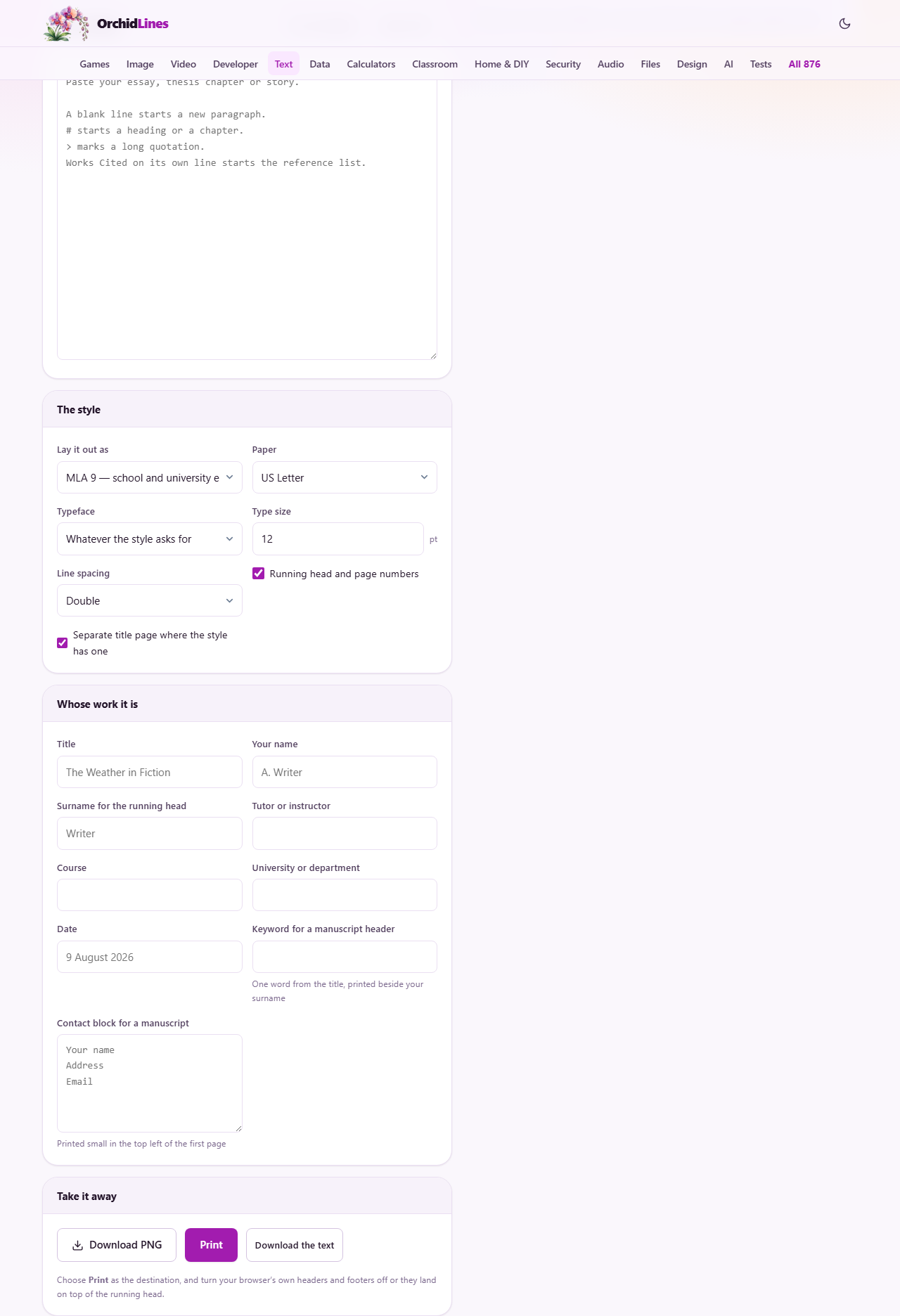
The menu called Lay it out as is the main decision, and it drives almost everything else. MLA suits school and university essays. APA is built for the social sciences. Chicago, also known as Turabian, is common in history and the humanities. Standard manuscript is what you send a publisher with a story. Plain double-spaced is a clean fallback when no rulebook applies.
Each choice quietly switches on the boxes it needs and hides the rest, so you never fill in a field the style will ignore. Pick the style first. Doing so also resets the type size and line spacing to that style's own defaults, which you can then nudge if you must.
Paper, face, size and spacing
Four small controls sit beside the style menu. Paper offers US Letter or A4. Typeface defaults to whatever the chosen style asks for, and you can force Times New Roman, Courier New, Arial or Georgia instead. Type size is in points, from eight to sixteen, in half-point steps. Line spacing gives you double, one and a half, or single.
The spacing menu hides more than it shows. Double is not simply twice the point size; it is built from the real single-line height of the face you picked, which is why the page count here matches the one your marker will see. If you change the face, the whole page re-measures itself, so an essay in Georgia will run to a slightly different number of pages than the same words in Times.
Saying whose work it is
The panel titled Whose work it is holds the name fields. Title and Your name are the obvious two. Surname for the running head is the word that prints in the top corner beside the page number. Tutor or instructor, Course, University or department and Date fill the block a school essay wants on its first page.
Two fields are only for a story. Keyword for a manuscript header is one word lifted from the title; it prints next to your surname on every page after the first. Contact block for a manuscript takes your name, address and email across a few lines, and those print small in the top left of the opening page. Leave any box blank and it simply does not appear.
The two switches
Under the style controls are two tick boxes. Running head and page numbers turns the whole header on or off. With it on, MLA prints your surname and the page number in the top right, a manuscript adds the keyword between them, and the academic styles show a bare page number.
Separate title page where the style has one does what it says. APA and Chicago each open with a page of their own for the title and your details, and this switch decides whether that page is built. MLA, a manuscript and the plain layout have no separate title page, so for those three the box has nothing to do.
Reading the pages on screen
The right side shows real sheets of paper, scaled down to fit the window. They are drawn here rather than left to the printer, because a browser has no reliable way to stamp a page number into a running head, and these styles all demand exactly that.
A row of small chips reports the figures: the word count, the number of laid-out pages, how many lines fit on a page, a rough manuscript-page total, an estimated reading time, and the paper size. A yellow strip appears when something needs attention, such as a missing surname or a reference list with no heading to start it.
Getting it off the screen
The Print button opens your browser's own print box. From there you can send the pages to a printer or, by choosing a save option as the destination, keep them as a PDF. One thing to do first: turn off the browser's own headers and footers, or its date and web address will land right on top of your running head. The setting is usually tucked under more options.
The Download the text button is a different thing entirely. It saves the plain words you pasted, as a simple text file, with none of the layout. Think of it as a backup of your typing rather than the finished document. The formatted pages only ever leave through Print.
A worked example: an MLA essay
Meera has finished a 1,600-word essay and needs it in MLA by morning. She pastes it into the writing box. She leaves Lay it out as on MLA. In the name panel she types the title, her full name, and Meera Rao's surname, Rao, in the running head field. She adds her tutor, her course, and the date.
The pages redraw at once. The first sheet shows the four-line block in the top left, then the centred title, then the essay with a half-inch first-line indent on each paragraph. The top right of every page reads Rao and the page number. The chips say five pages. She types Works Cited on a line of its own at the end, pastes her sources under it, and that list jumps to a fresh page with a hanging indent. Then she prints to PDF.
A worked example: a story for submission
Now a different job. Aled has a 3,470-word story and a magazine that asks for standard manuscript format. He switches Lay it out as to Standard manuscript. He fills the contact block with his name, address and email, and puts one word from the title in the keyword field.
The first page changes shape. His contact details sit small in the top left. The top right reads about 3,500 words, a rounded estimate on purpose. The title drops to roughly the middle of the page with his byline beneath it. Because a manuscript starts each chapter on a new page, any hash heading he used pushes the next section down to a clean sheet. Any italics he marked come out underlined, which is old-fashioned and exactly what this format wants.
Common slips and their fixes
The most frequent one is an empty surname box. Without it the running head has no name to print, and the warning strip says so. Type the surname and every page corrects itself. The next is a reference list that does not start. The heading has to be Works Cited, References or Bibliography on a line by itself, or the entries stay in the body with no hanging indent.
Two more come at print time. If the pages carry a stray date and web address, the browser headers are still on; switch them off in the print box. And if you were hoping the download button would hand you a formatted file, it will not: use Print and save as a PDF for that.
When another tool fits better
This page is for the last step, when the writing is settled and you want it dressed correctly and printed. It is not a place to keep writing. If you are still drafting, still moving paragraphs, still leaving comments for a co-author, a full word processor is the right home and you should come here only at the end.
It is also built around English-language academic and fiction layouts. A form with numbered legal clauses, a slide deck, or a table-heavy report each want their own kind of tool. Bring this page finished prose, and it will handle the shell.
The draft stays with you
Every page you see is measured and drawn by the browser tab in front of you. The essay or story you paste is never sent to a server, never stored, and never seen by anyone but you. Close the tab and the only copy left is the one on your own machine.
That is worth knowing when the writing is unpublished or graded work you would rather keep quiet. You can lay out a dissertation chapter or a story no editor has read yet, print it, and walk away with nothing left behind.