
Testing a Reading Trick on Your Own Eyes
This page reformats text so the front of every word is emphasised, a style some readers swear speeds them up. Rather than sell you on it, this article shows you how to run a fair trial: what each setting changes, what the research honestly says, how to tune the display for comfort, and how to carry the result into your documents if it earns its keep.
The theory in one paragraph
Skilled readers do not read letter by letter. The eye hops along a line, landing a few times per sentence, and the brain fills in whole words from partial glimpses. The idea behind this format is to give each hop a target: make the opening letters of every word heavier, and the eye supposedly lands faster and moves on sooner, with the faint tail of the word inferred rather than inspected.
Whether that mechanism truly speeds anyone up is an open question. What is certain is that the effect is easy to generate, harmless to try, and strongly liked by a minority of readers. This page exists so you can find out cheaply which camp you are in.
What the studies found, told straight
The honest summary: controlled tests have mostly measured no reliable gain in reading speed or comprehension, and one or two measured a small slowdown. Nobody has shown harm, and nobody has shown a miracle.
Yet self-reports keep arriving from people, often those who struggle to hold focus on dense pages, who say the emphasis anchors their eyes and stops lines from swimming. Both things can be true at once: no average effect, real individual effect. The practical conclusion is not to trust anyone's verdict, including your own first impression. Run the comparison described later in this article on a genuinely long text before deciding.
The share control is the heart of it
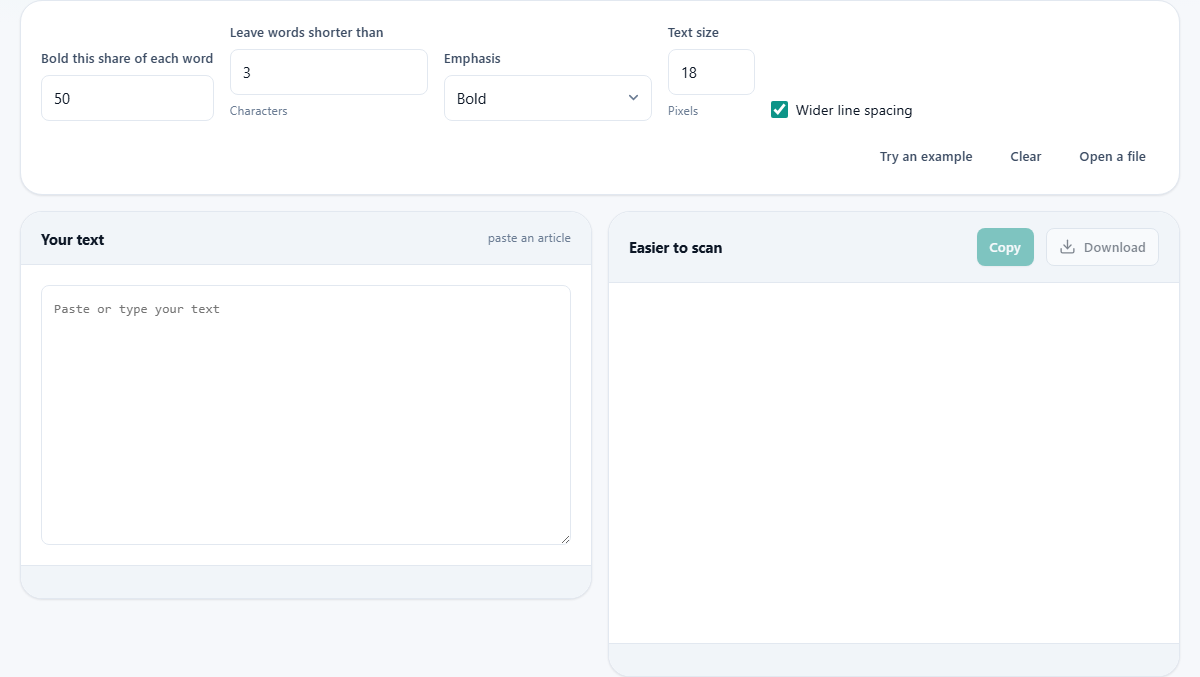
Bold this share of each word sets how much of every word gets the emphasis, from 10 to 90 percent in steps of five, starting at half. At 10 percent only the opening letter or two carries weight, a whisper of a cue. At 90 nearly the entire word is heavy, which defeats the purpose, since emphasis only works against contrast.
Half is the conventional setting, but the interesting range is 40 to 60. Move in steps and read a full paragraph at each stop, not just a line. The right value feels like nothing at all; the wrong values feel like reading through a fence.
Why little words are left alone
Leave words shorter than sets a length below which words are skipped entirely, and it starts at three characters. English is stuffed with tiny function words: a, of, to, in, the. Emphasising their fronts adds visual clutter with no navigational value, because your eye barely visits them anyway.
Raise the threshold to four or five and the page grows calmer, with only substantial words carrying weight. Drop it to one and absolutely everything is marked, which some readers prefer for consistency. This is taste, not correctness; the setting exists because no single answer suits everyone.
Three flavours of emphasis
The Emphasis menu offers three renderings. Plain Bold is the classic: heavy fronts, normal tails. The second option keeps the bold fronts but also fades the rest of each word, which raises the contrast between anchor and tail without making the page darker overall; many people find this the gentlest on the eyes over a long session.
Coloured swaps weight for hue, tinting the word fronts instead of thickening them. It reads lighter and can suit screens where bold text renders clumsily. Try all three on the same passage; the differences are larger in feel than any description suggests.
Comfort settings that may matter more
Two controls have nothing to do with the trick and everything to do with reading comfort. Text size runs from 12 to 32 pixels, starting at 18. Wider line spacing, on by default, opens up the vertical gaps between lines.
Here is a quietly subversive tip from the page itself: for many readers, bigger type and roomier lines deliver more benefit than the emphasis does. If you find the converted text easier, spend one minute checking whether plain text at the same size and spacing feels just as good. You might discover the real fix was never the bolding.
A fair trial, step by step
Pick a long article you genuinely want to read, a few thousand words, not a sample paragraph. Use Open a file if it lives in a text file, or paste it in. Set the share to 50, the skip threshold to 3, emphasis to the faded option, size to 20, and read half the piece in the output pane, timing yourself loosely.
Then read the remaining half as plain text at the same size. Compare not just speed but how often your attention slid off the line. Repeat another day with the share at 40. Two or three such sessions give you a real answer about your own eyes, which is the only answer that matters here.
Taking the formatting with you
The Copy button preserves the emphasis as real formatting, not as markup you have to interpret. Paste into a word processor or an email client and the heavy word fronts arrive intact, so you can convert a study handout or a long brief once and keep the formatted copy.
This is the sensible workflow for anything you will read repeatedly: convert here, paste into the document you actually live in, and keep this page for fresh material.
The three counts under the result
A row of small chips sits below the converted text. The first gives the number of words that were treated, which also appears as a short line beneath the input. The second repeats the share you have chosen, handy once you have nudged the number a few times and lost track of where it ended up. The third estimates how long the piece will take to read, worked out at roughly two hundred and twenty words a minute.
That last figure is the most useful thing on the panel and has nothing to do with the emphasis at all. Before starting a long article it tells you whether this is a ten minute job or a forty minute one, which usually decides whether you read it now or keep it for later. Treat it as a guide rather than a promise: two hundred and twenty words a minute is an ordinary adult pace for plain prose, and dense material runs slower for everybody.
What actually receives the emphasis
The rule is narrower than most people assume. Runs of letters are marked and nothing else is. Accented letters and apostrophes count as part of a word, so names and contractions are handled properly rather than being chopped in two. Digits are not letters, so a year, a price, a room number or a reference code comes through exactly as typed, and a paragraph thick with figures looks almost unchanged.
There is a rounding rule too. The share is always rounded up, never down, and at least one letter is emphasised whatever number you set. At the default of half, a three letter word gets two heavy letters rather than one and a half. That is why short words still look deliberate instead of half finished, and it is also why very low shares change less than you might expect on short words.
A second setup: revision notes before an exam
The fair trial above is for judging the format. This is for using it. A student has a chapter of biology notes to go through in short bursts. Set Bold this share of each word to 40, so the cue is a nudge rather than a wall of heavy type. Raise Leave words shorter than to 5, which lets the small joining words fade back and leaves the technical terms carrying the marks. Choose Coloured for the emphasis, because a tint stays clearly separate from any bold headings the notes already contain. Push Text size to 24 and keep the wider spacing ticked, since notes are read in stops and starts rather than in one flow.
One practical warning goes with this. The page does not hold on to what you paste; reload it, or come back tomorrow, and the input box is empty again. So the copy step matters. Convert, press Copy, and paste the result into the document you actually revise from.
Text that suits it, and text that fights it
The format is not equally useful on everything, and knowing where it fails saves wasted effort.
- Flowing prose is the natural home: articles, chapters, essays, long briefings, anything you read line after line.
- Tables of figures and price lists gain almost nothing. The numbers are untouched, and your eye is hopping down columns rather than following a line.
- Code, commands and file paths are better left alone. Emphasising part of a name is confusing, and the formatting that copies so usefully into a document is a nuisance in a code editor.
- Poetry and song words can feel wrong, because the emphasis falls by counting letters rather than by meaning, and it may cut across a rhythm the writer chose carefully.
- Very short pieces are not worth converting. The benefit, if you get one, comes from a long stretch of text.
What this page will not do
It is a display preference, not an intervention. Nothing here diagnoses, treats or measures anything about reading difficulties, and the honest state of the evidence is described above. If reading is a persistent struggle, this format may still be a comfort worth having, but it belongs alongside proper support, not in place of it.
It also cannot rescue bad writing. A muddled document with emphasised word fronts is still muddled, just more confidently so.
Your reading stays your own
Whatever you paste or open here, work notes, contracts, a chapter of something personal, is processed entirely on your device by the page's own script. No copy is transmitted, and nothing persists after you close the tab. Reading habits are private, and the material you read is often more private still; the design of this site keeps both where they belong.