
Ones, Zeros and the Numbers Hiding in Your Words
Under every message you have ever typed sits arithmetic. This article explains that arithmetic gently: what a byte is, how the same text looks in four different number systems, how to convert in both directions without tripping over spacing, and why accents and emoji need special care that this converter takes automatically.
Where the numbers come from
A computer stores no letters. It stores numbers, and by agreement certain numbers stand for certain characters. The capital A is 65. The lower case a is 97. A space is 32. Type a sentence and you have really typed a list of numbers; the screen just dresses them up.
Each number is held in binary, meaning it is written using only ones and zeros. Eight of those digits form a byte, and a byte can hold any value from 0 to 255. So the capital A, number 65, lives in memory as the pattern 01000001. This page simply shows you that layer. Nothing mystical happens: the same text, one costume change down.
Two directions, one switch
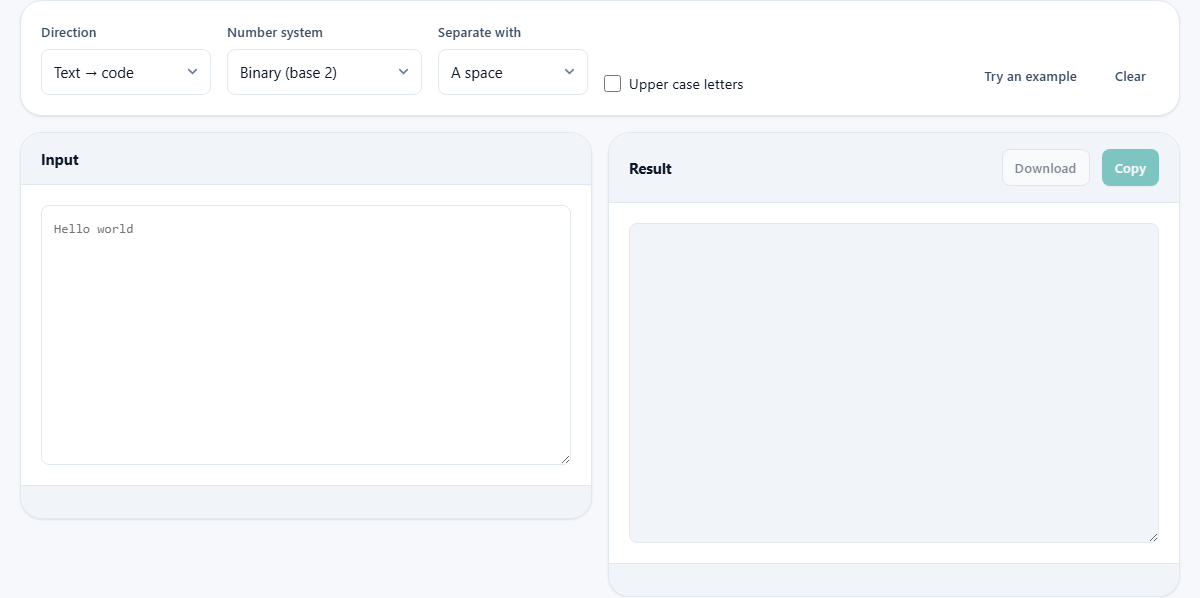
The Direction menu offers Text to code and Code to text. The first takes ordinary writing and produces digits; the second takes digits and rebuilds the writing. Converting runs live, so the result updates with every keystroke.
The round trip is the property worth trusting. Convert a sentence to digits, copy the result, flip the direction, paste it back, and the original sentence returns exactly, emoji and all. If you are learning, that loop is also the best exercise available: encode something small, then decode it by hand before letting the page confirm your answer.
Four number systems, one meaning
The Number system menu holds binary, hexadecimal, decimal and octal. These are not four codes; they are four ways of writing the same values. Binary uses two symbols and is what hardware actually does. Decimal is the counting you grew up with, so it is the easiest place to see that A really is 65.
Hexadecimal, base 16, is the working shorthand of programming. One hex digit stands for exactly four binary digits, so a whole byte becomes just two characters: the A that was 01000001 in binary is simply 41 in hex. Octal, base 8, is the historical cousin you meet in a few older systems and in file permissions. When a puzzle or a textbook hands you digits, matching this menu to the right base is the whole game.
Separators and the upper case box
The Separate with menu controls what goes between the groups: a space, a comma, a new line, or nothing at all. Spaces make output humans can read, one byte per group. New lines suit long text you want to scan vertically. Nothing produces one unbroken run of digits, which some puzzle formats and data fields require.
The Upper case letters box only matters for hexadecimal, where the digits above nine are written with letters. Ticked, you get 4A; unticked, 4a. Both mean the same thing, so this is purely about matching the convention of wherever the output is going.
Accents, emoji and the trap most converters fall into
For plain English, every character is one byte and any converter seems fine. The differences appear the moment the text does. This page converts the UTF-8 bytes of your text, the encoding the whole modern web uses. In UTF-8, an accented letter occupies two bytes and most emoji occupy four.
A converter that ignores this produces digits that cannot be decoded back, which is why pasting an emoji elsewhere often returns question marks. Here, the byte count simply grows and the round trip still lands perfectly. This is also why your output can contain more groups than your input has characters: count bytes, not letters, and the mystery disappears.
A small message, all four ways
Take the two-character message Hi and follow it through. As binary with spaces it becomes 01001000 01101001, two groups of eight. Switch the menu to decimal and the same message reads 72 105, which you can verify against any character chart. Hexadecimal gives 48 69, half the length of the binary. Octal gives 110 151.
Now flip the Direction menu, paste 01001000 01101001 into the input, and Hi comes straight back. Try deleting the space between the groups first: the decoder still gets it right, because sixteen binary digits can only split into two bytes one way. Five minutes of this kind of play teaches more than an hour of reading about it.
Decoding forgives messy input
Digits arrive in the wild in every imaginable shape: grouped with spaces, chained with commas, stacked one byte per line, or fused into a single run. The decoder accepts all of these without any tidying from you. It also ignores the 0b and 0x prefixes that programming languages stick in front of binary and hex values, so copied code snippets paste straight in.
One habit still helps: paste exactly what you were given, rather than retyping it. Transcription is where errors sneak in, and one mistyped digit shifts a whole byte to a different character.
When the page says no
Feed the decoder digits that do not belong to the selected base, hex letters while binary is chosen, or an eight or nine while octal is chosen, and it tells you plainly instead of guessing. That is a deliberate kindness. A converter that silently skips bad characters hands you output that looks valid and is quietly wrong, which is far worse than an error message.
So treat a complaint as information. Nine times out of ten it means the Number system menu does not match the digits, and switching the base fixes everything without touching the input.
The little counts under each panel
A row of small chips sits below the result, and it changes with the direction. Going from text to code it reports three things: how many characters you typed, how many bytes those characters occupy, and which base the output is written in. Going the other way it reports how many characters came out and which base they were read from.
The two counts on the encoding side are the interesting pair. When they agree, your text is plain and every character is one byte. When they differ, a short line appears saying so, telling you the character count, the byte count, and that accents and emoji take more than one each. That line is the fastest explanation of why the output looks longer than expected, and it turns a confusing result into an obvious one.
A second walkthrough: a clue written in hex
Suppose a puzzle hands you the string 48 65 6c 70 21 and no explanation. Set Direction to Code to text and paste it in. If the Number system is still on binary, the page objects at once that 48 is not valid binary, which is true: binary has no digit 4 or 8. That complaint is itself the clue.
Switch the base to hexadecimal and the answer appears: Help! The chips confirm five characters out, read from hexadecimal. Now push it further. Flip the direction back to Text to code, choose decimal, and the same five characters read 72 101 108 112 33. Those are the plain character numbers, and 33 for an exclamation mark is a number worth remembering. One clue, three number systems, and the whole idea made concrete in about a minute.
The complaints you may meet, and their cures
The decoder is fussy on purpose. Each message points at a different fault.
- A run of bits that is not a whole number of bytes: your pasted binary does not divide by eight. A digit was usually lost while copying, or a stray character joined the run.
- Something is not valid for the chosen base: the Number system menu disagrees with the digits in front of you. Change the menu, not the input.
- A value that is not a byte, meaning it falls outside 0 to 255: two groups have probably been run together, or the numbers were never byte values in the first place.
- Bytes that are not valid text: the digits decoded, but the bytes do not form real writing. Almost always the wrong base again, or a fragment that begins in the middle of a multi byte character.
Getting the result out of the page
Two buttons sit above the result panel, and both stay greyed out until there is something to hand over. Copy puts the whole result on the clipboard, which is what most people want for pasting into a worksheet, a chat or a code file. Download saves it as a plain text file instead, which suits a long conversion you would rather not hold in the clipboard while you do something else.
Two more buttons sit up beside the settings. Try an example fills the input with a short greeting so you can see the layout without inventing test text. Clear empties both panels for a fresh start. Nothing else needs pressing anywhere: the conversion runs as you type, in both directions.
What people actually use this for
Students and teachers use it to make encoding lessons concrete, because watching your own name become bytes beats any diagram. Puzzle solvers meet binary and hex constantly in escape rooms, geocaches and online riddles, where a wall of eight-digit groups is a strong hint about what to try. Programmers use it as a quick sanity check when a byte value in a log or a data dump needs a human reading.
None of these people need the same output format, which is why the separator, base and case controls exist rather than one fixed style.
Converted on your machine, kept on your machine
The encoding and decoding are performed by the page itself, on your device, with no server participating. Whatever you type, and whatever you decode, exists only in this browser tab, and there is no size cap beyond what your machine can comfortably hold. For schoolwork that is a convenience; for anything sensitive it is the whole point.