
Packing a web page and its whole folder into one attachment
What the Self-Contained HTML Bundler follows, what it deliberately leaves alone, how to read the five counters and the table it hands back, and a complete build on a small report folder with the numbers you should expect to see.
The awkward thing about a web page
A web page is almost never one file. It is a short document that names other files: a stylesheet for the looks, a script for the behaviour, pictures, fonts. Open the page and the browser fetches each of those in turn. Move the page on its own and every one of those names points at nothing.
That is fine while the page lives on a server. It becomes a nuisance the moment you hand somebody the page itself. Email it and they get a bare skeleton. Bundling solves this by writing the contents of those other files into the page, so the result is one document that carries everything it needs.
- A report or dashboard sent to somebody who will open it straight from their downloads.
- A page that has to work on a machine with no connection at all.
- An exhibit or a demo carried on a memory stick.
- A snapshot kept for the record, where a folder of loose parts would rot.
- A bug report where the recipient must see exactly what you saw.
Why it asks for the folder
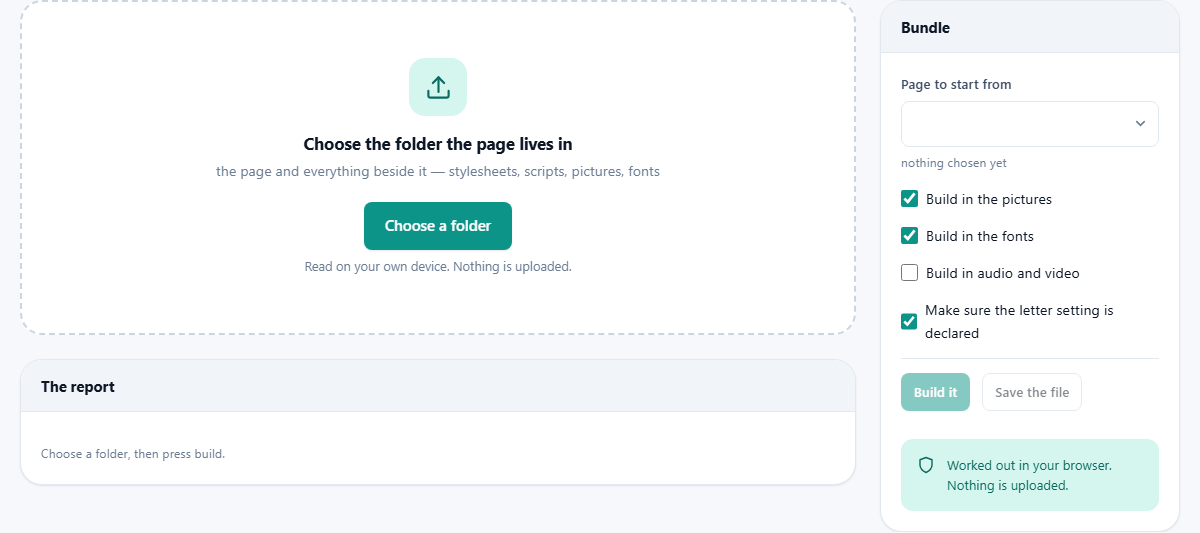
The drop area says to choose the folder the page lives in, and that wording is exact. A browser can only read what you have handed it. If you hand over one page, the page's list of stylesheets and pictures is just a list of names with nothing behind them.
Handing over the folder gives the tool every file at once. It still only opens the ones your page actually names, so the rest are present, not read. A line under the menu then tells you how many files it found and how many of them are pages. If the folder holds no page at all, the status line says so in red and the build button stays out of reach.
Page to start from, and the four boxes
The menu labelled Page to start from lists every page in the folder. Anything called index comes first, then the ones nearest the top of the tree, then the rest in alphabetical order, which is nearly always the order you were hoping for. One build makes one page, so a small site is done a page at a time.
Under it sit four settings.
- Build in the pictures, on to start with. Turn it off and the pictures stay as links, which is useful only when you want a very small file and the pictures are somewhere the reader can still reach.
- Build in the fonts, also on. Fonts are heavy, so switching this off saves the most weight. The page will then fall back to whatever typeface the reader's machine offers.
- Build in audio and video, off to start with, and left off for good reason. Sound and film are large, and writing them into a page inflates it far past anything you can send in a message.
- Make sure the letter setting is declared, on. If your page never said which alphabet it uses, a line saying so is added at the very top. Without it, a page opened from a disk can show accented letters as nonsense. If the page already declares one, nothing is changed.
Build it, then save it
Build it does the work and leaves the result waiting in memory. The status line then reports two sizes: what the finished single file weighs, and what the page on its own weighed before. The gap between them is everything that was pulled in.
Save the file writes it to your downloads. The name is taken from the page you started with, with -standalone added, so index.html comes back as index-standalone.html. Your original folder is not altered.
Change a setting and build again as often as you like. Each build starts from the untouched folder, so no earlier attempt can affect a later one.
The report is the point
Most of the value here is not the file, it is the table under it, because it tells you what will be broken before your reader finds out.
Five counters sit above it: how many references the page had, how many were built in, how many were missing, how many still need the internet, and the finished size. Two deserve attention every time. Missing means a file the page asks for is not in the folder, and it will be a blank space on the other machine. Still need the internet means a reference to another site, which cannot be built in and will fail for anyone offline.
The table has three columns: the kind of thing, the reference exactly as the page wrote it, and what happened to it. Missing entries are red, and anything left rather than absorbed is coloured too, so you can scan and stop where it matters. A page with nothing to pull in says so plainly.
What is followed, and what is left alone
Stylesheets are read and their whole contents are written into the page. Every address inside a stylesheet is handled from where that stylesheet sits, not from where the page sits, which is the detail most home made attempts get wrong. A stylesheet in a css folder asking for something one level up means one level up from css. Stylesheets that pull in other stylesheets are followed the same way.
Scripts named by the page are pulled in whole. Pictures are covered in all their usual spots, including the lists of alternatives used for different screen sizes and the ones written into a style attribute on one element. Icons named in the head are included, and so are posters, subtitle tracks and embedded objects.
Two things are deliberately left. A link to another page in the same folder stays a link, and is listed so you know the bundle is one page rather than a site. Anything on another site is also left as written, because this page has no way to fetch it and would rather tell you than pretend.
A quarterly report folder, built
The folder holds index.html, a notes.html, a css folder with site.css which pulls in print.css, a js folder with app.js, a fonts folder and an img folder of charts. Choosing it shows eleven files and two pages, with index.html already selected. Everything is left at its defaults.
After Build it, the counters read: references 12, built in 10, missing 1, still need the internet 1, finished size 2.4 MB. The status line says the page alone had been 18 KB.
In the table, site.css and print.css both say built in. So do the font, the background picture the stylesheet asked for, app.js, the logo and the first chart. One row is red: img/chart-2.png, not found in the folder. One row is coloured: a script whose address begins with https, left as a link because it is on another site. The last row notes that notes.html was left as it is, because it points at another page in the folder.
So there is work to do before sending. Find chart-2.png and put it where the page expects it, or fix the reference. Then decide about that outside script: copy it into the folder and point the page at the local copy, or accept that this one piece needs a connection. Build again and the missing counter should read zero.
The size you pay
Anything written into a page has to be spelled out in ordinary text characters, and that costs about a third more room than the original file took. Ten megabytes of folder becomes roughly thirteen megabytes of page. You are not compressing anything, you are removing the need for a folder.
For a report of a couple of megabytes nobody notices. For anything with film in it the sums stop working, which is why the audio and video box starts switched off. If the finished file is too large to send, cut the fonts first and the pictures second, then build again and watch the size counter.
The one thing a bundle cannot repair
A page opened straight from a disk is treated by browsers as having no home, and the strictest rules apply. A script written in the modern module style will refuse to run under those rules, and gathering everything into one file does not change that.
So those scripts are marked in the report as they are built in. If you see that mark and the page needs the script to do anything useful, a single file will not serve you; the page has to be opened through a proper server.
Common slips
- You picked the page instead of the folder. The tool asks for a folder for a reason, and picking one file leaves it nothing to gather.
- The build looks fine but the counters say five missing. Read those rows. A reference with the wrong capitals counts as missing on a system that cares about capitals.
- The file is far bigger than expected. Check whether the media box got switched on.
- You expected a whole site. Each build produces one page, and the links between pages will not work in the bundles.
When a bundle is the wrong answer
If the page will live on a server anyway, do not do this. Separate files are held in the browser's cache and shared between pages, and rolling them into one throws that away.
If what you want is a fixed document rather than a working page, printing it gives something smaller and easier to read on a phone. And if the page fetches data while it runs, no amount of packing helps; that needs a live source, not a copy.
It never reaches out, and it never sends
This tool cannot download anything, and that is not a policy but the shape of the thing. It is why a reference to another site is reported rather than quietly absorbed.
The other direction is just as plain. Your folder is read by your own browser, the new page is assembled in your own memory, and Save the file writes it to your own disk. Nothing about the folder is transmitted or kept.