
Reading an attachment on a machine that has no word processor
The help above says what this does. This piece goes further: what the page actually does with your file in the second after you drop it, how to read the facts panel, exactly which parts of a document survive the trip and which do not, what each of the five buttons produces, and the handful of files it will politely refuse.
The problem, in three familiar shapes
You are on a borrowed laptop and the agenda arrives half an hour before the meeting. Nothing on the machine opens it, and the first search result wants you to upload the file to a stranger and wait.
Or the document is a signed agreement, a medical letter or a reference about a named person. Handing that to a free conversion site is not a small thing, whatever their page promises.
Or you simply want to check something quickly: is this the version with the new dates in it, who last touched it, is the salary figure still wrong. None of that needs a word processor, an account or an install. It needs a reader.
This page is that reader. Drop the file, read it, take the text with you if you want it, and close the tab.
What happens in the second after you drop it
A modern Word file is not one thing. It is a compressed archive with a folder structure inside it, and the words live in a single marked-up file within that structure, with any pictures kept alongside in their own folder.
So this page opens the archive, finds that marked-up file, and translates it into the same sort of markup a web page is made of. Pictures are pulled out and handed to the browser directly. No conversion service is involved because none is needed; the format was designed to be opened this way.
The result is shown on a white sheet in the middle of the page. It is the content of the document, poured into a single continuous column. It is not a photograph of the pages, and it does not try to be.
The facts panel
Above the sheet is a short list of details: File, Title, Author, Last edited by, Modified, Words and Images. Any line the document has nothing to say about is left out entirely, so a stripped file shows a shorter list than a well-filled one.
Those middle entries come from the properties stored inside the document rather than from the text, which makes them genuinely useful. Author is whoever created it, Last edited by is whoever saved it most recently, and the two are often different people in a way nobody intended to advertise. If you are about to send a document out, that is worth a look first.
The word count is worked out from the text as it has been rendered here, so it can differ by a little from the number a word processor shows, since the two are not counting exactly the same things. Images is a straight count of the pictures found in the archive.
What survives the trip
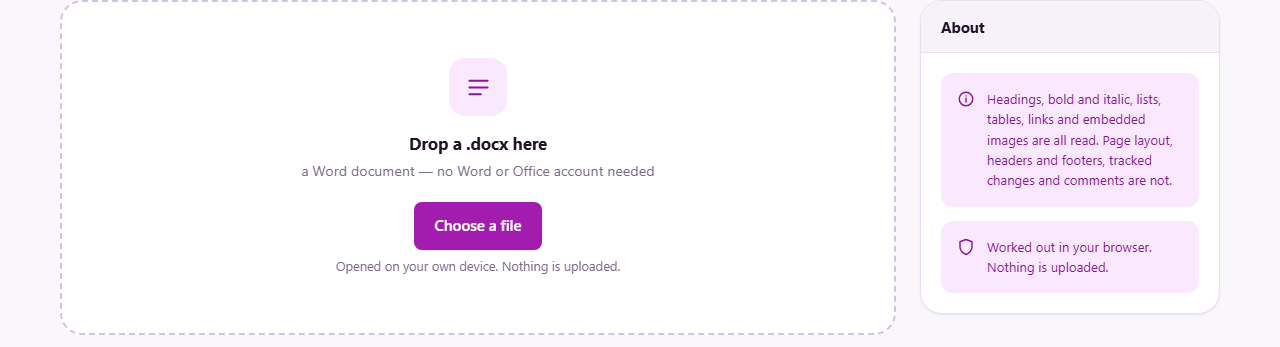
The rail on the right states the boundaries, and they are worth understanding in detail. Headings keep their levels, so a document with a proper outline still reads as one. Bold, italic, underline and struck-through text all come across, as do raised and lowered characters. Paragraphs styled as quotations are set apart. Bulleted and numbered items keep their order and their indent level, and tables arrive as tables.
Links that point at a web address become clickable and open in a new tab; a link to a bookmark elsewhere in the document is shown as ordinary text, because there is nothing sensible for it to point at here. Pictures stored inside the file appear where they were placed. If one cannot be matched to its slot, a small marker is left instead of a gap, so you know something was there.
Now the other side. Page size, margins and columns are not applied. Headers, footers and footnotes are not shown. Automatic fields, comments and tracked changes are left out. That last one deserves care: if the file still holds edits nobody has accepted, what you read here is the text as it stands, which may not match what a colleague sees with their markup turned on. Numbering is not rebuilt either, so a numbered list appears as a plain list; when a clause refers to itself by number, check it against the original before quoting it.
The five buttons
Copy the text puts the whole document on your clipboard as plain text, ready for an email, a message or a notes app. Formatting does not travel with it, which is usually the point.
Download .txt saves the same plain text as document.txt. Download .html saves document.html, which keeps the headings, the emphasis, the lists and the tables, and opens in any browser. Pick the first when you want words to work with and the second when the structure matters.
Print hands the rendered document to your browser's own print dialogue. Another file clears the sheet and brings back the drop area, ready for the next one. Nothing is remembered between files.
Getting a fixed copy without a converter
Every desktop browser can save a printed page as a PDF instead of sending it to a printer. Press Print, then choose the PDF option in the destination list of the dialogue that appears.
Be clear about what you get. The PDF will hold the document's words, headings, tables and pictures, flowed and broken into pages by your browser. It will not reproduce the original page breaks, the header on every sheet, or the exact line endings. For reading, filing and forwarding it is perfect. For anything where the layout is the contract, go back to the program the file was written in.
One file, from drop to done
A supplier sends supplier-agreement-v4.docx and you are on a machine with nothing installed. Drag it onto the drop area. The sheet fills, and the facts panel reads: File, supplier-agreement-v4.docx; Author, a name you recognise; Last edited by, a name you do not; Modified, last Tuesday evening; Words, 4,812; Images, 1.
That mismatch between the two names is your first useful fact, before you have read a word. Now scroll the sheet. The clause headings are real headings, the payment terms table is a table, and the signature block sits at the end with the company logo above it.
You want the payment clause in an email, so you select it on the sheet and copy it, or press Copy the text and take the lot. You want a copy for the finance folder, so you press Print and save it as a PDF. Finally you press Another file and open the previous version to compare the dates. Total elapsed time, about a minute, with nothing installed and nothing sent anywhere.
The files it will turn away
A few things will not open here, and each says so plainly rather than failing in a confusing way.
- The older .doc format. It is a completely different kind of file from the 1990s, not an archive at all. Open it once in any word processor and save it again as .docx.
- OpenDocument files ending in .odt. These are archives too, but arranged differently inside. The page recognises one and tells you what it is.
- A file renamed to .docx that was never a Word document. The archive is opened, no document part is found, and you are told so.
- A document locked with a password to open it. Encryption changes the whole container, so there is nothing here to unpack. Remove the protection in the program that applied it.
- A browser too old to decompress archives on its own. Any current browser is fine; a very old one will say it cannot do it.
When a reader is not enough
This page shows and exports. It does not change a word. If you need to edit the text and save a Word file again, the DOCX viewer and editor in the text section of this site does that job without leaving your browser either.
If the work involves accepting or rejecting tracked changes, adding comments for someone else, or laying out pages precisely, use a full word processor. And if what you were sent turns out to be an e-book, a spreadsheet or an email export rather than a document, this site has separate readers for each, which will make far more sense of them than a document viewer can.
Why local reading is the whole point
Everything described above happens inside the tab you have open. Your browser reads the file from your disk, unpacks it in memory, and draws the result. There is no upload step, no processing queue, and no copy left behind on anyone's server. The downloads and the printout are produced on your own machine as well.
That is not a detail for documents. Contracts, offers, appraisals, references and letters about people's health are precisely the files that get dropped into whichever converter appears first in a search. Reading one here costs nothing and shares nothing, which is the sensible default for anything you would not post publicly.