
Drilling the facts that actually need drilling
How weighted repetition works, what every control on the trainer does, a full session walked through from start to finish, and what the practice list at the bottom is really telling you.
Why random drilling wastes time
A child who already knows 5 times 10 does not need to see it again. Yet a random drill serves every fact equally, so most of a ten minute session goes on the ones that were never a problem. The session ends, the hard facts got three tries out of forty, and nothing has changed.
This trainer does not pick at random. Every fact carries a weight. When a fact is answered correctly, its weight drops. When it is answered wrong, the weight rises and that question comes back far more often. The effect is simple: the session spends its time where the trouble actually is.
Who finds it useful
Primary school teachers running a five minute warm-up before a maths lesson. The tool can sit on the class projector or on a shared laptop that gets passed round the table. Because no login is needed, one device can serve a whole group in turn.
Parents at home who want a short drill but do not want to sit and make up questions. The trainer picks the questions and keeps score, so the adult only needs to be nearby. It is also useful on a tablet in the car or at the kitchen table before homework.
Older students filling gaps. A twelve year old who still pauses on 7 times 8 can tick just the seven and eight tables, set the session going, and work on exactly those facts without wading through ones and twos. Tutors preparing a student for secondary school entrance exams use it the same way.
Choosing which tables to work on
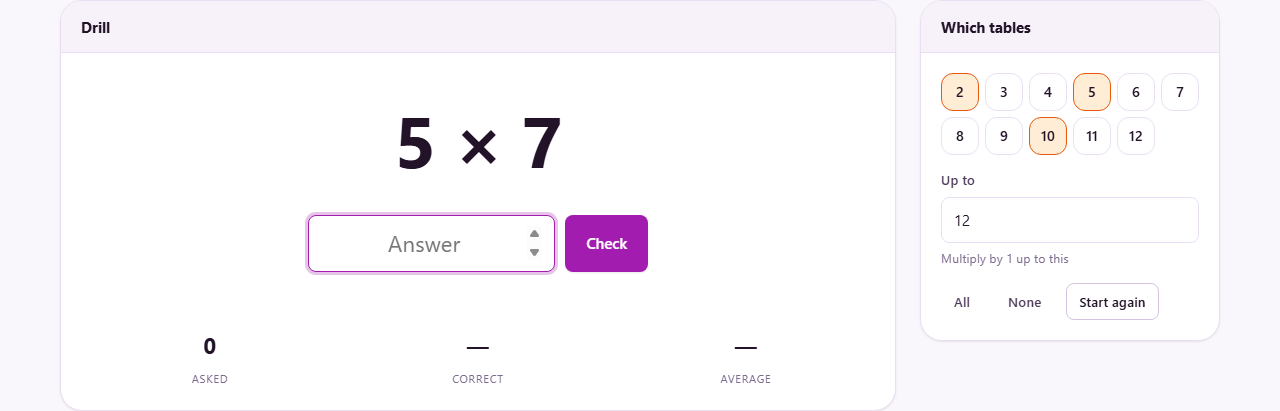
The right hand panel is headed Which tables and holds a row of numbered chips from 2 through 12. Each chip is a tick box. Two, five and ten are ticked when the page loads, because those are the tables most schools teach first.
Tick as many or as few as you want. The All button ticks every chip at once. The None button clears them all so you can start from scratch and pick just the ones you need. Turning a chip on or off takes effect straight away - the very next question will come from the new set without needing to restart.
Below the chips is a field labelled Up to. It sets the highest number any question can multiply by. The default is 12, which covers the full table. Drop it to 6 for a younger child who has only learned the first half, or raise it as high as 20 for extra practice beyond the standard range. Setting it to 15, for example, means questions like 7 times 15 will appear alongside the regular ones.
Answering a question
The Drill panel shows a question such as 7 times 9. Type the answer in the box labelled Answer and press Enter on the keyboard, or press the Check button beside it.
If the answer is right, the next question appears and the fact's weight drops. If the answer is wrong, the correct answer is shown before the drill moves on. That moment of seeing the right answer matters - it is the only teaching the tool does, and it only happens for the facts that need it.
The drill never repeats the same question twice in a row. Getting a fact wrong and then seeing it again immediately would test nothing but the last ten seconds of short term memory. Instead the question goes back into the weighted pool and comes round again after a few others have been asked.
Reading the stats and the practice list
Three figures sit below the answer box. The first, asked, is simply how many questions have been put. The second, correct, is the number answered right, shown as a count. The third, average, is the mean time each answer took in seconds.
Speed matters as much as accuracy here. A child who gets 6 times 8 right but takes four seconds has worked it out rather than recalled it. That fact is known but not fluent, and fluency is what the drill is building. The average time across the session tells you how much working out is still going on. Watch it drop over the course of a week, and you can see recall replacing calculation.
Below the stats, a practice list appears once any facts have been answered wrong. These are the specific multiplications that keep going wrong, and they are the most useful output of the whole session. Write them on a card, stick them on the fridge, and test them again the next day. That is where the real learning happens, outside the screen.
The practice list does not disappear when a fact is eventually answered right. It stays visible as a record of every trouble spot in the session, so you can review the full list at the end rather than trying to remember which questions caused problems along the way.
A full session walked through
A parent ticks 6, 7 and 8 and leaves Up to at 12. The first question is 7 times 4. The child types 28 and presses Enter. Correct, and the next question appears.
Question five is 8 times 7. The child types 54. Wrong - the correct answer, 56, is shown briefly before the drill moves on. The weight on that fact goes up, and within the next few questions 8 times 7 appears again. This time the child types 56. Correct, but the weight is still higher than average, so it will come back once more before the session is done.
After thirty questions the stats read 30 asked, 26 correct, 3.1 seconds average. The practice list shows three facts: 8 times 7, 6 times 9, and 7 times 12. Those are the ones worth writing down.
The parent presses Start again to reset the weights and the score. A fresh session begins with the same tables still ticked. The following evening the same three facts go on a flashcard for two minutes of practice before the next drill, and the second session usually goes faster.
Mistakes to watch out for
- Ticking every table from the start. A younger child who has only been taught 2, 5 and 10 will face facts they have never seen. That is confusing rather than helpful. Match the ticks to what has been introduced in class.
- Treating the score as a test result. The percentage will be low at first because the hard facts keep coming back. That is the tool working, not the child failing. A score of 80 per cent in a weighted drill is better than 95 per cent in a random one.
- Running the drill for too long. Ten minutes is plenty. Longer than that and answers slow down from tiredness, which raises the weights on facts that are actually known. Short daily sessions beat one long weekly one.
- Ignoring the average time. A session where every answer is correct but the average is five seconds is slower than it looks. The facts are being calculated rather than recalled. Aim for under two seconds per answer on the tables that have been practised.
- Forgetting that closing the tab clears everything. There is no account and no saved progress. The weights are for this session only. If you want to keep a record, note down the practice list before you close the page.
When a different tool fits better
- For printed worksheets to take home, the Maths Worksheet Generator creates sheets with the answers on a separate page.
- For division practice, this trainer only covers multiplication. The worksheet generator can produce division problems that always divide exactly.
- For a timed challenge with a fixed question count, a worksheet with a stopwatch beside it works better than a weighted drill that never finishes on its own.
- For younger children learning to count or add, the difficulty here starts at multiplication and does not go lower.
Nothing leaves the machine
The entire drill runs inside your browser. No answers are sent anywhere, no scores are stored on a server, and no account is needed. A shared classroom laptop can be handed from one child to the next without any login, and pressing Start again is all it takes to begin fresh. You can even disconnect from the internet after the page loads and it will keep working, because there is nothing on the other end. Close the tab and every trace of the session is gone.