
Turning one word list into three different practice sheets
How the three sheet types work, what the gap-fill algorithm actually does with the missing letters, why the first letter is never removed, and a practical walkthrough of setting up a weekly spelling test for a primary class.
One list, three uses
A weekly spelling list is the raw material. Most teachers type it once and then need three things from it: a practice sheet for the children to study from, a gap-fill exercise to test recall without dictating, and a numbered answer sheet for whoever reads the words out loud.
This tool takes that one list and produces all three. Paste the words, choose the sheet type, and print. Switch to the next type and print again. The words stay in the box between prints, so there is no retyping.
Who uses it
Primary teachers are the main audience. Most schools send home a list of ten to fifteen words on Monday and test on Friday. The practice sheet goes in the book bag. The gap fill goes on the whiteboard or gets handed out mid-week. The dictation list stays on the teacher's desk.
Parents who home-school use it the same way. A parent can print the practice sheet, cover the first column, and let the child write each word in the next column. A tutor working on a specific phonics pattern can type a custom list and print a gap fill targeted at exactly the sounds the child is learning.
Secondary teachers occasionally use it for subject vocabulary. The words are longer and the removal percentage needs to be lower, but the format works for any list of terms a student needs to memorise.
The settings panel, field by field
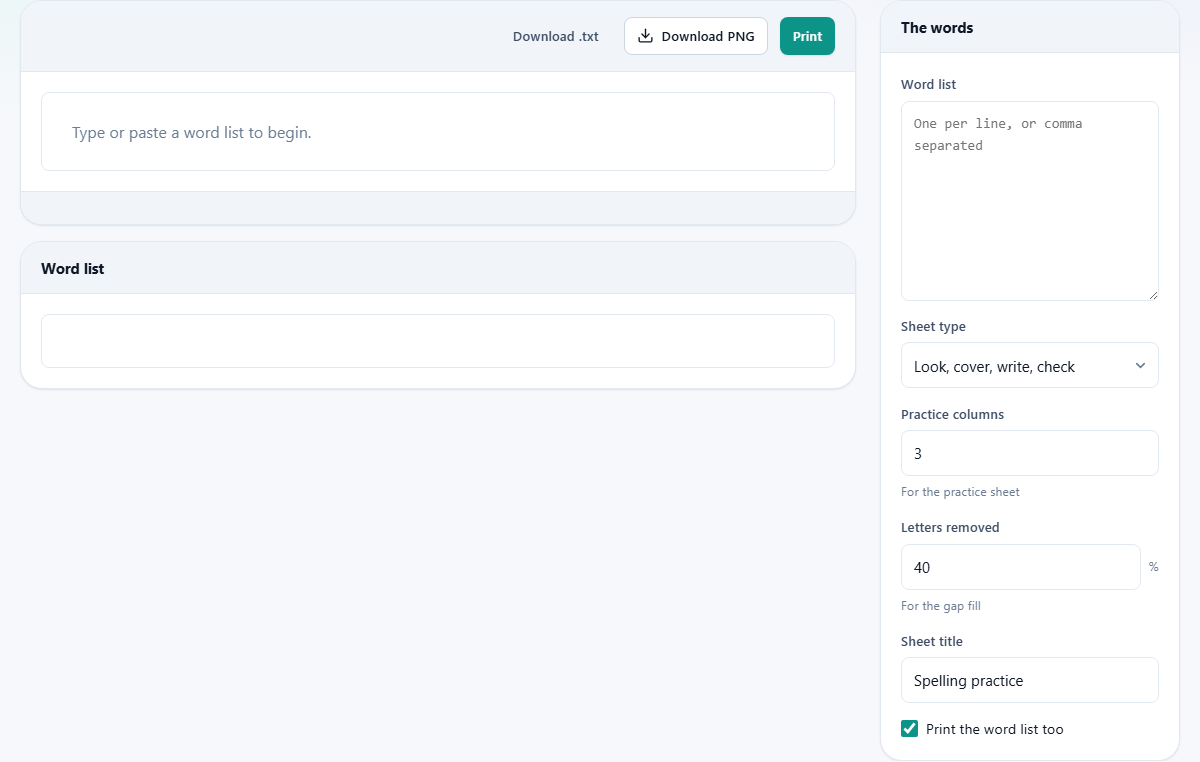
Word list takes the words, one per line or separated by commas. Any number of words is accepted. The sheet adjusts its layout to fit.
Sheet type offers three choices. Look, cover, write, check prints the word on the left with ruled columns beside it. The child reads the word, covers it, writes it from memory, then uncovers to check. Gap fill - letters removed prints each word with some letters replaced by blanks. Dictation list with writing lines prints the words in a numbered column with ruled lines next to each number for the child to write on during a spoken test.
Practice columns sets how many writing columns appear on the practice sheet. It defaults to three and goes up to six. Three is enough for a short daily session. More columns suit a weekend homework sheet.
Letters removed is a percentage slider for the gap-fill sheet. It starts at 40 and runs from 10 to 80. A higher percentage removes more letters and makes the exercise harder. The same list at 60 per cent is a very different challenge from the same list at 30.
Sheet title defaults to Spelling practice. Change it to whatever belongs at the top of the printout. Print the word list too is ticked by default. It adds a separate answer sheet below the exercise, which the teacher can keep for marking or hand out for the study stage.
How the gap fill removes letters
The letters are not taken out at random. They are removed on an even stride across the word. That means the blanks are spread through the word rather than bunched together. Two blanks never appear side by side, and the first letter is never removed.
The first letter stays because without it a short word becomes nothing but underscores. The word light with all five letters removed is just five blanks, and any five-letter word could fill them. Keeping the L narrows it down and turns the exercise into spelling recall rather than guessing.
The even spacing also stops the tool from accidentally producing a giveaway. If only one letter were removed from a long word, most children would spot it without thinking. An even stride at 40 per cent produces a challenge that is fair on both short and long words.
A worked example for a Year 3 class
A teacher has twelve words for the week: because, different, thought, question, beautiful, through, caught, enough, favourite, special, although, surprise. She pastes them into the Word list box.
First she chooses Look, cover, write, check with Practice columns set to 3. She prints one copy per child. The sheet shows each word on the left with three blank ruled columns beside it.
Next she switches Sheet type to Gap fill - letters removed and leaves Letters removed at 40. The word beautiful now shows as b _ a _ t _ f _ l. The word caught shows as c _ u _ h _. She prints a class set for Wednesday.
Finally she switches to Dictation list with writing lines. This prints the twelve words in a numbered column on one side and ruled lines on the other. She keeps this copy on her desk. On Friday she reads each word aloud and the children write it on a blank lined sheet.
All three prints came from the same word list. She never retyped a word.
Getting the difficulty right
The removal percentage is the main lever. At 30 per cent, most words lose only one or two letters. At 60 per cent, words lose nearly half their letters, and only a child who truly knows the spelling will get it right.
Push the percentage up rather than adding more words when a group finds the test easy. A longer list tests memory for the order of words. A higher removal percentage tests knowledge of each individual spelling.
For very young children or children learning English as an additional language, start at 20 per cent. For confident spellers, 50 to 60 per cent is a genuine test. Going above 70 risks making short words impossible.
Printing tips that save time
Print each sheet type one at a time. Switch the type in the dropdown and press Print again. The word list stays in the box, so there is nothing to re-enter.
If you want a file instead of paper, choose Save as PDF in your browser's print dialog. That gives you a file to email to a parent or drop into a shared folder.
The answer sheet prints on its own page. Keep it for marking, or hand it out at the start of the week and collect it back before the test. The checkbox Print the word list too controls whether it appears at all.
Using it for languages other than English
The practice and dictation sheets work with any language. Paste French, German, Spanish or any other words and the layout is the same.
The gap fill works for languages that use Latin letters. It removes individual letters from the word. For scripts outside that range, the word will print unchanged because the tool does not know which characters are individual letters in a non-Latin script.
That means you can use all three sheet types for French or German vocabulary, but only the practice and dictation sheets for Arabic or Mandarin.
Mistakes that weaken the exercise
- Setting the removal percentage too high for short words. A three-letter word at 80 per cent loses two of its three letters and becomes guesswork. Keep the percentage sensible for the shortest word on the list.
- Printing the answer sheet with the gap fill. If the child can see the answers below the blanks, the exercise tests nothing. Untick Print the word list too when handing out the gap fill, and keep the answer page for yourself.
- Giving the same sheet type every day. Switching between the three types across the week keeps the practice varied. Monday is look-cover-write-check. Wednesday is gap fill. Friday is dictation.
- Forgetting the first column on the practice sheet. The look stage depends on the word being visible before the child covers it. Make sure the first column is there, and show the child how the cover-write-check routine works.
When another classroom page suits better
- For tracking attendance with codes and percentages, the Attendance Register Maker handles dates, sessions and closures.
- For a behaviour chart with stickers and a goal, the Reward Chart Maker prints a grid with squares large enough for real stickers.
- For grading a piece of written work against weighted criteria, the Rubric Maker builds a scored marking grid.
- For arranging children in seats before the test begins, the Seating Chart Maker lays out rows, clusters, pairs or a horseshoe.
The word list stays on your device
Nothing is sent anywhere. The list stays in the page inside your browser. A school laptop on a locked-down network will run this page without any trouble, because there is no outside connection to make.
When you close the tab, the words are gone. There is no stored history and no account. If you want to reuse the list, download it as a text file with the Download .txt button and paste it back in next term.