
Printing number lines and fraction strips that fit the lesson
What a number line and a fraction strip each teach, how to set the range and step for any topic from counting to negative decimals, how fraction strips avoid the rounding trap, and a worked example for each mode.
What a number line does that a list of digits cannot
A list of numbers on a whiteboard tells a child the names. A number line shows the space between them. The gap between 3 and 4 is the same width as the gap between 7 and 8, and a child who can see that gap is learning something about quantity, not just sequence.
That spatial sense carries over into addition, subtraction, and later into coordinates and graphing. A child who has spent a term jumping along a printed line already understands that moving right means more and moving left means less, long before the teacher ever writes a plus sign. Rounding activities work the same way: circle the nearest ten, and the line shows whether the number sits closer to one side or the other.
What a fraction strip adds
A fraction strip does for parts what a number line does for whole numbers. It takes one fixed length and divides it into equal pieces. Two halves sit above three thirds sit above four quarters. Because every strip starts at the same width, the child can see that two quarters really is the same as one half. The pieces line up.
Hand-drawn strips almost never get this right. A teacher who divides a ruler into thirds by eye ends up with a last third that is too short or too long, and the children who spot the mismatch learn the wrong lesson. A printed strip divides one fixed width with exact arithmetic, so the last piece is always the right size.
Choosing between the two modes
The Make dropdown at the top of the settings panel has two choices: Number lines and Fraction strips. Picking one changes the controls below it to match.
Number lines are for counting, ordering, addition, subtraction, rounding, and plotting. Fraction strips are for equivalence, comparison, and ordering of fractions. If the lesson is about pieces of a whole, choose strips. If it is about positions on a scale, choose lines.
Both modes print several items to one page, so a class set comes from a couple of sheets through the photocopier. The preview updates as you change the settings, so you can experiment before committing to paper.
Setting up a number line
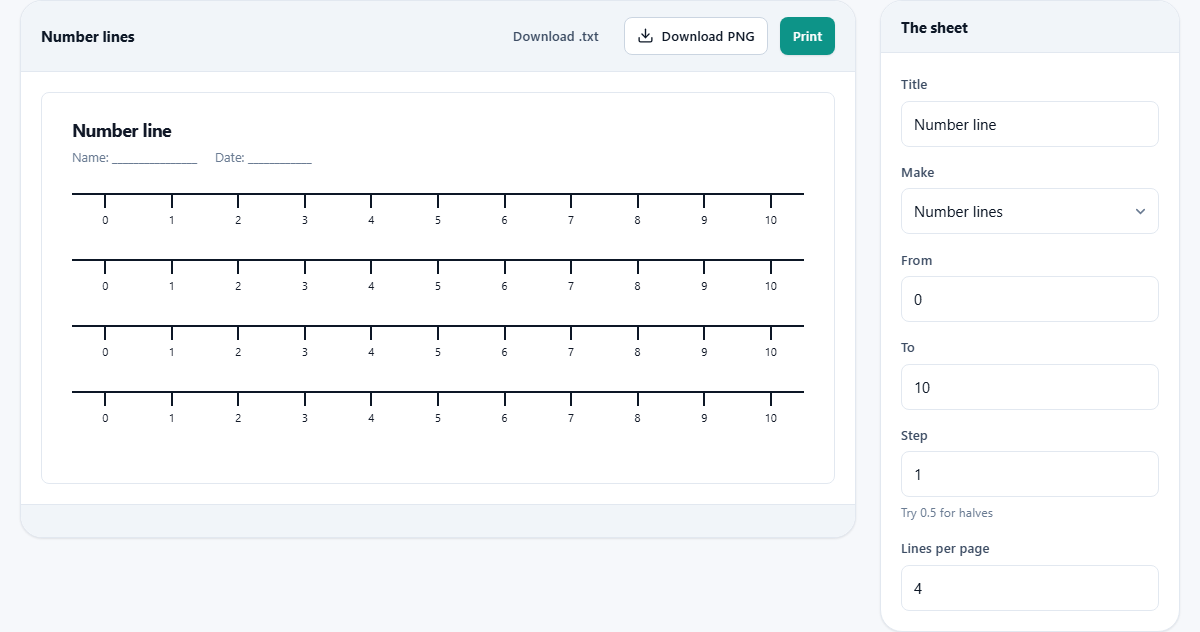
Title sets the heading on the sheet. It starts as 'Number line' but change it to the lesson name or the topic.
From and To set the left and right ends of the line. They accept negative numbers and decimals, so a line from minus 5 to 5 or from 0 to 1 both work.
Step controls the distance between ticks. The default is 1. Set it to 0.5 for halves, to 2 for even numbers, to 0.25 for quarter steps, or to any other value that fits the topic. If the step produces too many ticks, labels thin out on their own so they do not overlap. The minor ticks stay in place; only the numbers disappear from the crowded ones.
Lines per page sets how many copies of the line appear on one printed sheet. The default is 4. A class set of identical lines is just one page through the photocopier.
To make a blank number line for children to mark themselves, set a very large step so that only the two endpoints are labelled. The ticks between them disappear, leaving an open line with just the start and end visible. That is useful for estimation activities where the child has to judge where a number sits.
Setting up fraction strips
When you switch to Fraction strips, the controls change. The Strips field replaces From, To, and Step. Type the denominators you want, separated by commas. For example, 1, 2, 3, 4, 6, 8 gives the standard fraction wall: one whole, two halves, three thirds, four quarters, six sixths, and eight eighths.
Each strip is drawn as a row of cells, all cut from the same total width. Labels inside each cell show the fraction. So the thirds strip shows three cells, each reading one third.
Plain shaded cells, no labels is a checkbox that removes the fraction labels and fills the cells with a simple colour. That turns the strip set into a matching activity. Cut the strips apart, shuffle them, and ask the class to line up the pieces that are the same length.
Worked example: a counting-in-halves lesson
A Year 3 teacher wants a number line from 0 to 5 counting in half steps. She sets From to 0, To to 5, and Step to 0.5. Lines per page stays at 4. The preview shows four identical lines, each with ticks at 0, 0.5, 1, 1.5, and so on up to 5.
She prints one page, photocopies it, and hands a strip to each table. The lesson is to mark three and a half and then count forward two steps and say where they land. The children mark the line with a pencil, count the jumps, and arrive at four and a half. The gap is visible, so the answer can be checked by looking.
The next day she changes the line to minus 2 to 2 in steps of 0.5 and runs the same exercise across zero. The children see that the ticks to the left of zero are spaced the same way as the ones to the right, which makes negative numbers feel less strange.
Worked example: a fraction wall for Year 4
A teacher switches Make to Fraction strips. She types 1, 2, 3, 4, 6, 8, 12 in the Strips field. The preview builds seven rows. The top row is one solid bar. Below it, two halves. Then three thirds, four quarters, six sixths, eight eighths, and twelve twelfths.
She prints the sheet on card stock and asks the class to cut the strips into loose bars. Each child lines up two sixths against one third and sees they are the same length. Then three quarters against six eighths. The equivalence is physical, not abstract.
Card stock survives repeated handling. Paper strips tear within a lesson, so card is worth the small extra cost. The strips can live in a maths toolbox for the whole term.
For an extension task, she prints a second set with Plain shaded cells, no labels ticked. The children match the shaded pieces to the labelled ones and write the fractions in by hand. That step tests whether the equivalence has stuck.
Things that trip people up
- Setting a step that does not divide evenly into the range. A line from 0 to 10 in steps of 3 ends at 9, not 10. The line still draws correctly, but the last tick does not land on the right-hand end. Choose a step that divides evenly, or accept the short landing.
- Too many ticks on one line. A line from 0 to 1000 in steps of 1 would draw a thousand ticks. The labels disappear and the line becomes a solid block. Use a larger step.
- Expecting labelled strips to print at a readable size with twenty-four parts. A strip split into twenty-four cells has very narrow cells, and the fraction labels crowd. Drop the label count or use the shaded mode.
- Forgetting that unlabelled strips make a different activity. Without labels the child has to measure and compare, which is harder and more useful than reading a number.
- Printing on thin paper when the strips will be cut and handled. Card stock holds its shape and survives a week of lessons. Regular paper bends and tears within the first hour.
When a different page is a better fit
- For handwriting practice with a four-line ruled grid, the Handwriting Practice Sheets tool is the right choice.
- For a printed quiz with multiple-choice questions and an answer key, the Quiz and Test Maker handles that.
- For a daily reading log with columns for book title and pages, the Reading Log Maker builds that sheet.
- For a job rota that cycles through the class, the Class Job Rota Maker is the page to use.
Everything stays on your device
Both number lines and fraction strips are drawn inside your browser using plain arithmetic. No file is uploaded, no account is needed, and no data travels anywhere. The sheet builds and prints even without an internet connection. Close the tab and everything you typed is gone, because there was nowhere to store it in the first place.