
Teaching letter shapes with four ruled lines
How the four-line grid trains hands to tell tall letters from short ones, which settings produce the best sheets for different ages, a worked example for a reception class, and what to watch out for when the printout looks wrong.
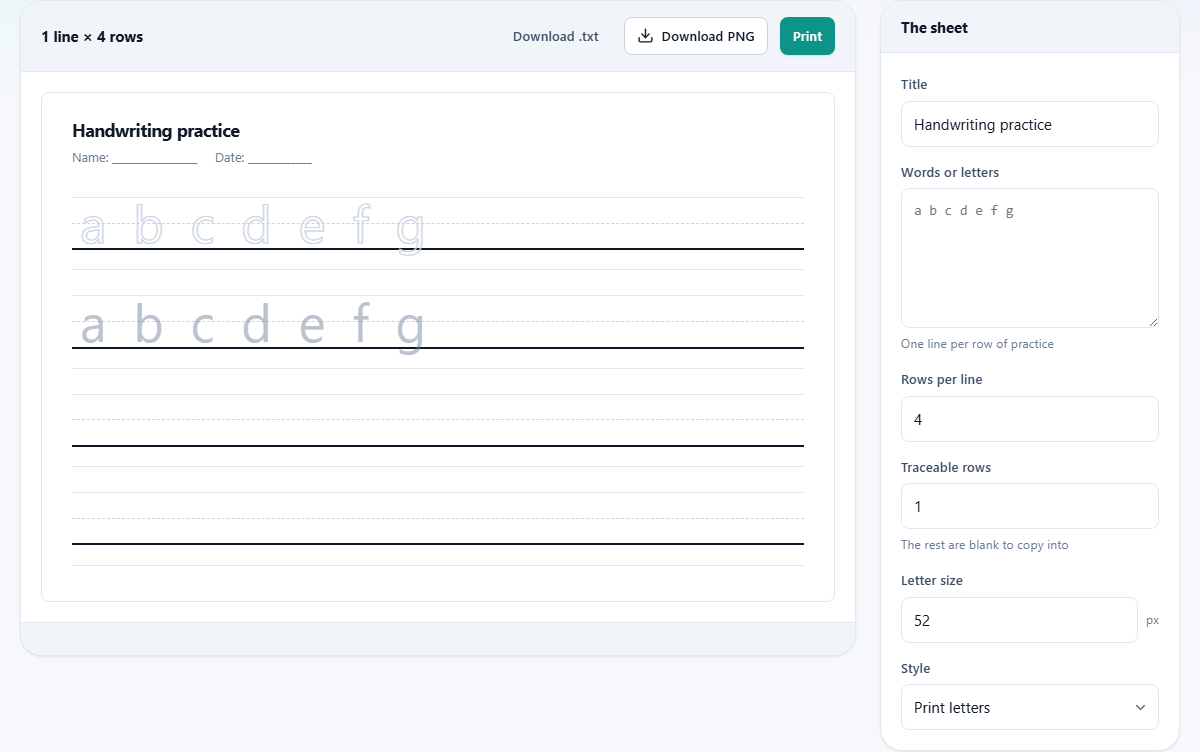
Why four lines instead of one
Ordinary lined paper has a single baseline and nothing else. A child writing on it has no way to judge how tall a lower-case letter should be. An 'a' ends up the same height as an 'l', or a 'g' sits flat without a tail, and the habit sets in before anyone notices.
The four-line system fixes that. A top line marks the ceiling for tall letters such as 'l', 'h' and 'k'. A dashed midline sits halfway down and shows where the shorter letters stop. A baseline is the line everything sits on. Below it, a descender line catches the tails of 'g', 'p', 'y' and 'j'. Together these four lines turn letter height into something a child can see and measure, not just guess.
Who prints these sheets, and when
Teachers use them for handwriting lessons and morning warm-ups. A sheet with the week's spelling words doubled as handwriting practice saves time in a packed timetable. Parents print them at home during the summer break to keep pencil control from going backwards. Tutors working with older children who missed the foundations use them to rebuild habits that plain lined paper cannot fix.
They are also useful for children learning a second script. Any set of characters that distinguishes between tall, short and descending shapes benefits from the same grid. Supply assistants and volunteers use them too, because a stack of printed sheets means the activity runs itself while the adult moves between tables.
Walking through every control on the page
The Title field sets the heading printed at the top of the sheet. Change it to a child's name, a date, or a topic heading such as 'Tall letters'. It starts with the default 'Handwriting practice'.
Words or letters is the main input. Type the characters or words you want the child to practise. Each line you type becomes one block of practice rows on the sheet. So if you type three lines, you get three separate blocks, each with its own ruled rows.
Rows per line controls how many ruled rows appear under each block. The default is four. For a child who needs lots of repetition, raise it. For a quick warm-up sheet, two is enough.
Traceable rows sets how many of those rows show the letters as outlines that can be traced over. The rest are left blank so the child writes from memory. One traceable row followed by three blank ones is the standard pattern for most classes.
Letter size is measured in pixels and starts at 52. Younger children need bigger letters. Around 70 works well for four and five year olds. Older children can drop to 36 and still see the guides clearly. The four ruled lines scale with this number, so the proportions always stay right.
Style offers two options. Print letters is the default. Joined / cursive switches to a cursive font if one is available on the computer doing the printing. Check the preview before printing a whole class set, because cursive fonts vary between machines.
The output: what the sheet looks like
The preview updates live as you change settings. Each block of practice shows the text centred on the four-line grid. Traceable letters appear as hollow outlines rather than in a pale grey fill. That design choice matters at the photocopier. Grey text either copies to solid black, which defeats the purpose, or fades to nothing. An outline survives both extremes.
Below the preview sit two buttons. Print opens the browser's print dialog, where you can send the sheet to a printer or save it as a PDF. Download .txt saves the content as a plain text file.
A worked example: reception spelling list
A teacher has five high-frequency words for the week: cat, dog, mum, big, and red. She types each word on its own line in the Words or letters field. That gives five blocks.
She sets Rows per line to 4, Traceable rows to 1, and Letter size to 66 because her class is mostly five year olds. Style stays on Print letters. The title reads 'Week 3 spelling'.
The preview shows five blocks. In each block the first row has the word drawn as an outline on the four-line grid. The three rows below it are blank but ruled, waiting for the child to copy the word three times. She hits Print, sets the printer to two copies, and the class set is done in under a minute.
The next week she swaps the five words for the new list, lowers Traceable rows to zero for the faster group, and prints a second batch with no tracing at all. Both sheets use the same grid, so the children are practising the same proportions either way.
Name tracing sheets
Practising their own name is the one task a child will repeat far longer than any spelling list. To make a name sheet, put the name on its own line. Set Traceable rows to the same number as Rows per line, so every row is traceable. Print that sheet.
Then print a second sheet with Traceable rows set to zero. The child traces the first sheet until the shape feels natural, then moves to the blank one and writes from memory. Two sheets, same grid, graduated difficulty.
Picking the right letter size by age
There is no universal rule, but a rough guide works well in practice. Children aged four and five do best around 70 pixels. The big letters give room for pencils that wander, and the wide spacing between the four lines makes each zone easy to see.
Infants aged six and seven can drop to about 50. The grid is still generous but the writing starts to look more like normal handwriting. Once a child is eight or older and the letter shapes are steady, 36 to 40 pixels produces a sheet that feels grown up. Going smaller than 28 is rarely useful because the ruled lines start to crowd together on paper.
If you are not sure, start large and step down over the term. A child who struggles at 50 almost always relaxes at 66. The preview updates live, so test both sizes before you print.
Common problems and how to fix them
- Blank rows are not blank. The traceable count is set higher than the rows per line. Lower traceable rows so some remain empty for free writing.
- Letters look different from school handwriting. The cursive style depends on the fonts installed on the computer. School handwriting fonts vary by country and are not always present. Switch back to print letters, or install the font your school uses.
- The sheet overflows onto a second page. Too many lines of text combined with a high row count fills more than one printed page. Reduce lines per block, or split the words across two sheets.
- Outlines are hard to see on screen but fine on paper. The monitor's brightness can make thin outlines look faint. Print a test page before judging.
- The midline is missing. It never is. The dashed line between the top line and the baseline is always drawn. If it looks invisible, the letter size is too small for the screen. Zoom in or increase the size.
When a different tool does the job better
- For a reading record with dated rows and columns for books, pages, and a parent signature, the Reading Log Maker is a better fit.
- For a quiz or test with multiple choice questions and an answer key, the Quiz and Test Maker handles that.
- For number practice with a printed number line from any range, the Number Lines and Fraction Strips tool prints those.
- For name labels, certificates, or classroom signs, the handwriting sheet is the wrong shape. A design or document tool suits that job.
Nothing leaves your computer
The entire sheet is built inside your browser. The letters are drawn using fonts already on your machine. No file is uploaded, no account is needed, and no data is stored between visits. You can load the page, disconnect from the internet, and the sheet still builds and prints exactly as before. Closing the tab is the only cleanup there is.