
Running a one-minute reading record on screen
What words correct per minute measures, how the timer and error marking work, why dividing by the real seconds matters, and how to track a pupil's progress over time.
What a fluency score tells you
Words correct per minute, shortened to WCPM, is one number that captures how smoothly a child reads. It combines speed and accuracy into a single figure. A child who reads quickly but skips every fifth word scores lower than one who reads steadily and gets them all right.
The number is used in schools as a benchmark. A teacher runs a timed reading at the start of a term, records the score, and runs it again later to see whether the child has moved forward. Parents and tutors use the same test to spot trouble early. If a child's score has not changed across several months, the reading level may need adjusting. Special education specialists also rely on the figure when deciding whether an intervention is working or whether a new approach is needed.
Setting up the assessment
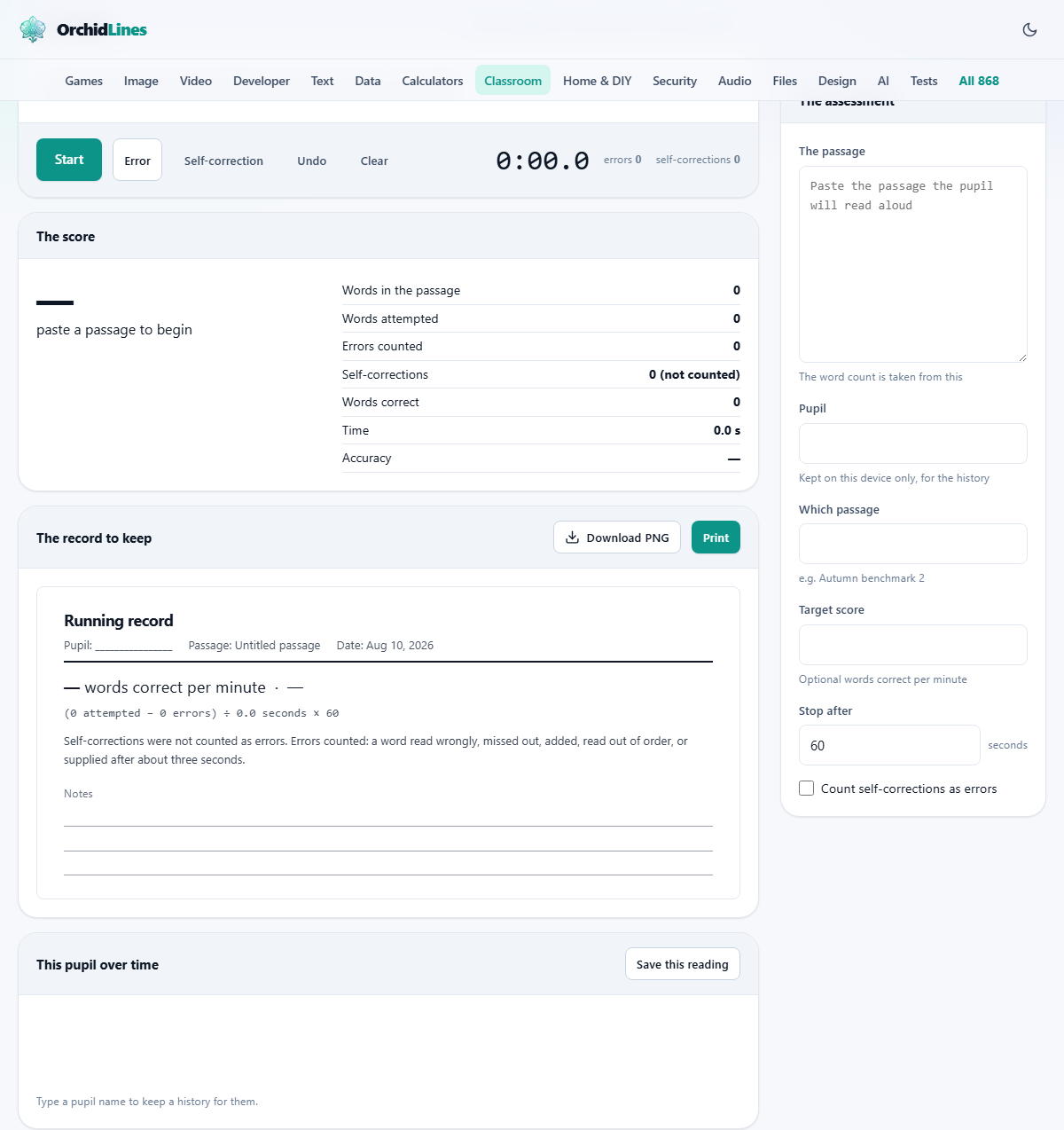
The field labelled The passage takes the text the pupil will read aloud. Paste exactly what they will see. The word count is taken straight from this field, so any extra text above or below the passage will throw the count off.
The field labelled Pupil holds the child's name. It is used only on this device, for the history chart. The field labelled Which passage is an optional label such as Autumn benchmark 2. It prints on the record so anyone reading it later knows which text was used.
The field labelled Target score is optional. If you type a number, the score panel shows how far the child is from that target. The field labelled Stop after sets the timer length in seconds. The starting value is sixty, which is the standard length. You can shorten or lengthen it, and the score adjusts because it divides by the real time, not by a fixed sixty seconds.
Running the reading
Press Start when the child begins to read aloud. The clock starts and the passage lights up. Each word in the passage becomes tappable.
When the child reads a word wrongly, misses one out, adds a word, or reads one out of order, tap that word in the passage. It is marked as an error. If you cannot tap the exact word in time, press the Error button instead. If the child corrects themselves, press Self-correction. To remove a mark, tap the marked word again. To take back the last action, press Undo.
When the child stops reading, tap the last word they reached. That sets how many words were attempted. Then press Stop. If the timer reaches zero before the child finishes, it stops on its own.
How the score is calculated
The formula is straightforward. Take the words attempted, subtract the errors, divide by the number of seconds the reading took, and multiply by sixty. The result is words correct per minute.
The important detail is the division by real seconds. Many paper worksheets divide by sixty regardless of how long the reading actually took. That punishes a fast reader who finishes a 78-word passage in 41 seconds. Under a fixed divisor, they score 78 minus errors. Under the real divisor, they score much higher, because they read 78 words in less than a minute.
Accuracy is a separate figure, shown as a percentage. It is the words correct divided by the words attempted. Below about 95 per cent accuracy, the passage is too hard and the speed figure means very little. The child is decoding individual letters rather than reading for meaning. Drop a level, get accuracy up, and speed follows on its own.
What counts as an error and what does not
Errors counted here are: a word read wrongly, a word missed out, a word added that is not in the text, a word read out of order, and a word you had to supply after the child stalled for about three seconds.
Not counted as errors: a self-correction, a repetition, or a hesitation that sorts itself out. These are worth noting as reading behaviour, but they do not reduce the score.
Some school schemes count self-corrections as errors. The checkbox labelled Count self-corrections as errors switches that on. When it is ticked, every word marked with the Self-correction button is counted in the error total. The printed record states which rule was used, so a score from January can be compared honestly with one from June even if someone changed the setting in between.
The printed record
Press Print to send the record to the printer. The printed page shows the passage with error marks, the score, the accuracy, the formula used, and the date. The passage, the buttons, and the history chart stay off the paper.
The record includes the formula so that anyone reading it later can check the arithmetic. It also states whether self-corrections were counted as errors. This transparency matters when a score is shared between teachers, parents, or specialists. A score without its method is just a number. A score with the passage name, the date, the time taken, and the error rule is evidence.
Tracking a pupil over time
Pressing Save this reading stores the score against the pupil's name on this device. A small chart shows every saved reading for that pupil, with the date along the bottom and the score up the side. If you set a target score, a line sits across the chart at that level.
The history is kept in the browser's local storage, not on any server. That means it stays on the device you used. A different laptop will not have it, and a different browser on the same laptop will not have it either. Clearing the browser's stored data removes it. For a permanent record, print each reading or note the numbers elsewhere.
A worked example at the reading table
A teaching assistant pastes a 110-word passage from the school's reading scheme. She types the pupil's name and sets the timer to sixty seconds. She presses Start as the child begins.
The child reads steadily, stumbles on two words, and self-corrects one of them. The assistant taps the two wrong words in the passage. At the forty-eighth second the child reaches the end. The assistant taps the last word and the timer stops.
The score panel shows 108 words attempted, 2 errors, 48 seconds. The calculation is (108 minus 2) divided by 48, times 60, giving 132.5 words correct per minute at 98 per cent accuracy. She presses Save and the score appears on the chart next to last month's reading of 118.
Mistakes that lead to bad scores
- Using a different passage each time. A harder passage produces a lower score even if the child reads better. Use the same level and style when comparing across dates.
- Running the test at different times of day. Reading speed drops with tiredness. A morning score and an afternoon score on the same day can differ by ten or more.
- Dividing by sixty when the child finished early. The whole point of using real seconds is to credit fast readers fairly.
- Ignoring accuracy and chasing speed. A child who races through at 150 words per minute but gets one word in ten wrong is not reading fluently.
- Testing too often. A weekly test is fine. A daily test teaches the child to be nervous rather than fluent.
When a different classroom tool fits better
If you need a written fill-in-the-blank test rather than an oral reading, the Cloze Worksheet Maker builds gap-fill sheets from your own passage. If you want a quick written check at the end of a lesson, the Exit Ticket Maker prints small slips with your own question. If you need to record marks across a whole class rather than one pupil at a time, the Class Marks Sheet handles weighted grades and statistics.
The pupil's name never leaves this device
The passage, the pupil's name, and the scores all stay inside your browser. Nothing is uploaded to any server. The history is kept in local storage on this machine and nowhere else. Closing the tab does not delete the history, but clearing the browser's stored data does. On a shared school computer, that is worth knowing. There is no account to create and no login to manage.