
Getting honest feedback in ninety seconds at the door
How exit tickets work in a classroom, what makes a good prompt, how to lay out the slips on a printable page, and why the confidence scale tells you more than the written answer.
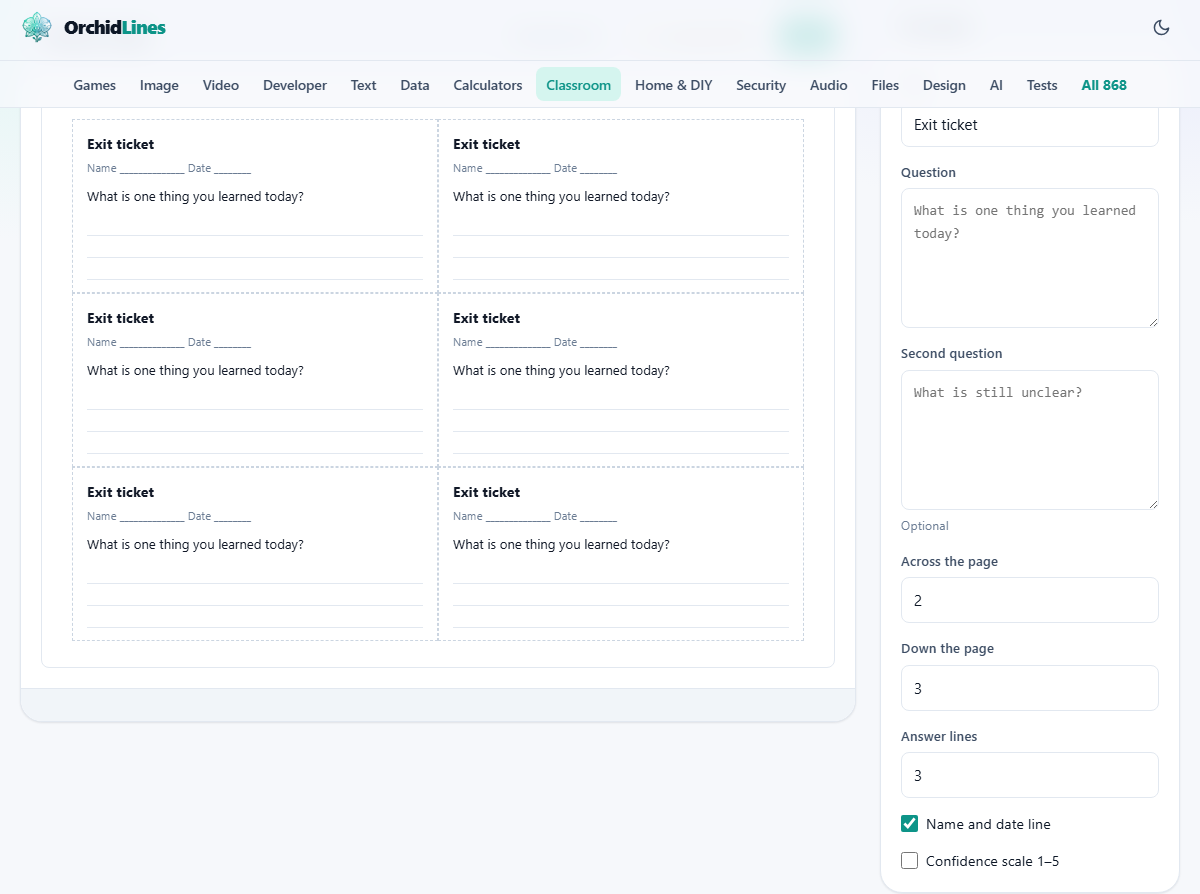
What an exit ticket is for
An exit ticket is a small slip of paper handed out in the last minute of a lesson. Each student writes a short answer to one question and drops it on the desk on their way out. The teacher reads the stack before the next day and knows, without guessing, which parts of the lesson landed and which did not.
The format works because the slip is small. Nobody writes an essay on a strip of paper. The answer is a sentence or two, quick to write and quick to read. A stack of thirty takes five minutes, not an evening. Teachers, tutors, and parents running study groups all find the same benefit: you learn what stuck and what slipped past, before the next lesson begins.
Writing the prompt
The field labelled Question holds the line that prints on every slip. One clear question is usually enough. Good prompts ask for one fact, one step, or one connection. Bad prompts ask for everything the student remembers, which turns a quick check into a chore.
The field labelled Second question is optional. A useful pattern is to put a content question first and a reflection question second, such as asking what is still unclear. When both are filled in, each slip carries both prompts with their own ruled space.
Setting up the grid
Two numbers control how many slips fit on one page. The field labelled Across the page sets how many slips sit side by side, from one to three. The field labelled Down the page sets how many rows, from one to six. The starting values are two across and three down, which gives six slips per sheet.
Six per page suits most classes. A group of thirty students needs five printed sheets. A group of twelve needs two. The slips sit on exact divisions of the page, so if you use a paper cutter set to one measurement, every sheet in the stack is cut the same way.
Larger slips give more writing room but fewer per page. Smaller slips save paper but leave less space for a long answer. A grid of three across and four down fits twelve slips on a single sheet, which works well for short, factual answers.
Answer lines, name line, and the confidence scale
The field labelled Answer lines sets how many ruled lines appear under each question. Three lines gets you a sentence you can read in seconds. Eight lines gets you a paragraph you will probably not read at all. Start with three and increase only if the question genuinely needs a longer response.
The checkbox Name and date line adds a ruled line at the top of each slip for the student's name and the date. Leave it on unless you want the tickets to be anonymous.
The checkbox Confidence scale 1-5 adds a row of five numbered circles at the bottom of the slip. The student circles the number that matches how confident they feel about their answer. This is often the most useful part of the ticket. A student who gets the answer right but circles a two needs something different from one who gets it wrong and circles a five. The first is uncertain and might lose the idea by tomorrow. The second is confident and has the wrong mental model, which is harder to fix later.
The title and printing
The field labelled Title prints at the top of every slip. The starting value is Exit ticket, but you can change it to anything - the date, the topic, or the class name. Short titles work best because the slip is small.
Press Print to open the browser's print dialog. The printout shows only the grid of slips, not the settings panel. The visible borders between slips act as cut lines, so there is nothing extra to align.
Press Download .txt for a plain text version. That file is useful when you want to paste the prompt into a message or a learning platform. It contains only the text of the prompt and the layout description, not the grid itself.
A worked example with a real class
A science teacher finishes a lesson on photosynthesis. She types the question: Name the gas that plants take in during photosynthesis. She leaves the second question blank. She keeps the grid at two across and three down, sets answer lines to three, and ticks the confidence scale.
She prints five sheets for her class of twenty-eight. She cuts them with a paper cutter and hands one slip to each student at the door. The students write a word or two and circle a confidence number. The whole process takes about ninety seconds.
Back at her desk she sorts the slips into three piles: correct and confident, correct but unsure, and wrong. The first pile needs nothing. The second pile tells her who to check in with quietly tomorrow. The third pile tells her who needs the concept retaught, and whether it was one student or half the room.
Tips for prompts that actually help
- Ask for one thing, not everything. A question like explain today's lesson produces vague answers that are hard to sort.
- Ask for the thing you are least sure they understood, not the thing you know they got. The ticket is a diagnostic, not a review.
- Keep the wording short. A question that fills three lines of the slip leaves no room for the answer.
- Vary the style over the week. A factual recall question on Monday, a connection question on Wednesday, and a what confused you question on Friday gives three different views of the same material.
- Use the confidence scale alongside the answer. The answer tells you what the student thinks. The scale tells you how firmly they hold that thought.
Other uses for the same slips
The same layout works for tasks that have nothing to do with exit tickets. Clear the question, turn off the answer lines, and you have plain name slips with a ruled line for the name. These work as raffle tickets, name draws, or seat labels.
With a question like Rate this session from 1 to 5 and the confidence scale turned on, the slip becomes a quick feedback form for a workshop or a staff meeting. With two questions you can run a short poll at any event where paper is easier than a phone.
Common mistakes and how to avoid them
- Printing too many answer lines. More lines invites longer answers, and longer answers take longer to read. Three is enough for most questions.
- Using only the written answer. The confidence scale is faster to sort and often more revealing. A stack can be sorted by number in under a minute.
- Forgetting to vary the prompt. The same question every day teaches students to write what they think the teacher wants rather than what they actually know.
- Skipping the name line when you need names. Anonymous tickets are useful for honest feedback, but useless when you want to follow up with a specific student the next day.
- Making slips too small. A grid of three across and six down looks efficient on screen, but the slips may be too narrow for a pencil.
When another classroom tool fits better
If you want to test reading fluency rather than content understanding, the Reading Fluency Recorder runs a timed oral reading and scores words correct per minute. If you need a fill-in-the-blank worksheet based on a passage, the Cloze Worksheet Maker removes words and prints the text with numbered gaps. If you want to look at marks across a whole class, the Class Marks Sheet handles weighted grades and letter boundaries.
Nothing leaves the page
The prompt and the layout are built entirely inside your browser. Nothing is sent to any server. There is no account to create and no data stored after you close the tab. On a school network where uploads are restricted, that is one fewer approval to chase. You can disconnect from the network and the page keeps working, because there was never anything on the other end.