
Building gap-fill sheets that test the right thing
How to turn any passage into a worksheet with numbered blanks, choose which words come out, adjust the sheet by clicking, and print it with or without a word bank.
The shave, the stride and the spacing test
Before a single blank appears, the passage is cut at every run of spaces. Each piece is then shaved. Anything at the front or the back that is not a letter or a digit is peeled off and set aside. What is left in the middle is the word. The piece (dough, shaves down to dough, and the bracket and the comma are drawn back around the blank on the sheet. A piece with nothing left after the shave, such as a lone dash, is not a word at all and can never be taken out.
Sentence numbers come from the same pass. If the shaved tail of a piece holds a full stop, a question mark or an exclamation mark, the count moves on by one. Those numbers are what the box marked Leave the first and last sentence whole reads. One guard sits on that box. If the whole passage is a single sentence, the box is ignored, because obeying it would leave nothing to blank.
Two pickers sit behind the four settings. Every nth word steps through the word list at a fixed stride. A kind of word and The longer words build a shortlist first, then walk it under a spacing test. The clicking setting picks nothing and waits for you.
The stride picker starts at one plus a random whole number below the step. With a step of 7 the start is the 2nd word up to the 8th. After that it counts on in sevens. A stop that lands in a protected sentence is dropped, and nothing takes its place. The stride does not shuffle along to find a replacement, so a sheet often carries fewer blanks than plain division suggests.
Here is a run you can repeat. The passage is four sentences and 47 words about why bread rises. Leave the step on 7, leave the ends protected, and type oven into the seed box. A typed seed is hashed to a number, and oven always hashes to 636895019, so the note under the sheet reads Seed 636895019. That seed makes the first draw 0.9318. Multiply by the step of 7, drop the fraction, then add one. The start is word 7. The stops are words 7, 14, 21, 28, 35 and 42. Word 7 sits in the opening sentence and word 42 sits in the closing one, so both fall away. Four blanks are left, on The, dough, oven and crust. The line above the sheet then reads 4 gaps in 47 words, one word in 11.8, because 47 divided by 4 is 11.75 and the figure is shown to one decimal.
The other two settings work from a shortlist. Every word that fits the rule goes on it, in reading order. The seed then chooses where in that shortlist to start, anywhere from the first entry up to the entry numbered by the spacing setting. From there the walk takes an entry only when its distance from the last one taken is greater than the spacing number. Greater, not equal. A spacing of 3 needs a difference of 4, which leaves three whole words standing between one blank and the next.
Same passage, same seed. Switch to A kind of word, leave it on all the little words, and leave the spacing on 3. The shortlist comes out as ten entries, at word positions 14, 16, 18, 19, 22, 23, 26, 30, 32 and 34. The first draw of 0.9318 times four is 3.7, which cuts to 3, so the walk starts on the fourth entry, position 19. Then 22 minus 19 is 3, which is not more than 3, so that one is passed over. 23 minus 19 is 4, so it is taken. 26 minus 23 is 3 and is passed over. 30 minus 23 is 7 and is taken. 34 minus 30 is 4 and is taken. Four blanks again, and all four of them are the word the. The bank prints them as one entry reading the ×4.
- Every is held between 2 and 20 and opens on 7. At least this long is held between 3 and 20 and opens on 6. Keep gaps apart by is held between 0 and 12 and opens on 3.
- Set the spacing to 0 and the test becomes a difference greater than zero. Two words side by side can then both be taken.
- A same-width blank is drawn 7.5em across, whatever the word behind it. A matched blank is the word length plus one, and never under three. So is gets a three-character blank and immediately gets twelve.
- Your clicks are applied after the rule has run, so a click always beats the setting.
- The passage is cut at 5,000 words, and a note tells you when that has happened.
- Leave the seed box empty and a fresh whole number below one billion is drawn for you.
Where these word rules are blunt
The letters the tool knows are A to Z, the digits, and the accented Latin block from À to ɏ. That takes in French, German, Spanish, Polish and their neighbours. It does not take in Greek, Cyrillic, Arabic or any Indian script. Paste a paragraph in Russian and every piece shaves down to nothing. The tool then finds no words at all, and the sheet keeps its opening line. This is a Latin-alphabet worksheet maker and it does not pretend to be more.
Only the outside is shaved, so punctuation inside a word stays and is counted. well-known is one word of ten characters. didn't is six, so it already qualifies under the opening six-letter setting for longer words. 1066 counts as a four-character word and can be blanked like any other. If you are building a vocabulary sheet, read the blanks before you print. A contraction is rarely the long word you meant.
The sentence counter cannot tell an abbreviation from an ending. Take the line Dr. Smith arrived at 9 a.m. today. The stops after Dr and after a.m both count as endings, so that one line is filed as three sentences. Protecting the first sentence then protects the word Dr and nothing else. The rest of the line is open to blanks. Text full of titles, initials or decimals drifts this way, and clicking the words back is the fix.
The word kinds are plain lists written into the code, not grammar. There are 31 entries under articles and determiners, 48 prepositions, 39 pronouns, 23 conjunctions and 27 helping verbs. Choosing all the little words joins all five, which is 168 entries and 167 different words, since until sits on two of the lists. Matching is done in lower case against the shaved word, and nothing else is looked at. So a word that can do two jobs is taken on sight. Both as and so are on the conjunction list, and they come out even where they are joining nothing.
- The crowding note appears when the words divided by the blanks falls below 4. A sheet of 40 words with 11 blanks trips it. The same 40 words with 10 blanks does not.
- The bank keeps the spelling of the first time a word was taken. If a capitalised The at the head of a sentence is the first one out, the bank lists it with its capital, which is a small clue about where it goes.
- Repeats are merged in the bank by lower case, so the and The become one entry with a count beside it.
- Download .txt does not save the passage. It writes the title, a Seed line and the numbered answers into a file called cloze-answers.txt.
- Nothing here marks anything. The tool prints the sheet and the key. It has no idea what a pupil wrote and never sees it.
- Your clicks are cleared when the passage text changes, and when you press Shuffle again. Changing a dropdown or a number keeps them.
- Printing is set for A4 with 16mm margins, the answer sheet always starts on a new page, and the key is laid out in four columns.
What a cloze worksheet does in a lesson
A cloze test removes words from a passage and asks the reader to fill them back in. The name comes from the idea of closure - the mind tries to complete a gap. That habit makes it a good measure of whether someone really understands a text, because guessing the missing word requires reading the whole sentence, not just the space around it.
Teachers use gap-fill sheets for reading tests, grammar drills, vocabulary checks, and quick bell-ringer tasks. Parents working through homework can use them to practise tricky words. Students studying alone can paste their own notes and quiz themselves.
Pasting the passage
The field labelled Paste the passage takes any block of text. Paragraphs, line breaks, and punctuation are kept as they are. You can paste a page from a textbook, a paragraph you wrote yourself, or a short story. Up to five thousand words fit, which is far longer than any single lesson needs.
The passage is the base for everything. Only words that appear in it can be blanked, so paste the exact text the class will read and nothing else. A title line or a source credit pasted above the first sentence can end up with a gap in it, which looks odd on the printed sheet.
The four ways to choose what comes out
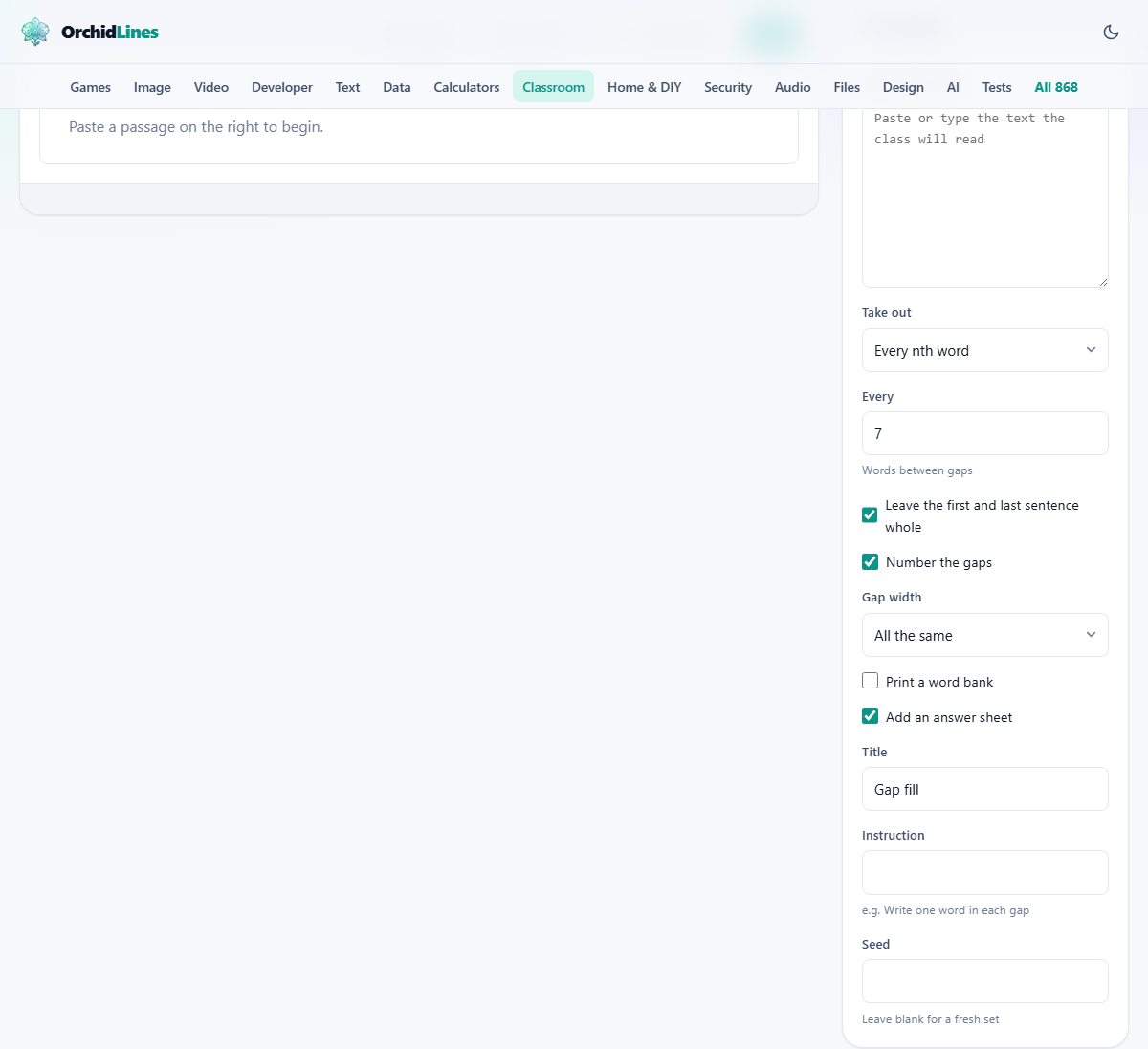
The dropdown labelled Take out has four settings. Each one changes which words are replaced by gaps.
- Every nth word is the classic cloze test. The field labelled Every sets how many words sit between gaps. Seven is the usual figure. Closer than one in five makes the passage hard to read at all, and the tool warns you when you cross that line.
- A kind of word removes one type of word throughout the passage. The dropdown labelled Which kind offers several sets: all the little words, articles like a and the, prepositions like in and under, pronouns like he and they, conjunctions like and and because, or auxiliary verbs like is and could. These are closed word classes that can be listed, so the matching is reliable without grammar analysis.
- The longer words removes everything at or above a letter count you set in the field labelled At least this long. Six letters is the starting value. This is handy for vocabulary work, where the hard words are usually the long ones.
- Only the words I click starts with no gaps at all. You click each word you want removed directly in the sheet below. This is the best setting when you are testing one specific thing.
Fine-tuning the sheet by hand
Whatever setting you start with, every word in the sheet is clickable. Click a word and it turns into a gap. Click a gap and the word comes back. Your manual changes survive a change of settings, so you can start with every seventh word and then put back the ones that are too hard or add a few that are too easy.
The field labelled Keep gaps apart by sets a minimum spacing. If you set it to three, no two gaps can sit within three words of each other. This stops the passage from having a run of gaps that makes the whole line unreadable. The checkbox Leave the first and last sentence whole keeps those sentences untouched, because a reader needs somewhere to start and somewhere to land.
Numbering, gap width, and the word bank
The checkbox Number the gaps puts a small number above each blank. This matters when you print an answer key, because the numbers let the student match their answers to the key without counting down the page.
The dropdown labelled Gap width has two settings. All the same draws every gap at the same length. As long as the word sizes each gap to match the hidden word. The first is almost always better for a test, because a short gap tells the class they are looking for a two-letter word, and a long gap tells them they are not.
The checkbox Print a word bank adds a shuffled list of the removed words above the passage. With the bank, the task is a matching exercise and most children can finish it. Without one, the task tests whether the reader can produce the word from memory. Both versions are worth keeping. Print each and hand out whichever fits the group.
If a word appears in several gaps, the bank shows it once with a small count beside it. Listing it once without the count leaves the reader short. Listing it once per gap lets a child count entries instead of reading.
Printing and saving
The checkbox Add an answer sheet puts a second page at the end with every gap filled in and its number. Press Print to send the worksheet to your printer. The printout includes the title, an optional instruction line, the passage with gaps, the word bank if switched on, and the answer sheet if switched on.
The field labelled Title sets the heading printed at the top of the sheet. The field labelled Instruction adds a line underneath it, such as Write one word in each gap. Both are optional.
Press Download .txt to save a plain text copy of the sheet. That file can be pasted into an email or a learning platform that does not accept print layouts.
The seed and getting the same sheet back
When you use every nth word or the longer words with a random starting position, the tool picks a random set. Every time you press Shuffle again you get a different set. The seed printed under the sheet is a short code that records which set was chosen.
If you type that seed back into the Seed field you get exactly the same gaps again. This is useful when you want to reprint a sheet next year, or when you want two classes to sit the same version. Nothing is saved on any server, so the seed is the only record.
A worked example from start to finish
A geography teacher pastes a paragraph about river erosion, 120 words long. She leaves Take out on Every nth word and Every on 7. The sheet shows 14 gaps with a note at the top. She clicks one gap to put a technical term back because it was only introduced that morning. She ticks Print a word bank and checks Add an answer sheet.
She prints the sheet. Each student gets the passage with 13 numbered blanks, a shuffled word bank above it, and an answer key on the second page. The title reads River erosion and the instruction reads Fill in each blank using a word from the bank.
Later that week she wants the same sheet for the afternoon class. She types the seed from the first printout into the Seed field, and the exact same gaps appear.
Common mistakes and how to avoid them
- Blanking too many words. One in five is already dense. One in three turns the passage into a puzzle rather than a reading task.
- Choosing a kind of word for a passage that barely uses that kind. A passage with no pronouns produces no gaps when you select pronouns. Switch to a different rule or click words yourself.
- Leaving the first sentence gapped. A reader who cannot parse the opening line struggles with the whole passage for reasons that have nothing to do with the gaps.
- Using word-length gaps on a test. A gap drawn to the length of the missing word tells the class whether the answer is short or long. Fixed-width gaps keep that clue hidden.
- Forgetting the seed. Nothing is stored, so if you close the tab without noting the seed, the same arrangement of gaps cannot be brought back.
When a different tool suits the lesson better
If you need a timed oral reading rather than a written fill-in, the Reading Fluency Recorder measures words correct per minute while the student reads aloud. If you want a quick end-of-lesson check with a single question, the Exit Ticket Maker prints small slips, several to a page. If you need to split the class into working groups before they start the worksheet, the Group Maker handles the names and keeps chosen pairs apart.
The passage stays on your own machine
The whole worksheet is built inside your browser. The text you paste is never sent anywhere. There is no account, no upload, and no copy stored on a server. You can prove it by turning off your network connection before you paste. The page still works, because there was never a server involved in the first place. On a locked-down school network where uploads are blocked, that is one less thing to clear with IT.