
Laying out a school day so the bells land on time
What the builder produces, who needs it, how every field on the settings rail shapes the schedule, a full example from first bell to final bus, and the trimming question that catches most people out.
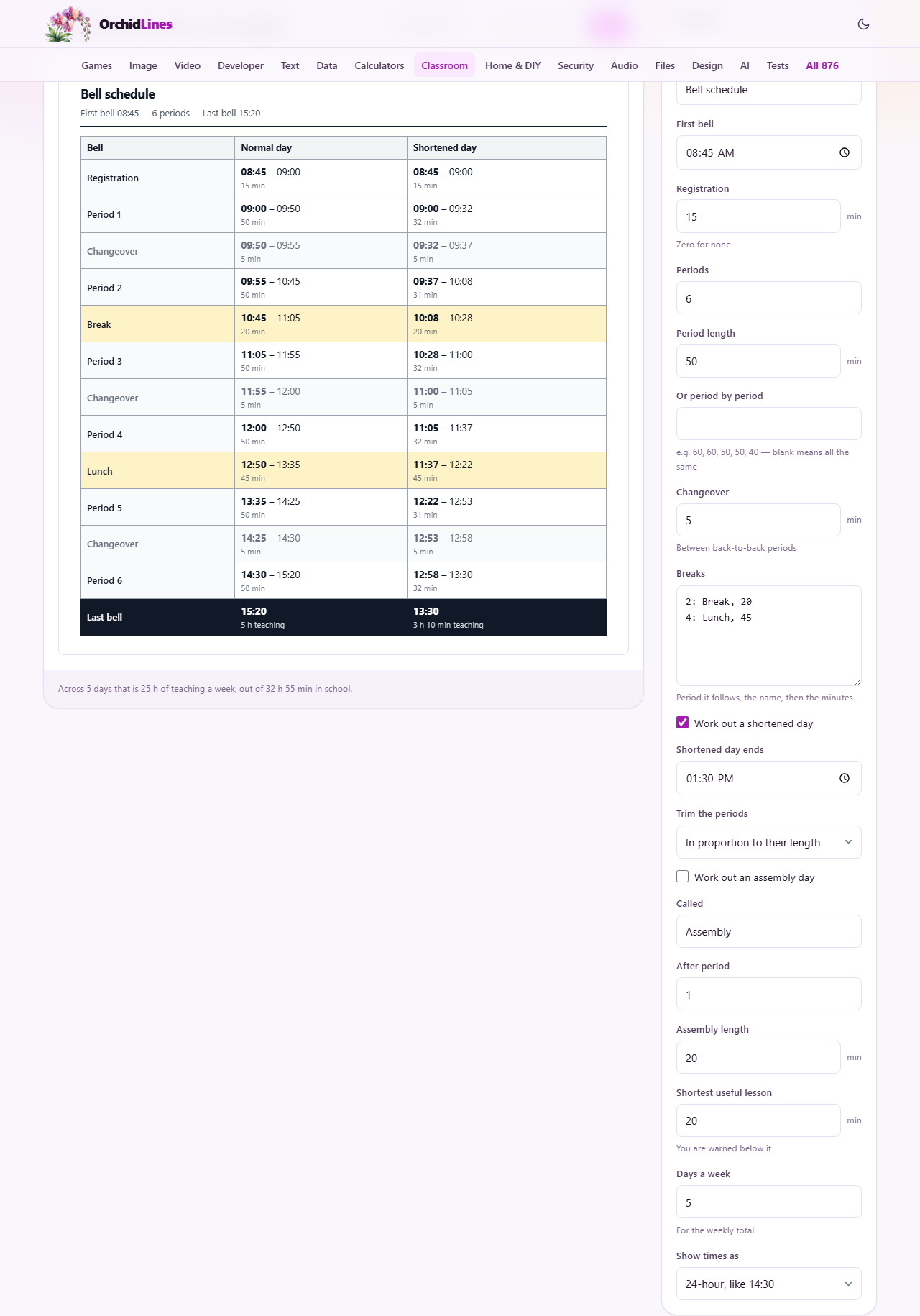
What comes out of the builder
The page lays a school day end to end. It starts at the first bell, adds registration if you have it, then chains periods, changeovers and breaks one after another until the day is done. The result is a table showing every block with its start and end time.
If you turn the shortened day on, a second column appears beside the first. It shows the same day squeezed into a shorter finish time, with the teaching periods trimmed down and the breaks left alone. Turn the assembly day on and a third column appears, with an assembly block inserted after the period you choose and the remaining lessons trimmed to fit. All three columns sit side by side so you can compare them line by line.
Who reaches for it
School office staff who write the printed timetable. Deputy heads planning a new term structure. Cover coordinators who need the shortened day times and do not want to work them out by hand on a Friday morning. Parents sometimes use it too, to check when break falls or how early a half day finishes.
Anyone who has ever had buses arrive ten minutes before the bell knows the cost of getting one line wrong. The builder removes the arithmetic and lets you focus on the decision - how long should each period be, and what happens when the day is cut short.
The first bell and the periods
Title is a free text label printed at the top of the schedule. First bell sets the start of the day as a clock time. Registration is the number of minutes of form time before the first lesson. Set it to zero if your school does not have a separate registration slot.
Periods is how many teaching blocks the day holds. Period length is the default length of each one, in minutes. If your periods are all the same length, those two fields are all you need.
Or period by period overrides the default. Type a list of lengths separated by commas, like 60, 60, 50, 50, 40. The builder reads that list from left to right. If the list is shorter than the number of periods, the remaining ones use the standard length. This is how you handle a school that runs double lessons in the morning and singles in the afternoon.
Changeovers and breaks
Changeover is the time between back-to-back periods, in minutes. It covers walking from one room to the next. Five minutes is common. It is added between every pair of lessons that do not have a named break between them.
Breaks is a text area where you list the breaks in the day. Each line names which period the break follows, what it is called, and how many minutes it lasts. For example, 2: Break, 20 means a twenty-minute break after period two. You can add as many lines as you need. Lunch is just a longer break with a different name.
A break replaces the changeover for that gap. The builder does not add a changeover on top of a break, because the break already covers the time it takes to move. That stops the schedule from drifting by a few minutes every time a break appears.
Shortening the day
Tick Work out a shortened day and two more fields appear. Shortened day ends is the target finish time. Trim the periods offers two rules. In proportion to their length scales each period down by the same fraction. The same number of minutes off each takes a flat chunk from every lesson.
The difference matters most when your periods are not all the same length. Ten minutes off a sixty-minute lesson leaves fifty, which is still a solid block. Ten minutes off a thirty-minute lesson leaves twenty, which may not be worth starting. Proportional keeps the balance between subjects that the full timetable was designed around. Equal trimming is simpler to explain but can shave a short lesson below the point where it is useful.
The Shortest useful lesson field sets a floor. If any trimmed period drops below this number, a warning appears on the schedule. Twenty minutes is the default. It does not stop you printing the schedule, but it flags the problem before a class turns up for a twelve-minute double science.
Assembly days
Tick Work out an assembly day and three fields appear. Called lets you name the block. After period says where it goes. Assembly length is how many minutes it takes.
The assembly is not added on top of the day. It is paid for. The day still finishes at the same time as a normal day, and the assembly minutes come out of teaching. The builder trims the remaining periods to make room, using the same rule you chose for the shortened day. Seeing the cost written down next to the normal schedule is usually what settles the discussion about how often to hold one.
Clock format and weekly total
Show times as switches between 24-hour and 12-hour display. The 24-hour option writes 14:30. The 12-hour option writes 2:30 pm. Pick whichever matches the clocks on the corridor wall.
Days a week is used to work out the weekly teaching total. The builder counts the minutes of actual teaching in a normal day, multiplies by the number of days, and prints the result at the bottom of the schedule. You can hold that figure against whatever your local authority or governing body requires.
A full example
A primary school starts at 08:45 with fifteen minutes of registration. It runs six fifty-minute periods with a five-minute changeover. There is a twenty-minute break after period two and a forty-five-minute lunch after period four. The normal day ends at 15:30.
The deputy head wants a shortened day that finishes at 13:30 for parent-teacher meetings, trimmed in proportion. She also wants an assembly day with a twenty-minute assembly after period one.
She fills in the fields, and the schedule shows three columns. The normal day runs from 08:45 to 15:30 with 300 minutes of teaching. The shortened day finishes at 13:30 with each period cut to about 32 minutes. The assembly day finishes at 15:30 with each period cut to about 47 minutes and a twenty-minute assembly after the first lesson. She prints the table and pins it by the bell panel.
Later in the term she swaps to 12-hour display because the infant corridor has analogue clocks. She sets Days a week to five and checks the weekly teaching total against the local authority minimum. It clears, so she prints a fresh copy for the staffroom.
Mistakes that waste a printout
- Leaving changeover at zero. The schedule looks tidy but every bell after the first is five minutes earlier than reality.
- Putting a changeover and a break in the same gap. The builder already drops the changeover where a break appears. Adding extra minutes pushes the afternoon out.
- Setting the shortened day end time earlier than the sum of the breaks. If lunch alone runs past your target, no amount of trimming will save it, and the builder says so.
- Forgetting to check the weekly teaching total against your local requirement. A trimmed period length that looks reasonable per lesson can fall short across the week.
- Choosing equal trimming without looking at the shortest period. A forty-minute lesson can become too short to use while a sixty-minute one still has room to spare.
When a different tool suits the job
- If you need a countdown timer for lessons rather than a printed schedule, the classroom timer is the right page.
- If you are building a seating chart for a room rather than a timetable for the day, the seating plan maker handles that.
- If the task is working out elapsed time as a maths exercise, the clock face worksheet generator is designed for that.
Everything stays on your own device
The schedule is worked out inside the page. No data is sent anywhere. There is no login, no saved history, and no file stored on a server. You can print the table, download a text copy, or close the tab. Once the page has loaded, it works without a network connection.