
Counting business days the right way
Why a simple date subtraction gives the wrong answer, how the tool handles different working weeks and holidays, every input explained, and a full example with real dates.
Calendar days are not working days
A deadline says 30 working days. You count 30 on the calendar and land on a date. But that count includes weekends, and probably a public holiday or two. The real deadline is several days later than the one you wrote down.
This mistake costs money. A contract that says 20 business days for delivery means 20 days when the business is open. Miss the real date and you pay a penalty. Quote a date too early and you scramble to finish. The gap between calendar days and working days grows with the length of the period, and it is always larger than people expect.
For a four-week period, there are 28 calendar days but only 20 working days if you work Monday to Friday. Add two public holidays in that stretch and it drops to 18. That is a ten-day difference from the naive count.
Who needs this
Project managers setting deadlines. HR departments calculating notice periods. Lawyers counting court filing days. Accountants working out tax submission windows. Freight companies quoting delivery times. Teachers planning term dates around holidays.
- Estimating a project finish date when the scope is quoted in working days.
- Checking how many shifts fall in a pay period.
- Calculating parental leave or probation periods that are defined by business days.
- Figuring out when a government approval will come through if the office closes on certain dates.
- Verifying that a supplier's quoted lead time actually lands before your own deadline.
The From and To dates
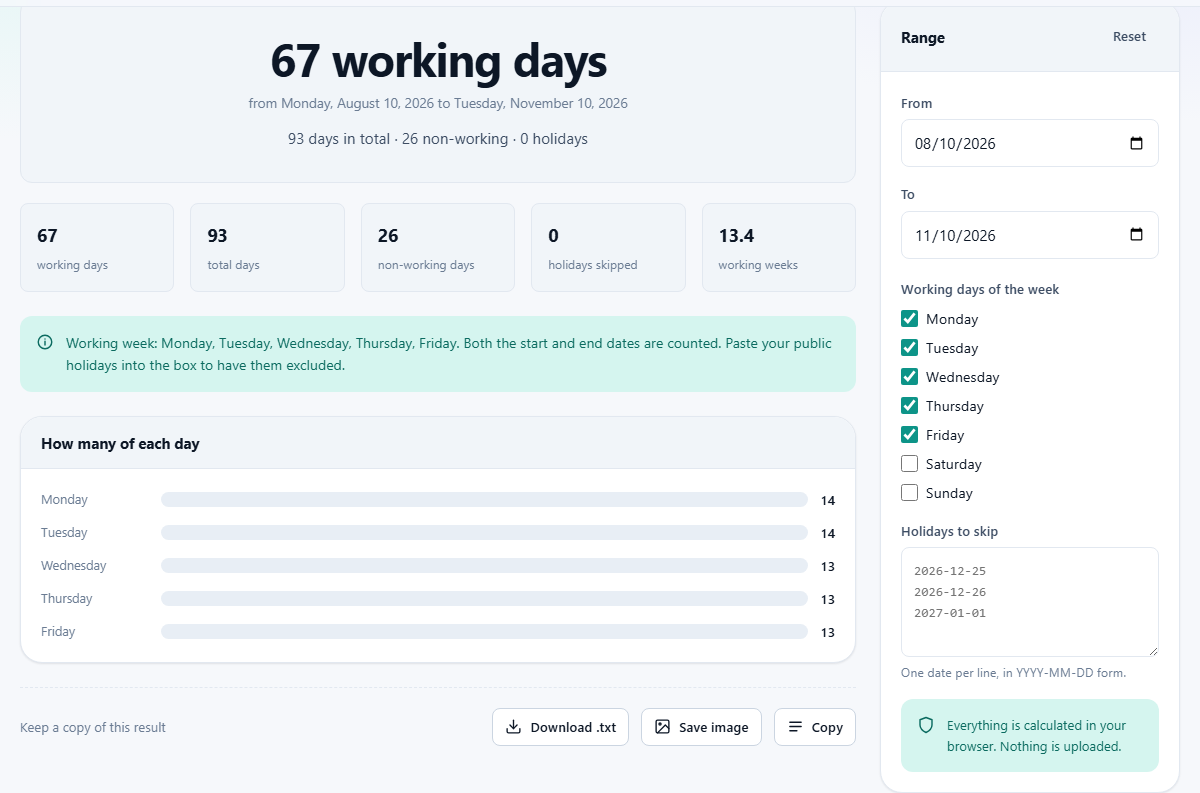
The From field is the first day of the range. The To field is the last day. Both are counted in the total, which matches how deadlines and notice periods are normally expressed. From Monday to Friday is five working days, not four.
You can swap the dates around. If the To date is earlier than the From date, the tool still counts the working days between them. The order does not matter for the total.
Setting your working week
Below the dates is a column of checkboxes labelled Working days of the week. Monday through Friday are ticked by default. Saturday and Sunday are not.
This is not decoration. A large part of the world does not work Monday to Friday. In many Middle Eastern countries the weekend is Friday and Saturday. Some have moved to Saturday and Sunday only recently. Retail staff often work weekends and take midweek days off. Nurses, factory workers and delivery drivers have rotating schedules that do not follow any fixed pattern.
Tick only the days you actually work. If you are on a four-day week, untick one day. If you work Sunday to Thursday, untick Friday and Saturday and tick Sunday instead. The tool counts only the days you have marked.
This also works for counting a single repeating day. Tick only Tuesday, for instance, and the tool tells you how many Tuesdays fall in the range. That is useful for recurring events like a weekly class or a standing meeting.
Entering holidays
The Holidays to skip box is a plain text area. Type or paste dates in YYYY-MM-DD format, one per line. The placeholder shows three examples: 2026-12-25, 2026-12-26, and 2027-01-01.
Only holidays that fall on one of your ticked working days are subtracted. A holiday on a Saturday when Saturday is not a working day has no effect. This prevents double-counting.
The tool does not carry a built-in list of holidays for any country. National holiday lists change every year and vary by state, province or region. A stale built-in list would give confidently wrong answers, which is worse than asking you to paste your own. Government websites publish the official list each year, and pasting it takes a few seconds.
If a line cannot be read as a date, the tool skips it and tells you how many lines it could not parse. That way a stray blank line or a header row does not break the count.
A worked example
You need to know how many working days fall between 1 September 2026 and 31 October 2026. You work Monday to Friday. There is one public holiday in that range: 5 October 2026.
Set From to 2026-09-01 and To to 2026-10-31. Leave Monday through Friday ticked. Paste 2026-10-05 into the holidays box.
September has 22 weekdays and October has 22, giving 44 weekdays in the range. Subtract the one holiday and the total is 43 working days. The tool shows this number along with a breakdown of how many of each weekday fall in the range.
Now change the working week to Sunday through Thursday. The total changes because some Fridays that were previously counted are now excluded, and some Sundays that were excluded are now counted. The new answer depends on exactly how the days land, which is precisely the kind of counting that goes wrong by hand.
The day breakdown
Below the total, the tool shows a bar for each weekday with the count of how many times that day appears in the range. This is useful on its own.
A payroll clerk working out how many Mondays fall in a quarter can read it straight from the chart. A school that runs a club every Wednesday can see exactly how many sessions fit in a term. A shift worker paid double on Sundays can count those specifically.
Notice periods and contract deadlines
Employment contracts often state a notice period in working days. A 30-working-day notice period is not the same as a calendar month. In most months it is six weeks of calendar time, sometimes more. Getting it wrong means either leaving too early, which can breach the contract, or telling your new employer the wrong start date.
The same logic applies to construction contracts, government approvals and legal filings. Courts in many countries count business days for response deadlines. An extension of 10 working days sounds short, but it can span two full weeks plus a few days, depending on where the holidays fall. Pasting the court holidays into the tool gives you the exact calendar date your response is due.
Shipping and procurement lead times are another common case. A supplier quotes 15 working days. You need to know the calendar date the goods will arrive so you can schedule the rest of the project around it. Typing the dates and pasting the relevant holidays gives a concrete answer instead of a guess.
Using it for shift patterns
The working week checkboxes are flexible enough to handle many shift patterns. If a nurse works every Monday, Wednesday and Friday, ticking only those three days gives the count of shifts in any date range. A weekend-only retail worker can tick Saturday and Sunday and leave everything else blank.
For truly irregular patterns like a four-on-four-off rotation, no checkbox setup will match. The tool is built for repeating weekly patterns. A rotating shift that does not repeat on a weekly cycle needs a different approach, like a shift planner or a calendar.
Even so, the single-day trick is valuable. Tick only Thursday to count how many Thursdays are in a school term. Tick only Saturday to count weekend markets. The answer appears instantly and you do not have to flip through calendar pages.
Common mistakes
- Forgetting to include both endpoints. From Monday the 1st to Friday the 5th is five days, not four. The tool handles this, but people making a mental estimate often lose one.
- Using a holiday list from last year. Dates like Easter and many national holidays move from year to year. Always paste the current year's list.
- Pasting holidays in the wrong date format. The tool expects YYYY-MM-DD. Dates written as DD/MM/YYYY or MM-DD-YYYY will not be read.
- Assuming every country uses Monday to Friday. If you are calculating a deadline for a partner in another country, check their working week first.
- Leaving public holidays out entirely. A 30-day deadline that crosses a Christmas period can lose three or four working days to holidays alone.
All counting happens on your own device
The dates, your working week pattern and your holiday list never leave your browser. Nothing is uploaded, nothing is stored on a server, and there is no account. Your settings stay on your own machine only. Close the tab and there is nothing to clean up.