
Converting any measurement without memorising the formula
How to pick a category, enter an amount, read the result and the full table of every unit in that category, and know the handful of cases where a conversion is not a straight multiplication.
Ten categories, one page
The Category dropdown lists ten measurement types: length, weight, volume, area, speed, data, time, pressure, energy, and temperature. Each one holds a full set of units, from the everyday to the specialist. Length includes millimetres, centimetres, metres, kilometres, inches, feet, yards, and miles. Weight covers milligrams through to tonnes and stones. Volume lists teaspoons alongside barrels.
Picking a category loads its units into the From and To dropdowns. The Amount field keeps whatever number you last typed, so switching categories with 100 already entered shows you what 100 of the old unit looks like in the new world. Change the amount and the answer updates as you type, with no button to press.
The ten categories cover most of what people look up on a daily basis. A nurse converting a patient weight from stones to kilograms uses the weight category. An engineer reading a pressure gauge in psi while the spec sheet says kilopascals uses the pressure one. A student checking how many joules are in a calorie uses energy. Each category is self-contained, so there is no scrolling through hundreds of unrelated units.
Entering a conversion
Type a number in the Amount field. Pick the unit you are starting from in the From dropdown, and the unit you want in the To dropdown. The result appears instantly.
Very large and very small numbers switch to scientific notation on their own. Converting one nanometre to miles would produce a number with thirteen zeros after the decimal point, which is unreadable. The page writes it in exponential form instead. This keeps the display clean without losing any precision.
The Swap button between the two dropdowns flips the direction. If you just converted inches to centimetres and now want centimetres to inches, press Swap rather than picking both units again. The amount stays the same, so you see the reverse conversion straight away. Reset clears everything back to the defaults if you want a fresh start.
The full table underneath
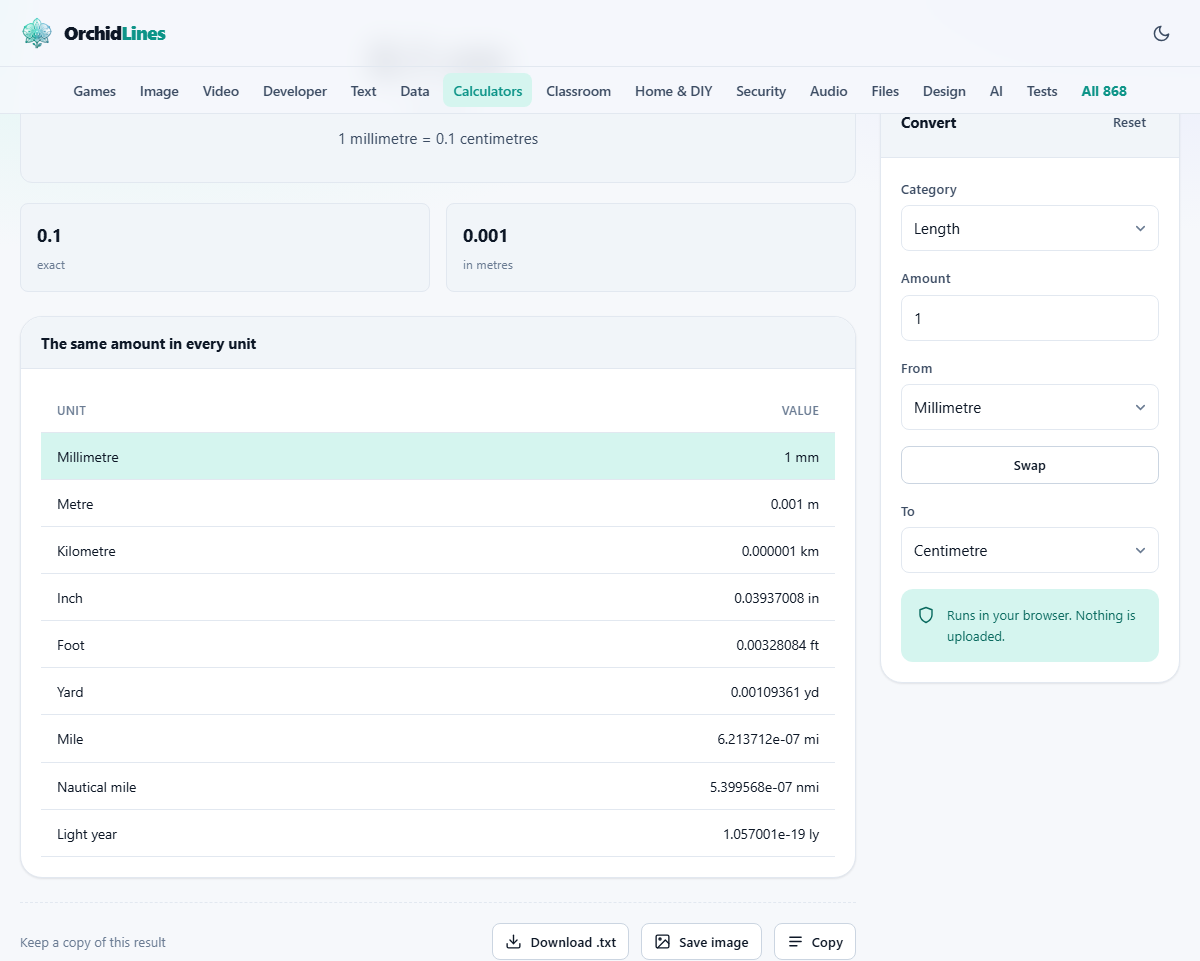
Below the main result sits a table showing the same quantity in every unit of the current category. This is often more useful than the single answer you asked for. When a recipe says four ounces and you are not sure whether it means fluid ounces or weight ounces, seeing both at once usually answers the question without a second lookup.
The table also helps when a specification sheet uses a unit you do not recognise. Rather than guessing which one it means, find the number in the table that matches and you know the unit. It turns a lookup into a scan, which is faster and less likely to go wrong.
For anyone who works across systems - metric and imperial, for example - the table is a quick sanity check. You can spot whether the number you expected is in the right ballpark by glancing at the familiar units on either side of it.
Temperature works differently
Most conversions are a straight multiplication. One inch is always 2.54 centimetres, so you multiply by 2.54 and you are done. Temperature breaks that pattern because Celsius and Fahrenheit have different zero points as well as different scales.
Zero degrees Celsius is 32 degrees Fahrenheit, not zero. The conversion multiplies by nine fifths and then adds 32. That offset means you cannot convert temperature by multiplying alone. Doubling a Celsius reading does not double the Fahrenheit one, which catches people who treat temperature the same way they treat length or weight.
The page also enforces absolute zero. Enter a temperature below minus 273.15 Celsius and you get an error instead of a nonsense answer. That temperature cannot exist in nature, and printing a number below it would be misleading rather than helpful. Kelvin starts at zero by definition, so negative Kelvin values are refused the same way.
Same name, different size
A US pint is 473 millilitres. A UK pint is 568 millilitres - a fifth larger. They are genuinely different measures that happen to share a name, and pouring one when you mean the other will ruin a recipe or short-change a customer. Both appear in the volume list with a country label so you can pick the right one.
US and UK gallons differ by even more, for the same historical reason. The US gallon descends from the English wine gallon. The UK gallon descends from the ale gallon. Neither country adopted the other's standard, and the word stuck to both.
The same confusion appears in computing. A drive manufacturer counts one terabyte as a trillion bytes. Your operating system counts it as 1,024 to the fourth power, which is about 1.1 trillion. That is why a drive sold as 1 TB shows up as roughly 931 GB once you plug it in. Nobody is lying - they are using different definitions of the same word. Both definitions sit in the data category so you can compare them and see where the missing space went.
A worked example: cooking with mixed units
A recipe from an American cookbook calls for two cups of flour. You own a kitchen scale that reads in grams. Choose Volume, enter 2, set From to US cups, and look at the table. The millilitres line reads 473. Now you need a rough weight: a cup of plain flour is about 125 grams, so two cups is 250 grams. The volume converter does not know the density of flour, but it does give you the exact volume so you can apply the weight yourself.
A second recipe calls for 350 grams of butter. The packet in the fridge is marked in ounces. Switch to Weight, enter 350, set From to grams, and read the ounces line. The answer is about 12.35 ounces, which is close enough to weigh on a kitchen scale marked in whole ounces.
Now a travel example. You are driving in the United States and the speed limit says 65 mph. How fast is that in km/h? Choose Speed, enter 65, set From to mph, and the km/h line reads about 104.6. You now know your target on a metric speedometer.
Common mistakes and how to avoid them
- Confusing fluid ounces with weight ounces. They measure different things - volume and mass. The page puts them in separate categories, so you cannot accidentally mix them.
- Forgetting which pint or gallon a recipe means. If the book is British, use the UK version. If it is American, use the US one. A recipe that just says pint is ambiguous, and the table shows both so you can decide.
- Treating months and years as exact. In the time category, a month is 30 days and a year is 365. Those are round numbers for rough work. For precise calendar arithmetic, a date calculator counts real months with their real lengths.
- Assuming that a Mach number converts to a fixed speed. Mach 1 depends on the temperature and altitude. The page uses the standard sea-level figure, which is close enough for general interest but not for aerospace work.
- Ignoring scientific notation. When the result shows a number like 3.28e-7, that is not an error. It is a very small number written in a compact form. The e-7 means move the decimal point seven places to the left.
Approximations and when to be careful
Where an exact definition exists, the page uses it. An inch is exactly 2.54 centimetres. A pound is exactly 0.45359237 kilograms. These are not rounded - they are the numbers the standards bodies agreed on.
A few entries are approximations and are labelled as such. The speed of sound used for Mach varies with temperature and altitude, so the page uses a standard sea-level figure. Atmospheric pressure conversions use the standard atmosphere of 101,325 pascals. Real atmospheric pressure varies, but the conversion factor between units does not - one atmosphere is always the same number of pascals, millibars, or inches of mercury.
Everything runs on your own machine
All the conversion factors are built into the page itself. There is no server doing the arithmetic and no request sent when you type a number. Once the page has loaded, the internet connection is optional. There is no account, no history of your conversions, and nothing to delete. Close the tab and the page forgets you were there.