
How percentage calculations actually work
This article walks through every kind of percentage question you are likely to face, explains the arithmetic behind each one, and shows you how to avoid the mistakes that trip up even confident number people.
Six questions that all sound the same
The word percentage hides at least six different questions. What is 15% of 200? What percent of 80 is 12? What is the percentage change from 50 to 65? What do you get if you increase 80 by 10%? What if you decrease it instead? And what was the original number before a known percentage was applied? Each of those needs a different formula, but people lump them together under one vague heading and then wonder why the answer comes out wrong.
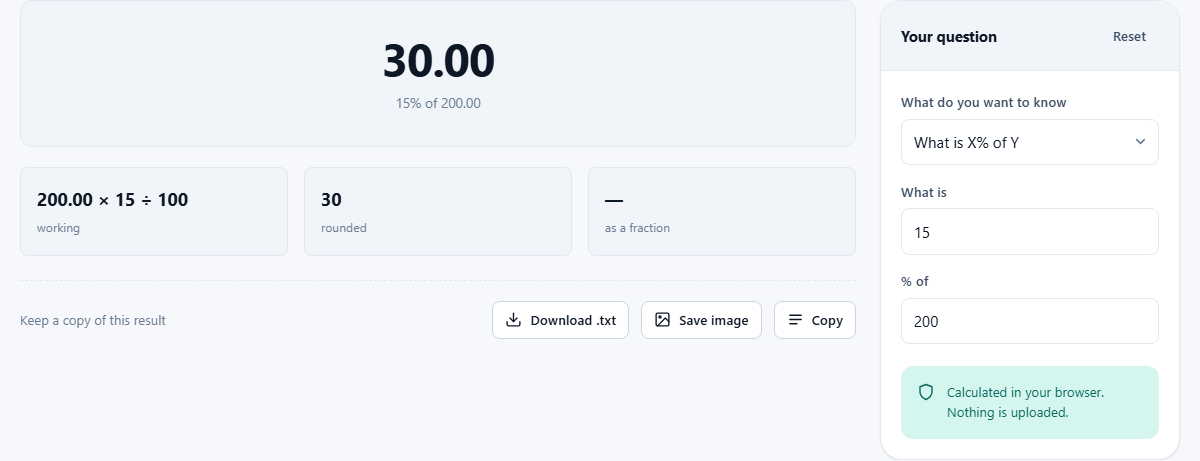
The Percentage Calculator puts all six behind a single dropdown labelled What do you want to know. Pick the question that matches yours, fill in two numbers, and the answer appears as you type. The labels on the input boxes change to suit the question you chose, so you always know which number goes where.
Finding a percentage of a number
The first mode, What is X% of Y, handles the most basic form. You are told a rate and a total, and you want the part. Enter the rate in the first box and the total in the second. The calculator multiplies, divides by a hundred, and prints both the answer and the working underneath it.
A quick mental trick makes many of these sums trivial. X percent of Y is always the same as Y percent of X. So 4% of 75 is the same as 75% of 4, which is obviously 3. Swap the numbers whenever one direction is easier to do in your head than the other. This works because multiplication is commutative: the order does not matter.
What percent one number is of another
Choose X is what percent of Y when you have two figures and want the rate that connects them. You scored 42 out of 60 on a test; what percentage is that? Enter 42 and 60 and the calculator divides the first by the second and multiplies by 100 to give you 70%.
This is the form teachers, auditors and anyone grading performance reach for constantly. It also turns up in cooking when you want to know what fraction of a recipe you have already measured out, or in budgeting when you want to see how far through a savings goal you have come.
The same mode handles proportions in any field. If 18 of 45 applicants passed an interview, entering 18 and 45 tells you the pass rate is 40%. If a factory produced 970 good parts out of 1000, the yield is 97%. The underlying arithmetic is always division followed by multiplication by a hundred, and the working printed below the answer confirms exactly that.
Percentage change, increase and decrease
Percentage change from X to Y tells you how much something went up or down, expressed as a fraction of where it started. The formula takes the difference between the two values, divides by the starting value, and multiplies by a hundred. A positive answer means growth; a negative one means a drop. This is the form you need when comparing two months of sales, two years of rent, or two readings from a medical test.
Increase X by Y% and Decrease X by Y% go the other way round. You know the starting figure and the rate, and you want the result. Increasing 200 by 15% gives 230. Decreasing it by 15% gives 170. These two are the everyday sale-price and mark-up calculations.
Notice that increasing by 15% and then decreasing by 15% does not bring you back to where you started. The decrease is applied to the larger number, so it takes off more than the increase put on. This asymmetry catches out even experienced people.
Reverse percentages and original prices
The last mode, X is Y% of what, solves the question backwards. You know the result and the rate, and you want the original. A jacket costs 80 after a 20% discount. What was it before? The discount leaves 80% of the price, so you divide 80 by 0.8 and get 100.
People instinctively try to add 20% back onto 80 and get 96, which is wrong. Adding the percentage back calculates 20% of the reduced price, not 20% of the original. The reverse percentage mode handles this correctly every time. It is particularly useful for working out pre-tax prices, undoing tip calculations, or recovering a salary figure before a known deduction was applied.
The trick is to think about what percentage of the original is left, not what percentage was removed. After a 20% discount, 80% of the original remains. After a 35% tax, 65% remains. You always divide the figure you have by the fraction that survived, and the calculator does this for you.
Why a 50% rise and a 50% fall are not equal
This is the single most common percentage mistake, and it costs people real money. Start with 100. Add 50% and you reach 150. Now take 50% off 150 and you land on 75, not back at 100. The second 50% was measured against the bigger number, so it removed more than the first 50% added.
The same logic works the other way. A share price that falls 50% must then rise by 100% just to get back to its original value. Whenever you see two percentage moves quoted together, check what each one was measured against. A 10% drop followed by a 10% rise leaves you slightly below where you began, not exactly on it.
Stacked discounts do not add up the way you expect
A shop offers 20% off, then an extra 10% at the till. Most people assume that is 30% off. It is actually 28% off. The first discount reduces the price to 80% of its original. The second discount then removes 10% of that reduced price, not 10% of the original. Eighty percent times ninety percent is seventy-two percent, so you pay 72% and save 28%.
The gap between the assumed total and the real total grows as the individual discounts get larger. Two successive 50% discounts do not give you the item free. They give you 75% off. The rule is simple: multiply the keep-fractions together rather than adding the discount fractions. Once you remember that, stacked promotions stop being confusing. Use the increase and decrease modes to check: decrease by the first percentage, note the result, then decrease that result by the second percentage. The final figure is always less generous than the two discounts added together.
Percentage points versus percentages
News reports mix these two up constantly, and the confusion matters. An interest rate that moves from 4% to 6% has risen by two percentage points. But it has also risen by 50%, because 2 is half of 4. Both statements are correct. They measure different things.
Percentage points describe the absolute size of the move on the scale. Percentages describe the relative size of the move compared with where it started. A politician who says unemployment dropped by 3% could mean it fell from 6% to 3%, or from 6% to 5.82%. The difference is enormous, and you cannot tell which is meant without asking whether they are talking in points or in percentages.
Reading the working and switching modes
Every answer in the calculator comes with the arithmetic written out underneath. You can see the multiplication, the division, and the intermediate steps. This is deliberate. A percentage answer you cannot reproduce by hand is an answer you do not really understand, and the working is there so you can follow it or copy it into a report.
Switching between modes keeps your numbers in place. If you have just found the percentage change from 200 to 250, you can switch to the increase mode and the same figures stay in the boxes. This makes it easy to look at the same pair of numbers from several angles without retyping anything.
Privacy and how it runs
The entire calculation runs inside your browser on your own device. No numbers leave the page. There is no server doing arithmetic in the background, no account to sign into, and no history stored anywhere except in your memory. Close the tab and everything is gone.
Because the tool works on such a fundamental piece of arithmetic, it is worth keeping bookmarked. Percentages come up in shopping, salary negotiations, exam results, investment returns, recipe scaling, and a dozen other places where getting the question wrong quietly costs you money or time. The Reset button clears both inputs so you can start a fresh calculation without reloading the page, and the dropdown remembers which mode you were in so you can run a batch of similar questions quickly.