
Dot products, cross products, and the answers in between
How to enter vectors in two or three dimensions, what each output means, why the page keeps whole-number answers exact, and a worked example that walks through every result the page produces.
What the page calculates
The page takes two vectors and reports everything the standard operations give you. That list includes the length of each vector, its unit vector, the sum and the difference of the pair, a scaled version of the first one, the dot product, the cross product, the angle between them, the projection of each onto the other, and the area of the parallelogram they span.
Turn on the third vector and two more results appear: the scalar triple product and the volume of the parallelepiped - the slanted box that three vectors define. These are the numbers that tell you whether three vectors lie in a single plane and, if they do not, how much space the box encloses.
All of this is calculated live as you type. There is no submit button. Change a number and every result updates at once.
Choosing dimensions and entering vectors
The dropdown labelled How many dimensions offers two choices: Three (x, y and z) or Two (x and y). In two dimensions the z fields disappear and the cross product is reported as a single number rather than a vector, which is explained further down.
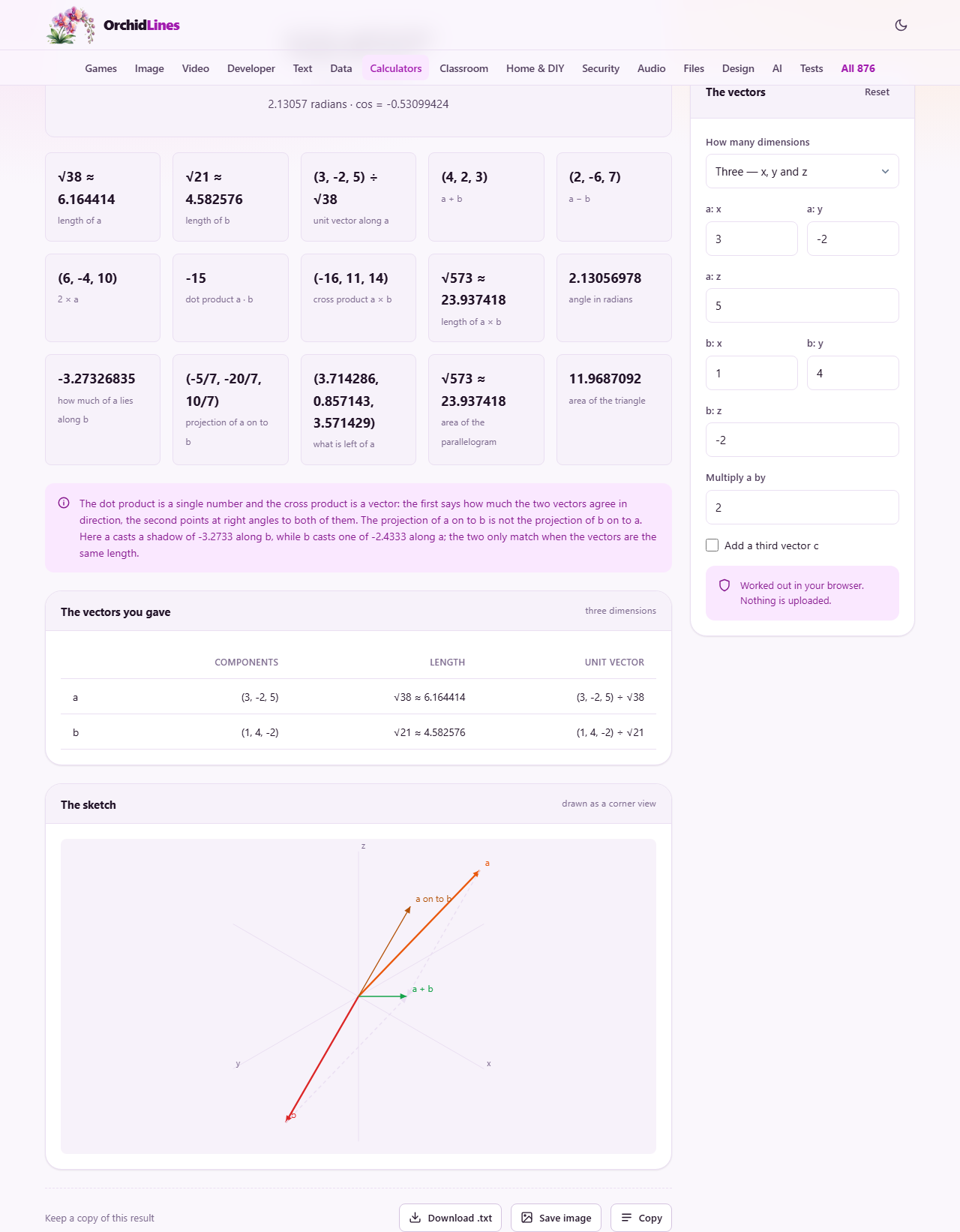
Vector a has fields labelled a: x, a: y, and a: z. Vector b has the same layout. The page opens with a set to (3, -2, 5) and b set to (1, 4, -2). These are not special values - they are just numbers that produce interesting results so you can see the page working before you type your own.
The field Multiply a by takes a scalar. Whatever number you enter here is multiplied with every part of a, and the result is shown alongside the other outputs. The default is 2, so the scaled version of (3, -2, 5) is (6, -4, 10).
The checkbox Add a third vector c reveals a second set of fields for vector c. The triple product and the volume only appear when this is turned on, because those results need three vectors to make sense.
The dot product and what it tells you
The dot product of two vectors is a single number. It is found by multiplying the matching parts and adding them up. For a = (3, -2, 5) and b = (1, 4, -2), the dot product is (3 times 1) + (-2 times 4) + (5 times -2), which gives 3 - 8 - 10, which is -15.
That number tells you how much the two vectors point in the same direction. When it is positive, they point roughly the same way. When it is negative, they point roughly opposite ways. When it is exactly zero, they are at right angles. That single test - dot product equals zero means perpendicular - is why the dot product appears in almost every branch of applied mathematics.
The angle between two vectors comes from the dot product divided by the product of their lengths. The page gives the result in both degrees and radians, so you do not have to convert.
The cross product in three dimensions
The cross product of two three-dimensional vectors is itself a vector. It points in the direction that is perpendicular to both inputs, and its length is the area of the parallelogram the two vectors span. For a = (3, -2, 5) and b = (1, 4, -2), the cross product is (-16, 11, 14).
Order matters. Swap a and b and the cross product reverses direction - the same arrow pointing the other way. The dot product does not care about order, and it is easy to assume the cross product works the same way. That assumption costs a sign error.
The page also reports the area of the parallelogram directly. That is simply the length of the cross product vector, which saves a separate calculation.
The two-dimensional version
Switch to two dimensions and the cross product becomes a single number instead of a vector. In two dimensions there is no z axis for the result to point along, so what people call the cross product is really the signed area of the parallelogram the two vectors make.
The sign carries useful information. If the number is positive, b is to the left of a when you stand at the origin and look along a. If it is negative, b is to the right. This left-right test is how graphics software decides which side of a line a point falls on, and it needs no trigonometry at all.
The page reports this clearly as a number, not as a vector with zero in the z slot. Some textbooks pad the result into three dimensions by writing (0, 0, area), but that hides what is really going on. Here you see the number for what it is: a signed area, not an arrow.
Projection and why it is not the same both ways
The projection of a onto b is the shadow that a casts when a light shines straight down onto the line of b. It tells you how much of a lies along the direction of b. The projection of b onto a is the reverse: how much of b lies along a.
These two numbers are generally not equal. They only match when a and b have the same length. The page shows both, along with the sketch of the shadow, so you can see the difference. People who project in only one direction and assume the other is the same end up with wrong coordinates.
The sketch is especially helpful here. Both vectors are drawn as arrows from the origin, and the dotted line from the tip of one perpendicular to the other shows exactly where the shadow falls. It makes the geometry visible rather than abstract.
A worked example from start to finish
Leave the defaults in place: a = (3, -2, 5), b = (1, 4, -2), three dimensions. The page reports the length of a as the square root of 38 - because 9 + 4 + 25 = 38 and there is no tidy whole number for that root. The length of b is the square root of 21.
The unit vector of a is each part divided by the square root of 38. Rather than writing a long decimal, the page keeps the root in the denominator: (3 / root 38, -2 / root 38, 5 / root 38). This is the exact answer, not an approximation.
The dot product is -15, as worked out above. The cross product is (-16, 11, 14). The angle between them comes from the dot product formula and works out to about 121 degrees, or about 2.11 radians. That is an obtuse angle, which matches the negative dot product.
The projection of a onto b gives a vector along b whose length is 15 / root 21. The projection of b onto a gives a different vector along a. Both are shown, and both are exact. If you entered decimal values instead of whole numbers, the output would switch to decimals, but the arithmetic would be the same.
The third vector and the triple product
Tick the Add a third vector c checkbox and enter values for c. The page then shows the scalar triple product, which is the dot product of a with the cross product of b and c. Its absolute value is the volume of the parallelepiped that the three vectors define.
If the triple product is zero, the three vectors all lie in the same plane. The box they would make has no thickness at all, so its volume is zero. This is a quick test for coplanarity that does not require drawing anything.
Exact answers and why they matter
When you enter whole numbers, the page keeps the answers exact wherever possible. The length of (1, 2, 3) is root 14, not 3.742. A projection that works out to a fraction is shown as a fraction, not as a rounded decimal. This matters for anyone checking homework or verifying a formula, because a decimal approximation can hide the structure of the answer.
Enter decimals and the page switches to decimal output. The arithmetic is the same - only the display changes. You lose the exact roots and fractions, but you gain readability when the numbers are already messy.
All the arithmetic stays on your device
Every calculation runs in your browser. No vectors are sent to a server, and no results are stored anywhere. There is no account and no log. Close the tab and the numbers are gone. You can load the page, turn off your network connection, and keep working. The mathematics needs nothing outside the page itself.