
Finding the smallest possible boolean expression
How to type a boolean expression, read the truth table it produces, understand the simplified form underneath, and know why the tool uses Quine-McCluskey instead of the algebra most people learned in class.
What a truth table does
A truth table lists every possible combination of inputs and shows whether the expression comes out true or false for each one. Two variables give four rows. Three give eight. Each extra variable doubles the count, which is why the page stops at eight - 256 rows is already a stretch to read, and 512 would be worse.
Digital circuit designers use these tables to verify that two gate arrangements do the same job. If every row matches, the circuits are identical. Students working through a logic course use them to check equivalences by hand. Programmers who need to simplify a chain of conditions in code use them to be sure the shorter version still covers every case.
A truth table also settles arguments about meaning. When two people disagree over what an expression does in a particular corner case, the table shows the answer for every corner case at once. There is no room for interpretation - the row is either true or false.
Typing the expression
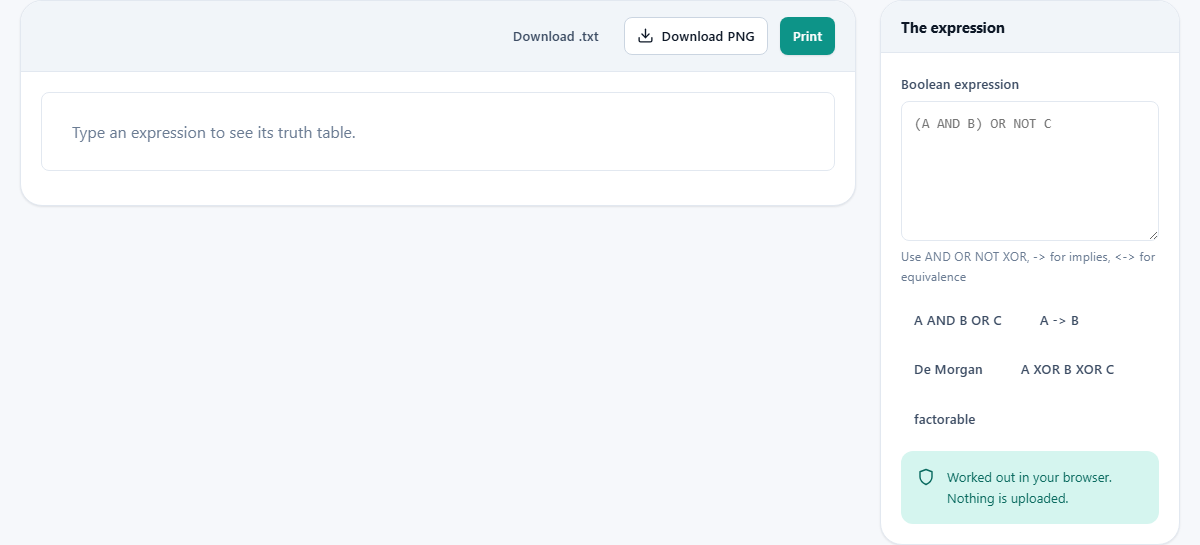
The text box labelled Boolean expression accepts any mix of single-letter variables and operators. Names run from A through H, giving a maximum of eight. The hint underneath says the same thing as the examples below.
Operators can be typed as words or as symbols, and the two styles mix freely in the same expression. AND is also &, or *. OR is |, or +. NOT is !, or ~. XOR is ^. For implication use -> or =>. For equivalence use <-> or <=>. There is no need to remember which style the page prefers, because it accepts all of them.
A row of preset buttons sits below the text box. Each one fills the box with a ready-made expression so you can see results straight away. The choices are A AND B OR C, A -> B, a De Morgan test NOT (A AND B), a three-way XOR, and a factorable form. They are a good way to learn the syntax before typing your own.
Why precedence matters more than you think
A OR B AND C does not mean the same thing as (A OR B) AND C. The page follows standard precedence: NOT binds tightest, then AND, then XOR, then OR, then implication, and equivalence binds loosest of all. This matches every textbook, but it trips people up because English does not have the same rule.
If you say the sentence out loud - A or B and C - you might read it left to right and group A or B first. The tool does not. It reads B AND C as a group, then ORs A with the result. When in doubt, add brackets. They never change a correct expression, and they can save you from a wrong one.
Reading the table and the summary
As soon as you type or change the expression, the table appears. Each row holds one combination of variable values and the result. True rows are shaded differently from false rows, so a tautology (all true) or a contradiction (all false) is visible at a glance without reading a single cell.
Above the table a summary line names the expression and tells you whether it is a tautology, a contradiction, or neither. That saves scanning when you already suspect which one it should be and just need confirmation.
Below the table sits the minimal form. This is the expression written in sum-of-products - a chain of OR groups, where each group is an AND of variables or their negations. The page does not just shorten what you typed. It finds the smallest sum-of-products form that produces the same table, and there is an important difference between those two things.
What Quine-McCluskey actually does
When you simplify by hand, you spot a pair of terms that differ in one variable, combine them, and repeat until you run out of moves. That works, but it depends on which pair you spot first. Two people can arrive at different answers, both valid, and neither one knows whether something shorter exists.
Quine-McCluskey does not rely on spotting. It compares every pair of minterms systematically, combines everything that can be combined, and builds a complete list of prime implicants. Then it picks the smallest set of those implicants that covers every true row. The result is genuinely minimal - there is no sum-of-products form with fewer terms.
The page does sum-of-products only. It does not produce a product-of-sums form directly. If you need one, simplify the negation of your expression, then apply De Morgan's laws to flip it. Comparing the truth tables of both will confirm they match.
Walking through a real expression
Type NOT (A AND B) OR C into the box. There are three variables, so the table has eight rows. A, B, and C each take true or false, and the result column shows what NOT (A AND B) OR C gives for each combination.
Row by row: when A and B are both true, A AND B is true, NOT flips it to false, and OR C depends on C alone. When either A or B is false, A AND B is already false, NOT makes it true, and the whole expression is true regardless of C. Only one row out of eight comes out false - the row where A is true, B is true, and C is false.
The minimal form underneath reads NOT A OR NOT B OR C. That is De Morgan applied to the first half, combined with the existing C. You could check this by typing NOT A OR NOT B OR C separately and confirming that its table is identical. If every row matches, the two are the same expression.
Now try the factorable preset: (A OR B) AND (A OR C). The table has the same eight rows, and the simplified version comes back as A OR B AND C. That is shorter by one operator and one pair of brackets, yet it produces the same output for all eight combinations. The tool did in under a second what might take several minutes of algebra.
Common mistakes and how to avoid them
- Assuming left-to-right reading. A OR B AND C groups the AND first, not the OR. Use brackets if your intended grouping differs from the standard precedence.
- Expecting product-of-sums output. The simplified form is always sum-of-products. For the other direction, negate the expression, simplify, and apply De Morgan.
- Typing more than eight variables. Nine variables would need 512 rows, and the page refuses rather than freezing. Trim the expression or split it into parts.
- Thinking there is only one correct minimal form. Several different forms can have the same number of terms and the same number of variables. Any of them is correct. Compare truth tables to confirm.
- Forgetting that XOR has lower precedence than AND. A XOR B AND C means A XOR (B AND C), which catches people who think of XOR as being on the same level as OR.
Checking De Morgan and other identities
One of the fastest uses is verifying a logical identity. Type NOT (A AND B) in the box and look at its table. Then type NOT A OR NOT B and look at that one. If both tables match row for row, the two expressions are equivalent. That is De Morgan's first law, confirmed without any algebra at all.
The same trick works for any suspected equivalence. Type A -> B and then NOT A OR B. If the tables agree, implication really is the same as negating the left side and ORing it with the right. This is quicker than a proof and harder to get wrong, which is why it shows up in homework answers as often as it does in professional debugging.
Saving and printing the table
Two buttons appear above the table. Download .txt writes the full table and the minimal form into a plain text file. Print opens your browser's print dialogue with the table laid out for paper. Both include the original expression, every row, and the simplified result, so the file or the printout stands on its own without the page open.
Nothing leaves your browser
The parsing, the table generation, and the Quine-McCluskey reduction all happen inside your browser. No expression is sent to a server. There is no account, no queue, and no log of what you typed. You can disconnect from the internet after the page loads and every feature still works, because there is nothing on the other end to talk to.