
Splitting a restaurant bill without losing a penny
How to divide a bill fairly, what each input does, the leftover-penny problem most calculators ignore, tipping on the pre-tax amount versus the whole bill, and a worked example with four people and a 15 percent tip.
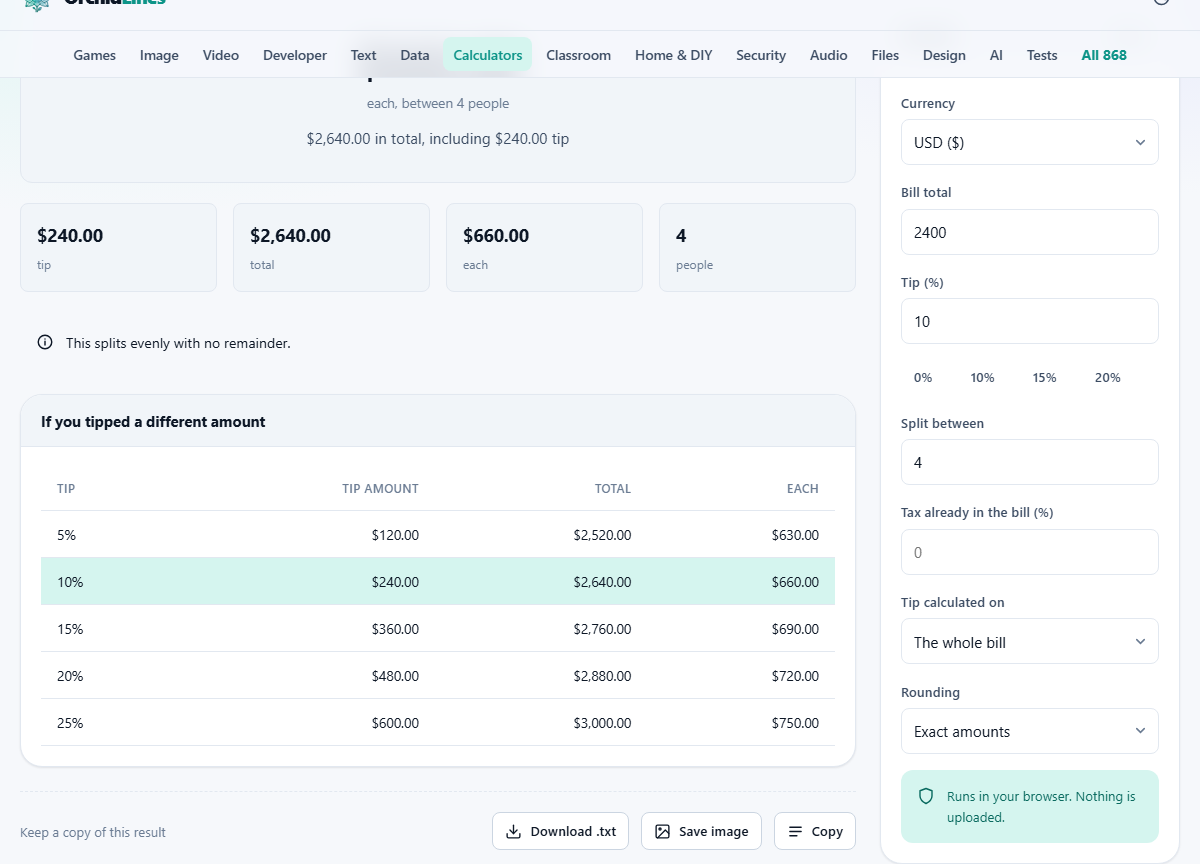
What the calculator works out
You enter the bill total, a tip percentage, and how many people are sharing. It gives you the tip amount, the total with tip, and the exact amount each person owes. If the total does not divide evenly, it tells you how many people pay one penny more so the shares still add up to the real total.
That last detail sounds minor, but it is the part most tip calculators skip. Divide 100 by three and you get 33.33 recurring, which nobody can pay. Rounding every share down leaves the table a penny short. Rounding every share up means someone paid too much. This tool works in whole minor units and distributes the remainder honestly.
Who uses it and when
Groups splitting a dinner bill are the obvious audience. But the same arithmetic comes up whenever a group shares a cost: a birthday present, a shared taxi, concert tickets bought by one person and repaid by the rest.
It is also useful for anyone who wants to compare tip percentages side by side. How much more does 20 percent cost than 15 percent on a 140-dollar bill? Changing one number answers that instantly.
Delivery drivers, hotel housekeeping, hairdressers, and bar staff all receive tips in some countries. The arithmetic is the same whether you are at a table or standing at a counter: total, percentage, split.
Walking through every input
Currency sets the symbol shown in the results. It does not convert amounts. Pick the currency the restaurant charged you in.
Bill total is the amount printed at the bottom of the receipt, before any tip. Type the number as it appears on the bill.
Tip (%) is the percentage you want to leave. Quick buttons for 0%, 10%, 15%, and 20% sit below the field. Press one to fill it in, or type any number you like. Zero is a valid choice. In much of Europe and Asia, leaving no tip or simply rounding up is perfectly normal.
Split between is the number of people sharing the bill. It accepts any number from 1 to 200. Set it to 1 if you are paying alone and just want to see the tip amount.
Tax already in the bill (%) is optional. If you want to tip on the pre-tax amount, enter the tax percentage here. The tool strips out the tax before applying the tip and then adds both back in for the final total. If you leave it at zero, the tip is applied to the whole bill.
Tip calculated on is a dropdown with two choices: The whole bill and The amount before tax. This works together with the tax field. If you set a tax rate and pick The amount before tax, the tip is smaller because it skips the tax portion.
Rounding offers three options. Exact amounts does no rounding. Round the total up raises the grand total to the next whole currency unit before splitting. Round each share up raises each person's share individually, which gives everyone a tidy number to hand over. Any extra generated by rounding goes to the tip.
The leftover penny, explained
Split 85.00 between four people and each person owes 21.25. That divides perfectly and nothing is left over. Now split 85.50 between four. Each share is 21.375, which has a fraction of a penny.
The tool rounds some shares up and some down so the parts add back to 85.50 exactly. It tells you how many people pay the higher amount and how many pay the lower one. In this case, two people pay 21.38 and two pay 21.37. Add those up: 21.38 plus 21.38 plus 21.37 plus 21.37 equals 85.50. Nothing is lost and nothing is made up.
Most other tip calculators either round every share down and quietly lose a penny, or round every share up and overcharge the group. Neither is correct. The honest answer is that some people pay one unit more than others, and the tool should say who.
Tipping on the pre-tax amount
In places where sales tax is added to the bill, some people prefer to tip on the pre-tax amount. The argument is that tax is not part of the service, so it should not increase the tip.
To do this, enter the tax rate in the Tax already in the bill field and set Tip calculated on to The amount before tax. On a 100-dollar bill with 8 percent tax, the pre-tax amount is about 92.59. A 15 percent tip on that is 13.89 instead of 15.00. On a large bill the difference is noticeable.
Neither approach is wrong. It is a personal choice, and expectations vary by region. The tool lets you try both and compare.
Rounding for convenience
Exact amounts gives the most accurate split but often produces numbers with odd pennies. Round the total up raises the grand total to the next whole unit first, then divides. Round each share up raises every individual share, which is the most practical option for a group because everyone hands over the same clean number.
The extra money generated by rounding is added to the tip. If the exact tip was 15.00 and rounding each share up adds 0.40 across the group, the effective tip becomes 15.40. The result makes this visible so you know exactly where the extra went.
A full worked example
Four friends eat dinner. The bill is 124.80. They want to leave a 15 percent tip, and the restaurant is in a state with 8 percent sales tax. They choose to tip on the pre-tax amount.
Enter 124.80 in Bill total. Set Tip to 15. Set Split between to 4. Enter 8 in Tax already in the bill. Set Tip calculated on to The amount before tax.
The pre-tax amount is 115.56. The tip at 15 percent is 17.33. The total with tip is 142.13. Divided by four, each person owes 35.53, but that only adds up to 142.12. The tool says three people pay 35.53 and one person pays 35.54. The total is 142.13 exactly.
Now switch Rounding to Round each share up. Each share becomes 36.00. Four times 36 is 144.00. The effective tip is now 28.44, which is more generous but gives everyone a clean number to pay.
Press Reset to clear everything and start over for the next meal. The page goes back to its defaults and the old bill is gone.
Tipping customs around the world
In the United States, 15 to 20 percent is expected at sit-down restaurants because tips form a large part of server wages. In the United Kingdom, 10 to 12.5 percent is common, but a service charge is often added to the bill already. In Japan, tipping is not customary and can even be considered rude. In India, rounding up or leaving small change is the norm.
There is no single correct figure. The quick buttons offer 0, 10, 15, and 20 as starting points. Use whatever fits the local custom. If a service charge is already included in the bill, tipping on top of it is optional and often not expected.
When travelling, check the local convention before the meal. A 20 percent tip in Tokyo would puzzle the staff. No tip at all in Dallas would offend them. The calculator does not tell you what to tip. It tells you what your choice will cost.
Mistakes people make when splitting bills
- Tipping on top of a service charge that already covers gratuity. Check the receipt before adding more.
- Using the tax-inclusive total in a country where tax is not shown separately. If the bill already includes tax and you enter a tax rate, the pre-tax amount will be calculated twice and the tip will be too small.
- Forgetting to change the currency. The symbol is cosmetic, but sending a payment request in the wrong currency creates confusion.
- Splitting by item instead of evenly. This tool divides equally. If one person ordered much more than the others, you need a different approach.
- Rounding each share up on a very large group. With 20 people, the rounding excess adds up and the effective tip may be much higher than intended.
Your bill stays on your device
Every calculation happens inside your browser. The bill amount, tip, and number of people are never sent to any server. Your settings are stored locally so they are ready next time, but no one else can see them. There is no account and no sign-up.