
Working out how many tiles you actually need
Buying tiles without doing the maths properly means either a second trip to the store or a stack of expensive leftovers. This article explains how the tile calculator handles grout joints, wastage and box quantities, and why the simple area division most people do in their heads always comes up short.
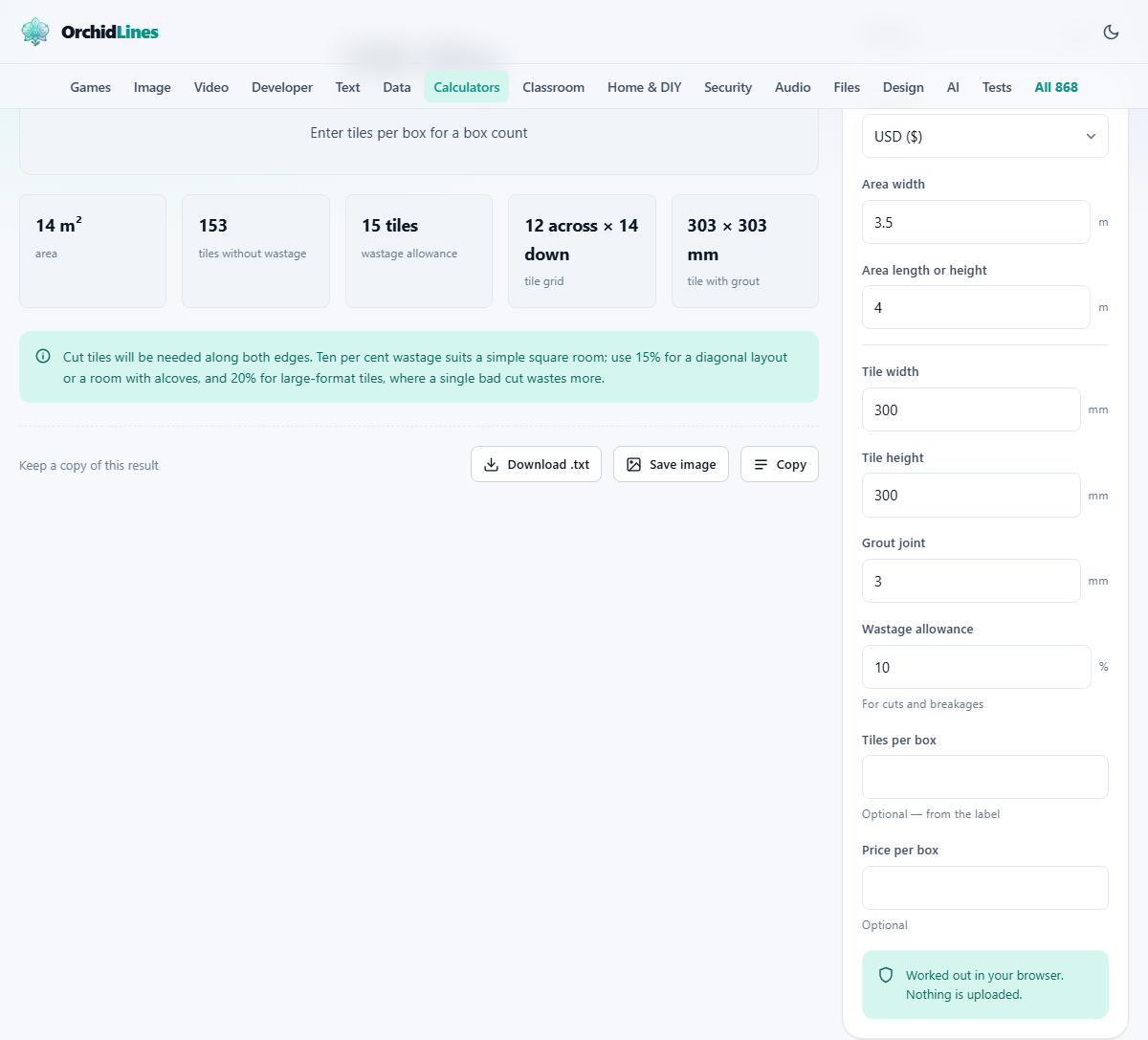
Why area division is not enough
The first thing most people do is divide the floor area by the tile area. A 14 square metre room with 300 by 300 millimetre tiles gives about 156 tiles. That number is wrong, and it is wrong for two reasons.
First, it ignores the grout joints. A 300 millimetre tile with a 3 millimetre joint occupies 303 millimetres on the floor. That extra 1 percent per tile adds up across a room. On a four-metre wall it is the difference between 13.3 tiles fitting and 13.2 tiles fitting, and that leftover tenth of a tile decides whether the edge takes a comfortable cut or an ugly sliver.
Second, area division assumes every cut piece can be reused elsewhere. In practice, a tile cut for one end of a row is rarely the right size for the other end. The offcuts go in the bin. Add the inevitable cracked tile from a clumsy cut or a dropped box and you need more tiles than the pure maths suggests.
What the calculator includes
This tool counts tiles row by row rather than dividing areas. It works out how many tiles plus joints fit across the width, how many fit along the length or height, and multiplies those two counts. The result is the actual number of tiles you would lay, not a theoretical area figure.
On top of that base count it adds a wastage allowance, which you set as a percentage. Then, if you enter how many tiles come in a box, it rounds up to the next whole box because you cannot buy half a box. If you also enter a price per box, it tells you the total cost.
The result gives you a shopping list you can walk into a store with, not an optimistic number that leaves you one row short.
Filling in the panel
The panel on the right is labelled The job. Start with the Currency selector if you plan to use the price feature. Then enter the room dimensions.
Area width and Area length or height are in metres. For a floor, enter the width and length of the room. For a wall, enter the wall width and the wall height. If you are tiling multiple walls of different sizes, do each one separately and add the tile counts together.
Tile width and Tile height are in millimetres. These numbers are printed on the tile box. Most common floor tiles are 300 by 300, 450 by 450, or 600 by 600. Rectangular formats like 600 by 300 are also popular.
Grout joint is the gap between tiles in millimetres. For floor tiles a 3 millimetre joint is standard. For wall tiles it might be 1.5 or 2 millimetres. The spacer clips you buy at the store set this dimension.
Wastage allowance is a percentage. Ten percent is the starting point for a simple rectangular room. Tiles per box and Price per box are both optional. Fill them in if you want the result to tell you how many boxes to buy and what they will cost.
Choosing the right wastage
Ten percent is the standard advice for a straightforward square or rectangular room with tiles laid in a grid pattern. It covers the cuts at the edges and the tile that cracks when you sneeze at the wrong moment.
Go to fifteen percent for anything more complex. Diagonal layouts waste more because every edge tile is a triangle cut. Rooms with alcoves, bay windows or irregular walls produce more edge cuts and more offcuts that cannot be reused. Patterned layouts with alternating tile sizes also generate more waste because the cutting sequence is less predictable.
Twenty percent is appropriate for large-format tiles, anything 600 millimetres or bigger. A bad cut on a large tile wastes far more material than a bad cut on a small one. The bigger the tile, the more expensive each mistake becomes, and the more generous your allowance should be.
It is always better to have a box left over than to be one box short. A spare box is not waste. It is the only way to replace a cracked tile three years from now with one that matches. Dye lots change between production runs, and a tile bought later may not quite match the ones on your floor.
How grout joints change the count
A 3 millimetre joint on a 300 millimetre tile adds 1 percent to the effective tile size. That sounds tiny, but across a long dimension it changes the tile count.
On a 4 metre wall, 300 millimetre tiles with no joints give 13.33, which rounds up to 14 tiles. The same wall with 3 millimetre joints gives tiles that effectively measure 303 millimetres, so 4000 divided by 303 is 13.20, which still rounds up to 14 but leaves a wider strip at the edge. The visual effect is different and the cut is different.
On a longer wall the effect is more pronounced. On a 10 metre run, the difference between using 300 and 303 is one full tile. Leave the joints out of the maths and you will be one tile short at the end of that run.
This is why the calculator asks for the joint width separately rather than ignoring it. The grout joint is a real physical dimension that takes up space on the floor, and the maths needs to account for it.
Walls, floors and doing them separately
The tool works for both floors and walls. For a floor, the two dimensions are the room width and the room length. For a wall, they are the wall width and the wall height. The maths is identical in both cases.
If you are tiling a bathroom with four walls and a floor, run the calculator five times. Do the floor first, then each wall. The tile counts add up directly if you are using the same tile everywhere. If the floor and walls use different tiles, run the calculation with the right tile dimensions for each surface.
For walls with windows or doors, you have two choices. The simple approach is to enter the full wall dimensions and let the wastage allowance absorb the opening. The precise approach is to subtract the opening area from the wall area before entering the dimensions. The first method slightly overestimates, which means a few extra tiles. The second is more accurate but requires more arithmetic on your part.
Planning where the cuts fall
Before you open a bag of adhesive, decide where you want the cut tiles to end up. Full tiles look best in the most visible areas. Cut tiles look best hidden behind the door, under a vanity unit, or in the corner where the cupboard stands.
The classic beginner mistake is to start tiling from one wall and work across the room. This guarantees a full tile at the starting wall and whatever sliver is left at the far wall. If that far wall is the first thing you see when you walk in, the sliver dominates the room.
A better approach is to find the centre of the room, snap a chalk line, and work outward from there. This puts equal-sized cuts on both sides. Those cuts are typically half a tile or more, which looks balanced rather than accidental.
None of this changes the tile count. You need the same number of tiles regardless of where you start. But it changes the result you live with for the next twenty years.
Adhesive and grout are separate purchases
This calculator counts tiles and boxes. It does not estimate adhesive or grout because those depend on variables it does not ask about: the substrate you are tiling onto, the trowel notch size, the depth of the joints, and the specific product you are using.
As a rough guide, a 20 kilogram bag of standard tile adhesive covers about 4 to 5 square metres with a 6 millimetre notched trowel on a flat substrate. Uneven substrates use more. Larger tiles need a bigger trowel notch and therefore more adhesive per square metre.
Grout is harder to estimate because it depends on the tile size and joint width together. Smaller tiles have more joints per square metre, so they use more grout. The bag will have coverage figures for common tile and joint combinations. Buy one more bag than you think you need.
The calculation stays on your device
Everything runs in your browser. No room dimensions, tile sizes, or prices are sent anywhere. There is no server involved, no account required, and no data saved after you close the page.
You can verify this by loading the page, disconnecting from the internet, and changing the numbers. The result still updates because the arithmetic happens entirely on your own machine.