
Finding sunrise, sunset and twilight times for any location
This article walks through how the sunrise and sunset calculator works, what the three kinds of twilight actually look like, how golden hour and blue hour fit the picture, and why a flat number from an algorithm can still be a few minutes off from what you see out your window.
What the calculator computes
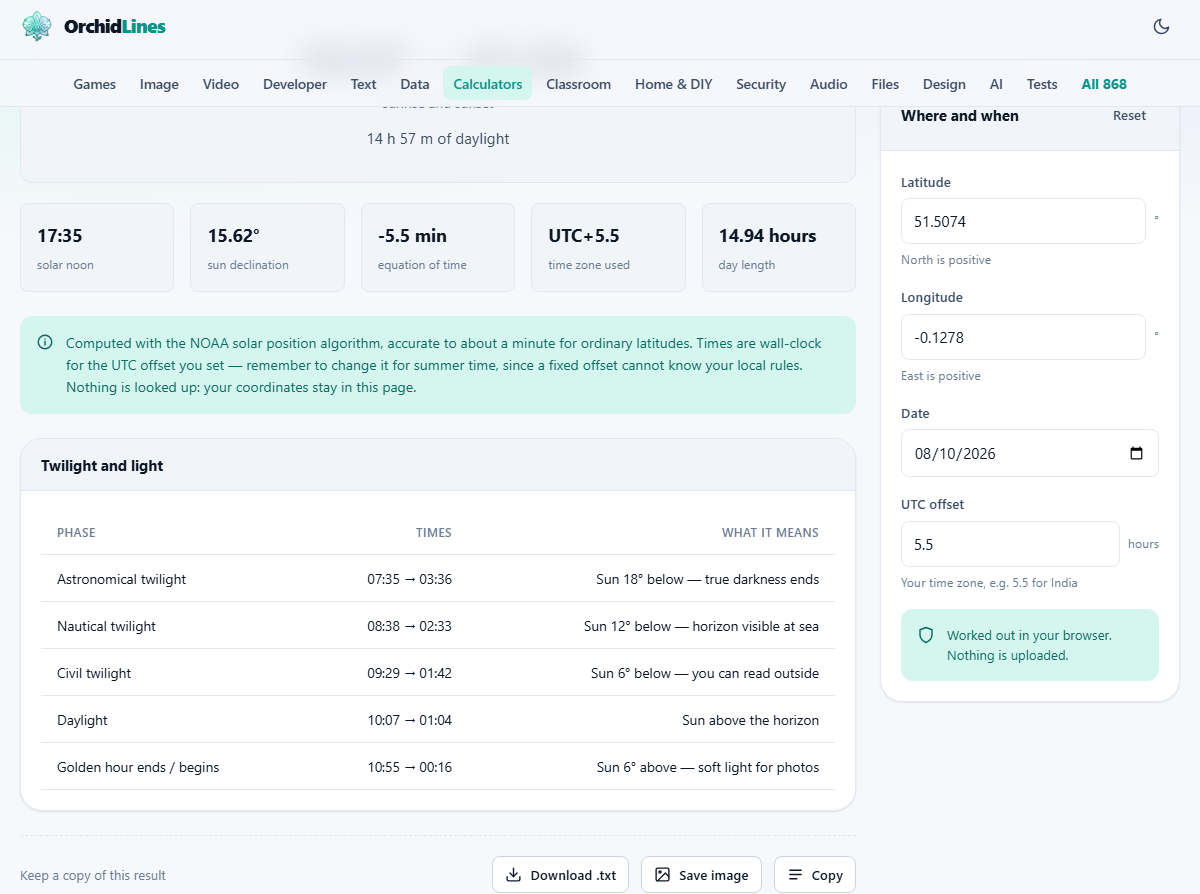
Give the tool a pair of coordinates and a date and it returns a full table of solar events for that day. Sunrise and sunset are the headline numbers, but the table goes further. It includes solar noon, the moment the sun is highest. It gives the total day length. It lists the start and end of each of the three twilight phases, both morning and evening. And it marks the golden hour boundary that photographers plan their shoots around.
The algorithm behind it is the NOAA solar position calculation, the same set of equations that produces the reference tables published by the National Oceanic and Atmospheric Administration. The difference is that this version runs entirely in your browser. There is no server call, no location lookup, and no tracking.
Entering coordinates and the UTC offset
The panel is labelled Where and when. The first two fields are Latitude and Longitude, both in decimal degrees. North latitudes and east longitudes are positive. South and west are negative. Any map application will show you the pair for a location if you tap or right-click on it.
Below that is the Date field. It defaults to today but you can set it to any date you like, past or future. Planning a trip and want to know how much daylight you will have? Set the date and the destination coordinates and the table fills in.
The UTC offset field turns the raw calculation into your local wall-clock time. It is the number of hours your time zone sits ahead of or behind UTC. India is 5.5, Japan is 9, New York is minus 5 in winter and minus 4 in summer. The tool does not handle daylight saving automatically because the rules differ by country and change with legislation. During summer time, add one hour to your normal offset.
The three twilights explained
After the sun drops below the horizon, darkness does not arrive all at once. It happens in stages, and astronomers have given names to three of them based on how far below the horizon the sun has gone.
Civil twilight is the first stage. It lasts from sunset until the sun is six degrees below the horizon. During civil twilight you can still read a newspaper outside, car headlights are not yet necessary everywhere, and the horizon is clear and sharp. This is the period most people think of as dusk.
Nautical twilight follows. It runs from six degrees below the horizon down to twelve. The name comes from navigation at sea: during this phase the horizon is still just visible, which is what a navigator needed to take a star sight with a sextant. On land the sky is deep blue and the first bright stars appear.
Astronomical twilight is the last phase, from twelve degrees to eighteen degrees below the horizon. Once the sun passes eighteen degrees, the sky is fully dark and faint celestial objects become visible to the unaided eye. For astronomers and astrophotographers, this is the boundary that matters.
Golden hour and blue hour
Golden hour is the period just after sunrise and just before sunset when the sun is low enough to produce warm, directional, flattering light. Technically it runs from the moment the sun clears the horizon to about the time it reaches six degrees of elevation, and the same range in reverse at evening. The exact duration depends on latitude and season. Near the equator it can be as short as twenty minutes. In Scandinavia in summer it can stretch for well over an hour.
Blue hour is the period of civil twilight, before sunrise in the morning and after sunset in the evening. The sky takes on a deep, saturated blue that balances beautifully against warm artificial lights below. City skylines, bridges and lit buildings all look their best during this window.
Both boundaries are included in the results table. If you are planning a photo shoot, the difference between arriving at the golden hour start and arriving ten minutes late can be the difference between the light you wanted and ordinary midday glare.
How sunrise is defined
Sunrise is not the moment the sun's centre crosses the horizon. It is the moment the upper edge of the sun's disc first touches the apparent horizon. The word apparent matters because the atmosphere bends light. A ray from the sun is refracted as it passes through the atmosphere, and this bending lifts the image of the sun by about half a degree.
The standard calculation accounts for this by using minus 0.833 degrees as the trigger angle rather than zero. That figure combines the sun's angular radius, about 0.27 degrees, with atmospheric refraction of about 0.57 degrees. The result is that you see the sun before it has geometrically cleared the horizon.
This is also why sunset feels generous. When you watch the last sliver of the sun sink below the horizon, the sun has already been geometrically below it for a minute or more. The image you are watching is bent upward by the same refraction.
Where the accuracy sits
At ordinary latitudes, between about sixty degrees north and sixty degrees south, the calculation is good to roughly one minute. For most purposes that is more than enough. Your own horizon is the bigger source of error.
A hill to the west delays sunrise and advances sunset by however long it takes the sun to clear that hill. A tall building across the street can shift the moment you actually see the sun by several minutes. Elevation matters too. If you are standing on a cliff looking out to sea, your horizon is lower and the sun appears earlier and disappears later than the flat sea-level calculation predicts.
Near the poles the accuracy degrades. Within a day or two of the equinoxes at very high latitudes, the sun skims the horizon so slowly that a small error in angle translates into a large error in time. The tool handles the extreme cases by reporting polar night or midnight sun rather than inventing a time that would be misleading.
Polar night and midnight sun
Above the Arctic Circle and below the Antarctic Circle, there are days when the sun does not rise at all, and days when it does not set. In midwinter the sun stays below the horizon for the entire day. In midsummer it stays above it. These are polar night and midnight sun.
The calculator does not force a sunrise time on a day that has none. If you enter coordinates above sixty-six degrees north and pick a date in December, the result will say polar night instead of showing a fictional time. The same applies for midnight sun on the long summer days.
Between these extremes there are days with extremely short or extremely long periods of daylight and extended twilights that can last for hours. The table handles all of these and shows whatever events actually occur on the date you chose.
Why coordinates instead of a city name
Many sunrise calculators let you type a city name and look it up. That lookup needs a database of place names and a server to search it, and it usually needs your location or at least a network request that reveals your interest in a particular place.
This tool avoids all of that. It asks for raw coordinates because those are what the algorithm needs and because providing them does not require any server interaction. Open any map application on your phone, tap the spot you care about, and the latitude and longitude appear. Copy them in and the rest happens locally.
The trade-off is a few extra seconds of effort. The benefit is that no one, not even the site itself, knows which location you looked up.
All of it runs on your device
The entire calculation happens in your browser. The NOAA equations are coded into the page. No coordinates, dates, or results are sent to any server. There is no account, no location permission, and nothing to delete afterwards.
You can test this yourself. Load the page, disconnect from the internet, change the latitude and date, and watch the table update. The maths keeps working because it was never depending on anything outside your machine.