
Working out speed, distance or time from the other two
Speed, distance and time are tied together by one of the simplest formulas in everyday life: any two of them fix the third. This article walks through the calculator, explains each input, covers the unit choices that let you mix kilometres with miles per hour without thinking twice, and digs into the average-speed trap that catches nearly everyone who tries to do it in their head.
Picking which value to solve for
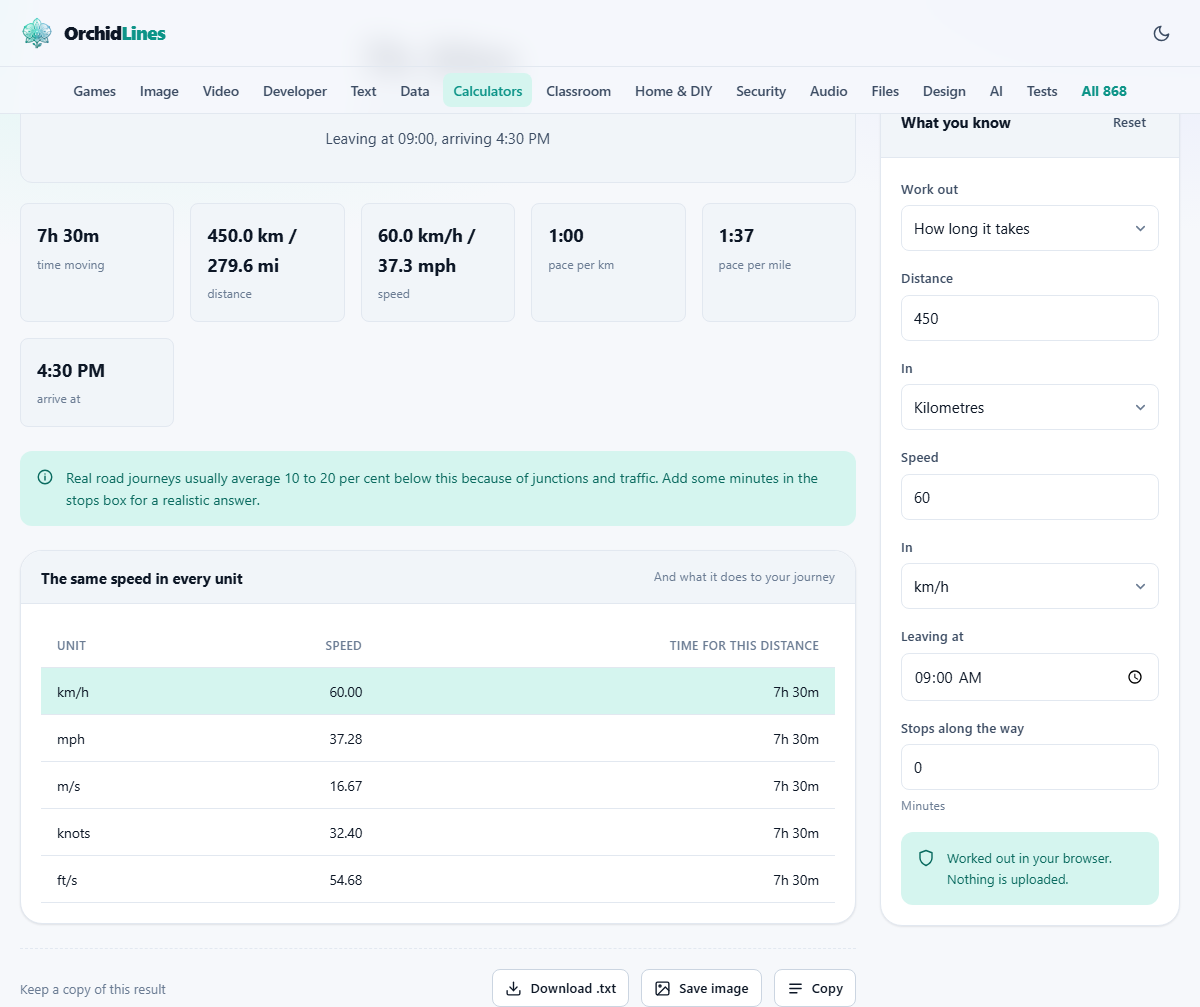
The dropdown at the top of the settings panel, labelled Work out, has three choices: How long it takes, The average speed, and How far you go. Whichever you pick, the input fields for the other two stay visible and editable. You enter what you know and the page fills in what you do not.
This covers the three standard rearrangements of the formula. Distance divided by speed gives time. Distance divided by time gives speed. Speed multiplied by time gives distance. The page handles the unit conversion internally, so you never need to worry about whether your speed and your distance are in compatible units.
Distance and speed units side by side
Distance and speed each have their own unit selector. The distance field offers kilometres, miles, metres, nautical miles and feet. The speed field offers km/h, mph, metres per second, knots and feet per second. These two choices are independent of each other, which means you can enter a distance in miles and a speed in km/h and the arithmetic still works.
Once the result is calculated, the page shows the speed in all five units at once, so you get a single table of equivalents rather than having to run the conversion separately. If you are planning a journey in one country using speed limits posted in another, the side-by-side display answers the question in a glance.
Time as hours and minutes
Travel time is entered in two fields: Hours and Minutes. This avoids the awkward decimal-hours format that most formulas use internally. Seven hours and thirty minutes is easier to type and easier to read than 7.5, and the page handles the split for you.
When the page is solving for time, it fills in both fields with the result. If the journey comes out to three hours and fourteen minutes, that is exactly what you see, not 3.23 hours, which would leave you squinting at your watch trying to figure out what 0.23 of an hour means.
Departure time and arrival
Below the hours and minutes fields there is one labelled Leaving at. Enter your departure time and the page calculates when you arrive. This is a clock-aware calculation, so a journey that starts at nine in the evening and takes eight hours shows an arrival time of five in the morning the next day.
If the total travel time, including any stops, crosses midnight, the page notes how many days later the arrival falls. A forty-hour coach journey starting on Monday morning does not just show a time; it shows that you arrive on Tuesday evening. This small detail saves the mental arithmetic that trips people up when planning long hauls or overnight drives.
Stops along the way
The field labelled Stops along the way takes a number of minutes. This is break time: lunch, fuel, rest, anything where the vehicle is not moving. The page adds it to the total journey duration so the arrival time is realistic, but it keeps it out of the average speed calculation.
That separation matters. Including a forty-minute lunch in your travelling time would drag the average speed down to a figure that does not describe how fast you were actually driving. The page treats moving time and stopped time as two different things, which is the correct way to report average speed and also the way most journey planners work.
The average-speed trap
Ask someone to find the average of sixty km/h and a hundred and twenty km/h and most will say ninety. That is wrong whenever the two legs cover the same distance rather than the same time. Drive sixty kilometres at sixty km/h and it takes one hour. Drive another sixty kilometres at a hundred and twenty km/h and it takes half an hour. Total distance is a hundred and twenty kilometres in one and a half hours, giving an average of eighty km/h, not ninety.
The difference exists because you spend twice as long at the slower speed, so it contributes twice as much to the average. This is why shaving minutes off the end of a trip is so hard: doubling your speed over the last stretch barely moves the overall average, while a single traffic delay early on wrecks it. The page always calculates average speed as total distance divided by total moving time, which is the only correct definition.
Pace for runners and walkers
Runners tend to think in minutes per kilometre or minutes per mile rather than in speed per hour. The page shows pace alongside every speed result, in both kilometre and mile versions. A speed of ten km/h is a pace of six minutes per kilometre, which is the kind of number a runner can actually feel in their legs.
Pace and speed are just two ways of describing the same thing, but they feel very different. Speed makes long distances intuitive, while pace makes interval training and race splits easier to compare. Having both in the same output means you do not need a second tool or a mental flip to move between the two views.
Knots and nautical miles
Both the distance and speed lists include nautical units. A nautical mile is defined as one minute of latitude, which makes it about 1.15 ordinary miles or 1.852 kilometres. A knot is one nautical mile per hour, and it is the standard speed unit for ships and aircraft.
If you are working out how long a flight takes, enter the distance in nautical miles and the speed in knots. Or enter the distance in kilometres and the speed in knots, and let the page sort out the conversion. The five-unit display in the result means you always see the answer in whichever system you prefer, regardless of which units you typed in.
Practical tips for journey planning
Road journeys almost always take longer than a pure speed-and-distance calculation suggests. Junctions, traffic lights, town centres, the start and end of the trip where you are moving slowly, and the natural variation in traffic flow all bring the average speed well below the posted limit. A good rule of thumb is to assume ten to twenty percent more time than the formula gives.
For longer drives, enter a realistic stop time. Most road-safety guidance suggests a break of at least fifteen minutes every two hours. Entering those breaks into the stops field gives you an arrival time that accounts for the time you are not covering ground, which is far more useful than a theoretical number that assumes you never slow down.
Using it for exercise and fitness
The same formula that plans a road trip also tracks a training run or a long cycle ride. Enter the distance you covered and the time you took, set the mode to solve for speed, and you get your average speed and your pace per kilometre and per mile in one step. Compare that to your previous outings and you have a simple progress log without needing a dedicated fitness app.
For interval training, the pace figure is the one that matters most. Knowing that your easy pace is seven minutes per kilometre and your threshold pace is five and a half gives you concrete targets to work toward. The page does the conversion instantly so you can focus on the running instead of the arithmetic.
No data leaves your device
The entire calculation runs in your browser. No distances, speeds, departure times or journey details are sent to a server. There is no tracking of your routes and no account to create. The page works the same way with or without an internet connection after it has loaded, and nothing you enter is stored anywhere outside your own machine. For a travel planning tool, that matters: journey details reveal where you live, where you work and where you go on holiday, and keeping all of that inside the browser means none of it is ever in anyone else's hands.