
Lines, slopes and coordinates without the rounding mess
Coordinate geometry questions follow a pattern: take two points, find the slope, write the line in the right form, maybe add a third point or a second line. The arithmetic is straightforward but full of places where a decimal rounding turns an exact answer into a wrong one. This article covers every calculation the page performs, explains why fractions appear instead of decimals, and walks through the modes that handle intersections and perpendicular lines.
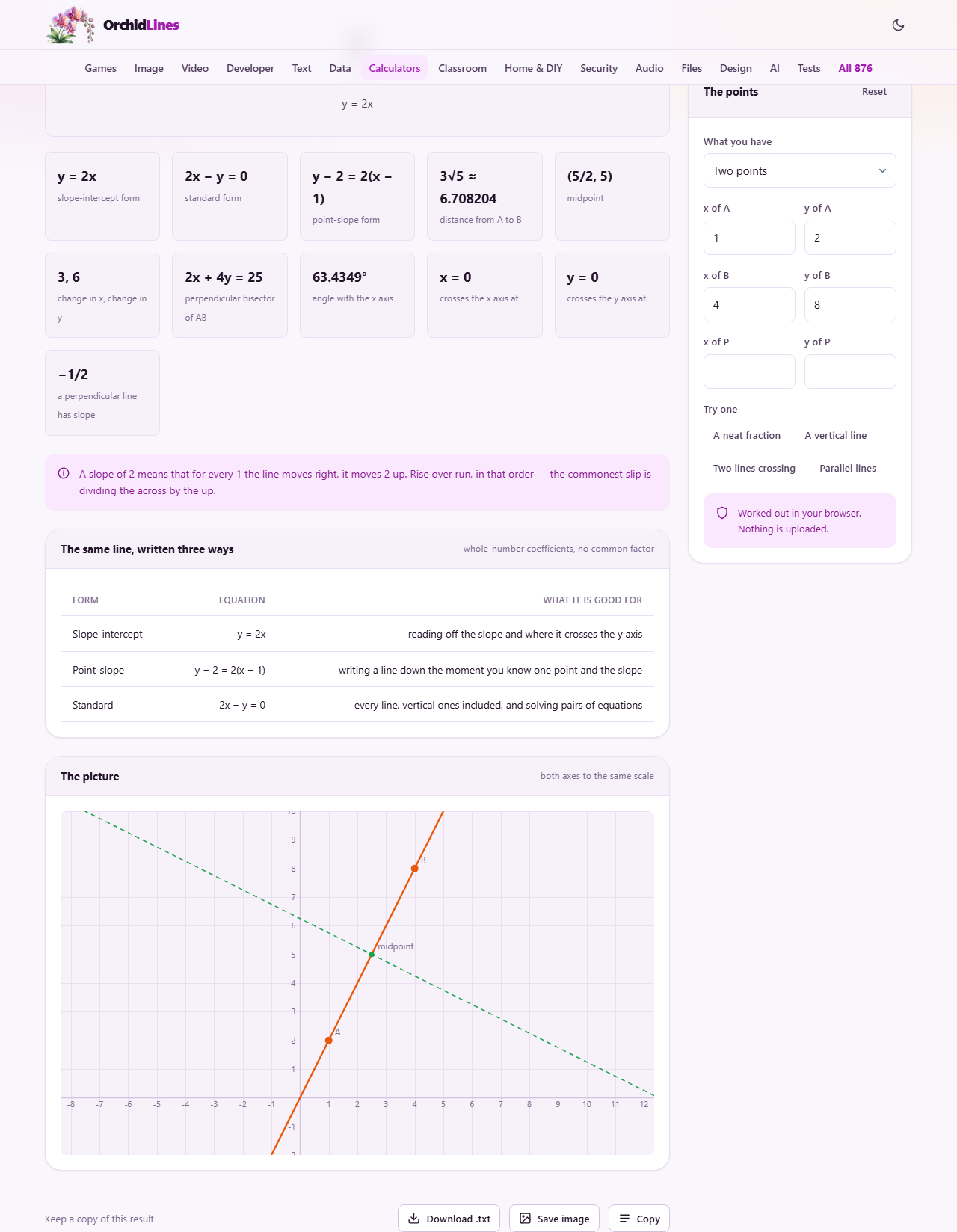
Starting from two points
The default mode takes two points, A and B, each with an x and a y coordinate. Type them into the four fields on the right-hand panel and the page instantly gives you the slope, the midpoint, the distance between the points, and the angle the line makes with the horizontal axis.
Every one of these results is kept as a fraction wherever a fraction is the exact answer. The slope of the line through (1, 2) and (4, 8) is two, which is tidy enough. But change B to (4, 7) and the slope becomes five thirds, which is exact. A calculator that rounds this to 1.6667 has already lost information, and anyone copying that into the next step of a problem will carry the error forward. Here the fraction stays as a fraction until you decide otherwise.
Three forms of the same line
Once a line is defined, the page writes it three different ways. Slope-intercept form, which looks like y equals mx plus b, is the easiest to read: the slope is right there in the equation and the y-intercept is the constant at the end. Point-slope form is what you write down quickest during an exam because you only need one point and the gradient. Standard form, written as Ax plus By equals C, is the form that makes simultaneous equations clean to solve.
Each form has its use, and homework questions tend to specify which one they want. Rather than converting between them by hand, the page shows all three at once so you can copy the one you need. The standard form follows a consistent convention: whole-number coefficients with no common factor and the x term kept positive. This means two different people solving the same problem will produce the same equation rather than two that look different but are secretly identical.
Distance and exact roots
The distance between two points with whole-number coordinates often comes out as an irrational number. The distance from (0, 0) to (3, 4) is five, which is neat, but the distance from (0, 0) to (1, 1) is the square root of two, which never terminates as a decimal. Writing it as 1.4142 is an approximation; writing it as root two is the actual answer.
The page gives the exact surd form wherever the points are whole numbers. You see something like five root two rather than a string of decimal digits, because that is the form most textbooks and answer keys expect. The decimal equivalent is shown alongside for anyone who needs a practical measurement, but the exact version comes first.
The perpendicular bisector
Alongside the line through A and B, the page also gives the perpendicular bisector: the line that crosses the midpoint at right angles. This comes up in constructions, in finding the centre of a circle through three points, and in reflection problems. Its slope is the negative reciprocal of the original slope, and its equation passes through the midpoint.
When the original line is horizontal, the bisector is vertical, and when the original is vertical, the bisector is horizontal. In both cases the page writes the equation correctly as x equals a constant or y equals a constant, rather than forcing it into a slope-intercept form that does not apply.
Adding a third point
Fill in the coordinates of a point P and the page adds several more results. It tells you the shortest distance from P to the line through A and B, which is always measured along the perpendicular. It gives you the foot of that perpendicular, meaning the exact point on the line that is closest to P. And it writes the equations of two new lines through P: one parallel to AB and one perpendicular to it.
This covers a wide family of exam questions in a single view. Given a line and a point not on it, find the perpendicular distance. Given a triangle, find the altitude. Given a point and a direction, write the line. All of these reduce to the same underlying geometry, and the page does the fraction arithmetic that makes them tedious by hand.
One point and a slope
The dropdown labelled What you have includes a second mode: One point and the slope. Here you enter point A and type the slope into a text field that accepts whole numbers, decimals or fractions. Type 3/4 and it is read as three quarters, not as the text string three-slash-four.
This mode is useful when a question gives you a gradient directly rather than a second point. The page produces the same set of outputs: the three equation forms, the y-intercept, and the angle. If you also fill in point P, the perpendicular distance and the parallel and perpendicular lines through P appear as before.
Finding where two lines cross
The third mode, Two lines each through two points, takes four points: A and B on the first line, C and D on the second. The page solves the pair of equations and gives you the crossing point as exact coordinates.
When the two lines are parallel, there is no crossing point, but the page still has something to say. It tells you the perpendicular distance between the two lines and states clearly whether they are parallel and distinct or whether they are actually the same line written with different points. That distinction matters: in a system of equations, one means no solution and the other means infinitely many solutions, and the algebra alone does not tell you which is which without extra work.
Vertical lines and the slope that does not exist
A vertical line has no slope. This is not a gap in the tool; it is a fact about the definition. Slope is rise divided by run, and a vertical line has a run of zero. Division by zero is not infinity; it is nothing at all. The page handles this correctly: it does not show a slope value, it writes the equation as x equals a constant, and it warns you that every formula built on y equals mx plus b does not apply.
A flat line, by contrast, has a slope of exactly zero. Zero is a real number, and the line is perfectly well behaved in every equation form. Confusing a slope of zero with no slope is a common mistake, and the page makes the distinction visible by showing one as a number and the other as a clear statement that no slope exists.
Sample problems built in
A row of buttons under the input fields loads worked examples. A neat fraction sets up two points whose slope is a clean fraction. A vertical line shows what happens when both x values are the same. Two lines crossing loads four points that meet at a single intersection. Parallel lines loads a pair that never meet, so you can see the distance calculation and the no-solution message.
These are not just demonstrations. Each one tests a different branch of the code, and each one lands on a case that students regularly get wrong. Working through them all once, reading the output and checking it against your own arithmetic, is a quick way to build confidence that you understand the rules before tackling your own problems.
Checking your own working
One of the best uses of this page is as a check after you have done a problem by hand. Work through the question on paper, then enter the same points here and compare. If the answers match, you have confirmed your method. If they differ, the fraction-level precision of the output tells you exactly where your working went off track.
This is especially helpful for standard-form conversion, where sign errors and missed common factors are easy to introduce. The page always removes common factors and keeps the x coefficient positive, so if your manual result has a negative x term, you know you need to multiply through by negative one.
Everything stays in the browser
All the geometry described above is computed on your own device. No coordinates, no equations and no answers are sent to any server. There is no account, no login, and the page works fully offline once it has loaded. Your homework stays between you and your browser.